Usage metrics and report usage monitoring in Power BI are vital for understanding how reports and dashboards are consumed, measuring engagement, and driving continuous improvement in business intelligence efforts.
These analytics provide insights into user behavior, report popularity, and performance, enabling organizations to optimize content, allocate resources, and justify BI investments.
By tracking usage patterns, BI teams can identify high-value reports, inactive content, and user adoption trends, guiding targeted training and development initiatives to maximize impact.
Power BI offers built-in telemetry data collected automatically when users view reports or dashboards in the Power BI Service.
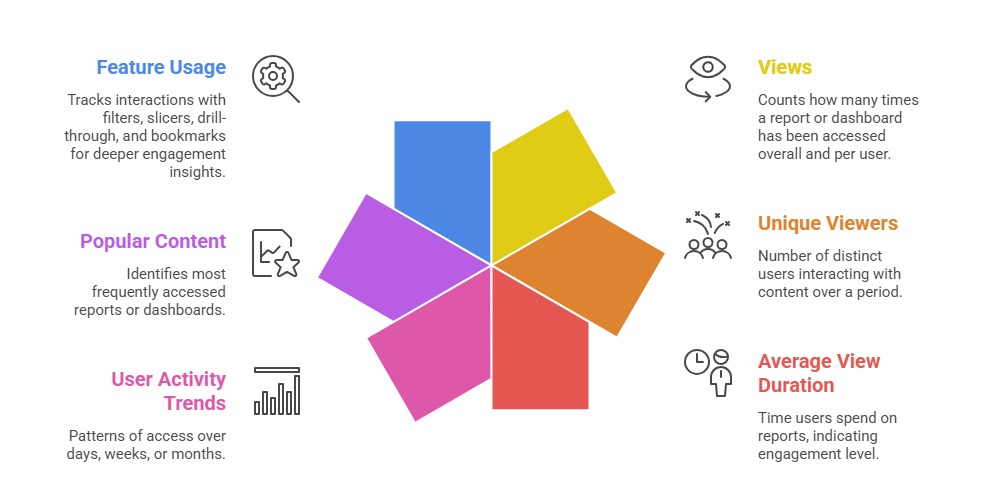
These usage metrics include key indicators such as the number of views, unique viewers, average consumption duration, and common navigation pathways.
Report owners and admins can access this data through pre-built or customizable usage report dashboards, or export raw data for advanced analysis. Usage monitoring also supports governance by detecting unauthorized access attempts or anomalies in usage patterns.
Key Usage Metrics in Power BI
Analyzing usage metrics is critical for improving report design and user adoption. The following metrics explain how users interact with Power BI content over time.
Methods for Monitoring Usage
Usage monitoring plays a critical role in governance, security, and compliance. The following methods explain how Power BI supports detailed tracking and auditability.
1. Built-In Usage Reports: Power BI provides ready-to-use usage reports for workspaces and individual content, accessible to owners and admins.
2. Custom Usage Analytics: Export usage data to datasets for creating tailored monitoring dashboards with advanced filtering and visualization.
3. Power BI APIs: Enable programmatic access to usage logs and metrics, supporting integration with other monitoring or alerting systems.
4. Audit Logs: Part of Microsoft 365 compliance center, providing detailed user and activity tracking for security and governance.
Best Practices for Usage Monitoring
1. Regularly review usage metrics to keep content relevant and retire or update unused reports.
2. Identify high-value users and engage them for feedback to improve report quality.
3. Use usage data to inform training programs focusing on underutilized features.
4. Combine usage monitoring with performance metrics to enhance overall user experience.
5. Share insights with stakeholders to demonstrate BI program value and foster adoption.

Class Sessions
Sales Campaign

We have a sales campaign on our promoted courses and products. You can purchase 1 products at a discounted price up to 15% discount.