Query reduction and load optimization techniques are critical for improving the efficiency and performance of Power BI reports and datasets.
As data volumes and complexities grow, optimizing how queries interact with data sources and how data is loaded into Power BI becomes increasingly important to maintain responsive user experiences and reduce resource consumption.
These techniques focus on minimizing unnecessary data retrieval, reducing query complexity, and optimizing data refresh processes to ensure fast report load times and timely access to relevant insights.
Key Query Reduction Techniques
Effective query reduction involves filtering data as early as possible, using incremental data loads, and leveraging aggregated tables to avoid processing excessive details.
1. Early Filtering: Apply filters at data source queries or Power Query stages to limit the data volume retrieved.
2. Parameterization: Use parameters in queries to dynamically control data scope based on user input or report context.
3. Aggregations: Create summarized tables to answer common queries without scanning detailed rows.
4. Query Folding: Ensure transformations in Power Query fold back to source queries, pushing processing to source servers.
5. Reduce Visuals: Limit the number of visuals per report page to reduce concurrent queries.
Load Optimization Techniques
Load optimization includes managing data types, reducing column cardinality, and balancing import versus DirectQuery modes based on use cases.
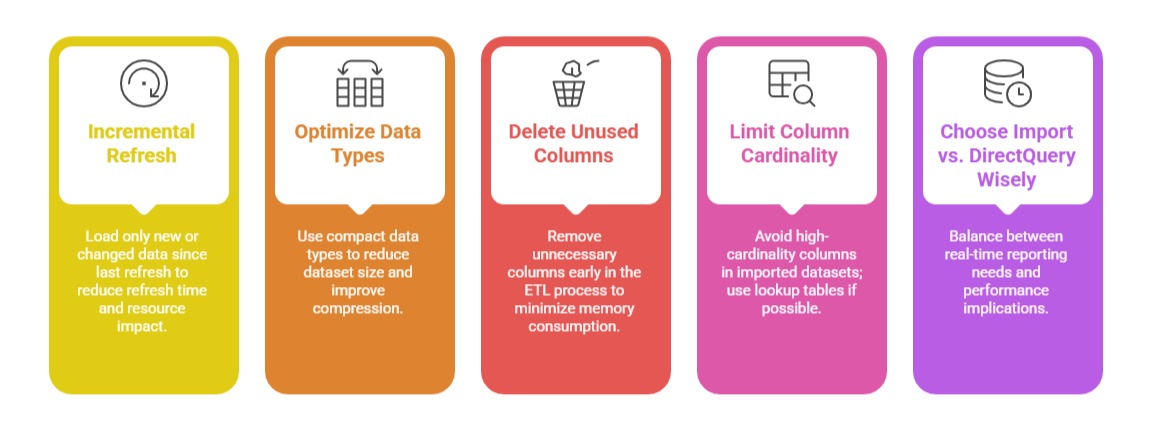
Implementing these best practices helps manage bandwidth, CPU usage, and memory consumption while enabling scalable analytics even with large, complex data environments.

Class Sessions
Sales Campaign

We have a sales campaign on our promoted courses and products. You can purchase 1 products at a discounted price up to 15% discount.