FastAPI is a modern Python web framework designed for building high-performance APIs with minimal boilerplate. It leverages Python type hints to provide automatic request validation, serialization, and interactive API documentation.
Pydantic models are used to define and validate request and response schemas, ensuring data consistency and reducing runtime errors.
FastAPI also supports asynchronous endpoint creation, allowing APIs to handle many concurrent requests efficiently using async and await.
FastAPI Project Setup
FastAPI requires minimal setup but follows best practices for virtual environments and dependency management. This ensures reproducibility and isolation, critical for full-stack projects where frontend and backend teams collaborate.
Start by creating a project directory and virtual environment using tools like pipenv or venv, as recommended in current guides. Install FastAPI (version 0.115+ as of late 2025) and the ASGI server Uvicorn via pip.
Here's the Step-by-Step Process
1. Create and navigate to your project folder: mkdir fastapi-project && cd fastapi-project.
2. Set up a virtual environment: python -m venv venv or pipenv --python 3.12.
3. Activate it: source venv/bin/activate (Linux/Mac) or venv\Scripts\activate (Windows).
4. Install dependencies: pip install fastapi uvicorn[standard] pydantic[email].
5. Create a requirements.txt file: pip freeze > requirements.txt.
6. Run the development server: fastapi dev main.py or uvicorn main:app --reload --port 8000.
This setup provides auto-reload for development and access to interactive docs at http://127.0.0.1:8000/docs (Swagger UI) and /redoc
Understanding Pydantic Models
Pydantic models define data structures with automatic validation, serialization, and OpenAPI schema generation, making them essential for robust API inputs and outputs. They leverage Python type hints for runtime checks, reducing bugs in full-stack data flows.
Declare models by inheriting from pydantic.BaseModel (or pydantic_v2.BaseModel in v2+). Fields use type annotations like str, int, or List[str], with optional defaults via = None.
Key Benefits

Example for an Item model
from pydantic import BaseModel

from typing import Optional

from datetime import datetime


class ItemBase(BaseModel):

    name: str

    description: Optional[str] = None

    price: float


class ItemCreate(ItemBase):

    tax: Optional[float] = None


class ItemResponse(ItemBase):

    id: int

    created_at: datetime

    price_with_tax: Optional[float] = None


    class Config:

        from_attributes = True  # For ORM compatibility [web:6]
Use in Endpoints: async def create_item(item: ItemCreate) -> ItemResponse. Pydantic handles parsing, validation, and response formatting automatically
Creating Basic Endpoints
Endpoints, or path operations, define API routes using decorators like @app.get("/"). FastAPI infers HTTP methods, parameters, and responses from type hints, generating interactive docs instantly.
After setup, create main.py with a basic app instance: from fastapi import FastAPI; app = FastAPI(title="Full Stack API", version="1.0.0"). Add decorators for paths.
Common Patterns
1. Path parameters: @app.get("/items/{item_id}") where item_id: int.
2. Query parameters: q: Optional[str] = None.
3. Request body: Use Pydantic models for POST/PUT.
Practical example combining elements
from fastapi import FastAPI

from pydantic import BaseModel


app = FastAPI()


class Item(BaseModel):

    name: str

    price: float


@app.get("/")

async def root():

    return {"message": "Welcome to FastAPI Full Stack Course"}


@app.post("/items/")

async def create_item(item: Item):

    # Simulate DB save

    return {"id": 1, **item.model_dump()}
Test Via /docs: Execute requests directly in the browser.
Async Endpoints in Depth
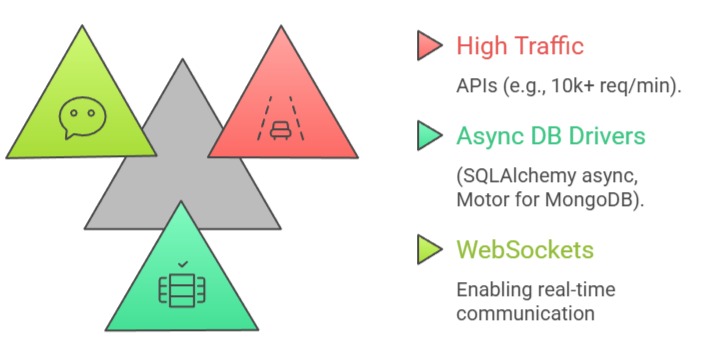
Async endpoints use async def to handle concurrent operations efficiently, ideal for I/O-bound tasks like database queries or external API calls in full-stack apps.
FastAPI's Starlette foundation supports native ASGI async, outperforming sync frameworks under load.
Declare with async def and await non-blocking operations (e.g., await db.fetch()). Use asyncio for parallelism, like await asyncio.gather(*tasks). Avoid mixing sync/blocking code, which defeats async benefits.
When to use Async:
Advanced Example with Simulated Concurrency
import asyncio

from fastapi import FastAPI


app = FastAPI()


async def heavy_task(duration: int):

    await asyncio.sleep(duration)  # Simulate DB/API call

    return f"Task completed in {duration}s"


@app.get("/async-tasks/{count}")

async def run_tasks(count: int):

    tasks = [heavy_task(i) for i in range(count)]

    results = await asyncio.gather(*tasks)

    return {"results": results}  # Processes concurrently [web:7]
Best Practices and Integration
Adopt modular structure: app/routers/, schemas/, models/ for scalable full-stack projects. Integrate with ORMs via dependencies: Depends(get_db) for sessions.
1. Use routers for blueprints: APIRouter() to split concerns.
2. Error handling: @app.exception_handler(ValidationError) for custom responses.
3. Security: Add HTTPBearer for JWT later in the course.
4. Environment: vars via python-dotenv for configs.
For full-stack: Expose OpenAPI schema for frontend tools like Swagger Codegen; deploy with Docker/Gunicorn.
