Database migrations using Alembic and connection pooling are essential practices for managing schema changes and maintaining performance in modern applications.
Alembic is a database migration tool commonly used with SQLAlchemy that helps track and apply incremental changes to the database schema over time.
Connection pooling, on the other hand, manages a set of reusable database connections, reducing the overhead of creating and closing connections for each request and improving application efficiency.
Understanding Alembic for Database Migrations
Alembic streamlines the process of evolving your database schema over time, treating changes as code that your team can review, test, and rollback.
As your API grows, features like user authentication or order tracking demand schema updates. Alembic generates migration scripts automatically from yoWhy Choose Alembic Over Raw SQL?
Manual SQL scripts work for simple apps but become error-prone in teams or with frequent changes. Alembic offers versioned migrations, downgrade support, and environment-specific configs, aligning with DevOps practices like CI/CD pipelines.
Key Advantages

Setting Up Alembic in Your FastAPI Project
Integrating Alembic starts with installing dependencies and configuring it alongside your SQLAlchemy setup. This assumes a FastAPI project with an existing database.py module using SQLAlchemy's create_engine.
Begin by adding Alembic to your requirements.txt
alembic==1.13.2

sqlalchemy==2.0.35
Step-by-Step Alembic Initialization
1. Install and initialize: Run alembic init alembic in your project root. This creates an alembic/ folder with env.py (environment config) and versions/ (migration scripts).
2. Configure alembic.ini: Edit the sqlalchemy.url to match your database, e.g., postgresql://user:pass@localhost/api_db. Set version_locations = %(here)s/alembic/versions.
3. Link to your models in env.py
from myapp.models import Base  # Your SQLAlchemy Base

target_metadata = Base.metadata
4. Generate first migration: Update your models (e.g., add a User table), then alembic revision --autogenerate -m "Create users table".
5. Apply migration: alembic upgrade head to run it against your DB.
Pro Tip: Use Docker Compose for local Postgres to mimic production: services: db: image: postgres:16.
Creating and Managing Migrations
Migrations capture schema deltas as Python scripts, making them executable and reversible. Alembic's --autogenerate flag inspects your models versus the DB, but always review generated code for accuracy.
For Example, adding an email column to User
# In models.py

class User(Base):

    __tablename__ = "users"

    id = Column(Integer, primary_key=True)

    email = Column(String, unique=True)  # New field
Run alembic revision --autogenerate -m "Add email to users", yielding a script like:
def upgrade():

    op.add_column('users', sa.Column('email', sa.String(), nullable=True))

    op.create_unique_constraint(None, 'users', ['email'])


def downgrade():

    op.drop_constraint(None, 'users', type_='unique')

    op.drop_column('users', 'email')
Best Practices for Robust Migrations
1. Review autogenerated scripts: Autodetect misses data defaults or constraints—manually tweak.
2. Use branches for features: alembic merge resolves parallel migrations.
3. Batch alters: Group non-conflicting changes (e.g., multiple ADD COLUMN) to minimize locks.
4. Data migrations: Embed Python logic in upgrade() for populating new fields:
op.execute("UPDATE users SET email = username || '@example.com'")Numbered Checklist for Production Deploys
1. Test migration on staging DB.
2. Use --sql flag to preview SQL without executing.
3. Deploy with alembic upgrade head in CI/CD (e.g., GitHub Actions).
4. Monitor with tools like pgBadger for Postgres.
Connection Pooling: Scaling Database Access
Connection pooling reuses a fixed pool of DB connections, preventing overhead from TCP handshakes and resource exhaustion in high-concurrency APIs.
Without it, a FastAPI endpoint handling 1000 req/s could spawn thousands of idle connections, crashing your DB.
SQLAlchemy's built-in QueuePool is production-ready, pre-creating connections and recycling them. This is vital for full-stack APIs where frontend calls trigger DB queries.
Configuring Pools in SQLAlchemy
Define your engine with pooling params in database.py
from sqlalchemy import create_engine

from sqlalchemy.ext.asyncio import create_async_engine  # For async FastAPI


# Sync example for Postgres

engine = create_engine(

    "postgresql://user:pass@localhost/api_db",

    pool_size=20,           # Max active connections

    max_overflow=10,        # Temp extras during spikes

    pool_pre_ping=True,     # Validate before reuse (health check)

    pool_recycle=300,       # Refresh every 5 min to avoid stale connections

    echo=True               # Logging for dev

)


# Async for FastAPI (using asyncpg)

async_engine = create_async_engine(

    "postgresql+asyncpg://user:pass@localhost/api_db",

    pool_size=20,

    max_overflow=10,

    pool_pre_ping=True

)
Handling Common Pooling Pitfalls
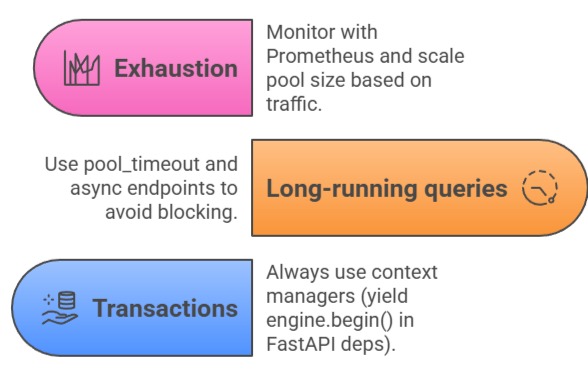
Example FastAPI dependency
from contextlib import asynccontextmanager


@asynccontextmanager

async def get_session():

    async with async_engine.begin() as conn:

        yield conn
Integrating Alembic with Pooled Connections: Alembic runs atop the same SQLAlchemy engine, so configure it to use your pooled setup via alembic.ini or env.py. This ensures migrations respect production pooling limits.
In env.py
from myapp.database import engine

connectable = engine
For CI/CD, script it:
1. Start pooled DB container.
2. alembic upgrade head.
3. Run API tests against pooled engine.
Real-World Example: In a FastAPI e-commerce API, migrate to add inventory table during Black Friday traffic—pooling absorbs query spikes while Alembic ensures zero-downtime.
Advanced Tips and Monitoring
Leverage Alembic's alembic batch for online alters (Postgres 11+). Monitor pools with SQLAlchemy events:
@event.listens_for(engine, "checkout")

def receive_checkout(dbapi_connection, connection_record, connection_proxy):

    if dbapi_connection.closed:

        logger.warning("Recycled dead connection")
Tools like Datadog or New Relic track pool metrics. For cloud (RDS/Aurora), tune based on instance size—e.g., db.t4g.medium handles 50 connections comfortably.
Testing: Use pytest-alembic to assert migrations
pytest --alembic-head

pytest --alembic-before-revision abc123