Path and query parameters are used to pass dynamic data from clients to backend APIs. Path parameters identify specific resources within a URL, while query parameters refine or filter requests, such as pagination or search options.
Proper handling of these parameters is essential for building flexible and user-friendly APIs.
Request and response validation ensures that incoming data matches expected formats and that outgoing data is consistent and reliable, reducing errors and improving API quality.
Understanding Path and Query Parameters
Path and query parameters are key mechanisms for passing data in HTTP requests, each serving distinct purposes in API design.
Path parameters embed variables directly in the URL path, ideal for resource identification, while query parameters append key-value pairs to the URL for optional filtering or pagination.
Path Parameters: Resource Identification
Path parameters, also called URL path variables, replace fixed segments in your endpoint URL with dynamic values, making your API flexible for accessing specific resources.
Consider a user management API: instead of separate endpoints like /users/123 and /users/456, a single /users/{user_id} handles any user ID.
Advantages
1. Intuitive RESTful structure (e.g., /api/v1/products/{product_id}).
2. Efficient routing in frameworks like FastAPI or Express.js.
3. Caches well in browsers and CDNs.
Here's how to implement path parameters in FastAPI, a modern Python framework emphasizing type hints for automatic validation:
from fastapi import FastAPI

app = FastAPI()


@app.get("/users/{user_id}")

async def get_user(user_id: int):

    return {"user_id": user_id, "name": "John Doe"}
This endpoint extracts user_id from the path (e.g., /users/42) and validates it as an integer automatically. If you send /users/abc, FastAPI returns a 422 error with details—zero boilerplate code required.
Best Practice: Always declare types (e.g., int, str) for automatic validation and OpenAPI schema generation.
Query Parameters: Filtering and Configuration
Query parameters appear after the ? in a URL (e.g., /products?category=electronics&limit=10), perfect for optional, non-hierarchical data like search filters or pagination.
Unlike path parameters, they don't affect the resource hierarchy, keeping URLs clean for core resources.
Common Use Cases
1. Sorting: /orders?sort=desc&field=created_at.
2. Pagination: /posts?page=2&size=20.
3. Filtering: /users?status=active&min_age=18.
In FastAPI, query parameters are declared as function arguments with default values:
@app.get("/products/")

async def list_products(category: str = None, limit: int = 10, offset: int = 0):

    # Simulate DB query

    products = [{"id": i, "name": f"Product {i}"} for i in range(offset, offset + limit)]

    if category:

        products = [p for p in products if category in p["name"].lower()]

    return {"products": products, "total": len(products)}
Access /products?category=phone&limit=5 to filter and paginate. FastAPI infers OpenAPI docs, including defaults and validation rules.
Pro Tip: Use Query() from FastAPI for advanced constraints, like limit: int = Query(10, ge=1, le=100) to enforce 1-100 range.
 Request Validation: Securing Incoming Data
Request validation verifies that client-submitted data conforms to your API contract, blocking invalid inputs early to avoid crashes or security issues.
It transforms raw HTTP payloads into typed, sanitized objects, leveraging schemas for complex structures—essential for full stack apps handling forms, JSON, or files.
Why Validate Requests: Invalid data causes 90% of API runtime errors. Validation enforces rules upfront, reducing server load and providing helpful error messages.
Industry standards like JSON Schema (RFC 8259) and Pydantic (FastAPI's backbone) ensure consistency.
Implementing Validation in FastAPI with Pydantic
FastAPI uses Pydantic models for declarative validation. Define a model, and FastAPI handles parsing, type coercion, and errors.
1. Define a Pydantic Model
from pydantic import BaseModel, EmailStr, Field

from typing import Optional


class UserCreate(BaseModel):

    name: str = Field(..., min_length=2, max_length=50)

    email: EmailStr

    age: Optional[int] = Field(None, ge=0, le=120)
2. Use in Endpoint
@app.post("/users/")

async def create_user(user: UserCreate):

    return {"message": "User created", "data": user}
3. Test It
Valid: {"name": "Alice", "email": "alice@example.com", "age": 30} → 200 OK.
Invalid email: {"email": "invalid"} → 422 with {"detail": [{"loc": ["body", "email"], "msg": "value is not a valid email address"}]}.
Key Validation Features
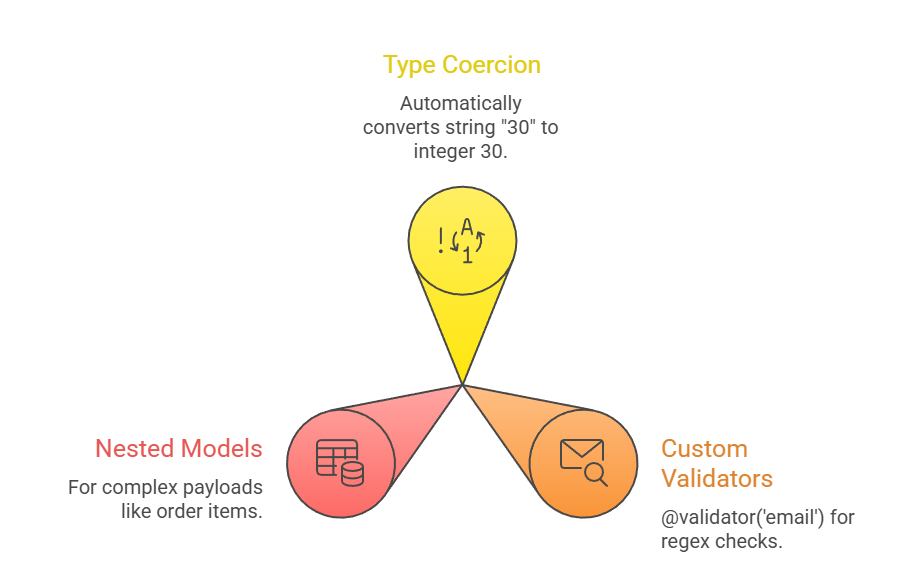
Security Benefits
1. Prevents injection attacks via sanitized inputs.
2. Rate-limits bad actors with early rejects.
3. For file uploads, use UploadFile; for headers, Header().
Response Validation: Ensuring Reliable Outputs
Response validation standardizes your API's output, making it predictable for clients and easier to test.
While requests protect your server, responses build trust—validating status codes, headers, and bodies against schemas.
Modeling Responses with Pydantic: FastAPI supports response models for type-safe outputs.
class UserResponse(BaseModel):

    id: int

    name: str

    email: str


@app.post("/users/", response_model=UserResponse)

async def create_user(user: UserCreate):

    # Simulate DB insert

    db_user = {"id": 1, "name": user.name, "email": user.email}

    return db_user  # Extra fields stripped, types enforced
This excludes internal fields (e.g., password_hash) from responses.
Common Response Patterns
Use these for RESTful APIs:
1. Success (200/201): Validated models.
2. Errors (4xx/5xx): HTTPException or custom models.
from fastapi import HTTPException


raise HTTPException(status_code=404, detail="User not found")
Pagination Responses

Best Practices (OpenAPI-aligned)
1. Always use response_model.
2. Include responses={404: {"model": ErrorResponse}} for full docs.
3. Version responses (e.g., /v1/users).
Best Practices
Combine these techniques for enterprise-grade APIs.
1. Nesting: Path > Query > Body for hierarchy.
2. Documentation: Auto-generated Swagger UI in FastAPI.
3. Testing: Use TestClient for unit tests.
from fastapi.testclient import TestClient

client = TestClient(app)

response = client.get("/products?limit=abc")  # Expect 422
Common Pitfalls to Avoid
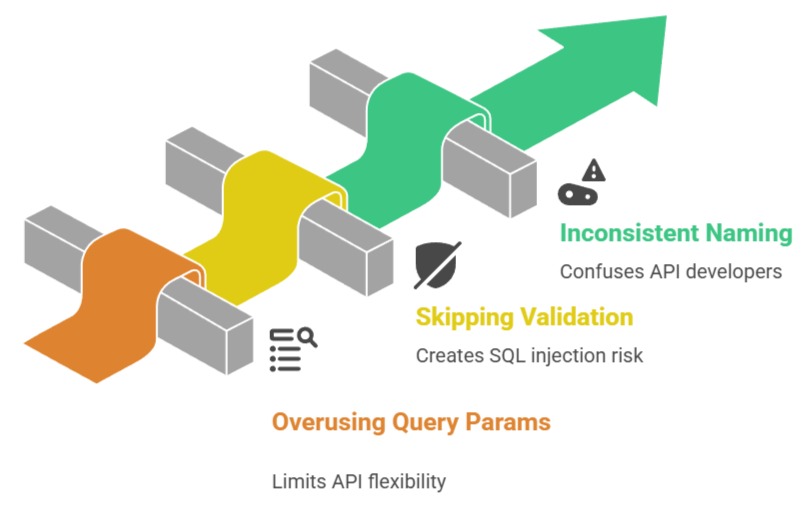
Tools Comparison


Class Sessions
Sales Campaign

We have a sales campaign on our promoted courses and products. You can purchase 1 products at a discounted price up to 15% discount.