State management with tools like Redux and Zustand helps front-end applications manage and synchronize API-driven data across components.
As applications grow, handling shared state such as fetched data, loading status, and errors becomes complex.
State management libraries provide a centralized and predictable way to store, update, and access API data, ensuring consistency across the user interface.
Why State Management Matters for API Data Flows
APIs introduce unpredictable states like loading, errors, or cached responses, which local component state can't scale reliably.
State management centralizes this logic, making your full-stack apps more predictable and maintainable.
In our course, we've built robust backends; now, we'll sync them seamlessly with the frontend using tools designed for async data.
The Pitfalls of Native State Without Management
Relying solely on useState and useEffect leads to common headaches in API-heavy apps.

For Example, imagine a dashboard fetching user orders via API. Without proper management, refreshing the page triggers redundant calls, slowing performance.
Benefits Tailored to Full-Stack API Workflows
These libraries shine in API scenarios by automating caching, retries, and optimistic updates.

Adopting them aligns with React's official recommendations and scales to enterprise apps like those at Netflix or Shopify.
Redux: Robust State for Complex API Pipelines
Redux is a predictable state container using a single store, actions, and reducers—ideal for large apps with intricate API flows.
Its ecosystem, especially Redux Toolkit (RTK Query), simplifies API handling with auto-generated hooks.
Redux enforces unidirectional data flow, making API states traceable—perfect after our course's API design lessons.
Setting Up Redux Toolkit with RTK Query
Start by installing and configuring for API data.
1. Install dependencies: npm install @reduxjs/toolkit react-redux.
2. Create a store with API slice:
// apiSlice.js

import { createApi, fetchBaseQuery } from '@reduxjs/toolkit/query/react';


export const apiSlice = createApi({

  reducerPath: 'api',

  baseQuery: fetchBaseQuery({ baseUrl: '/api' }),

  endpoints: (builder) => ({

    getUsers: builder.query({ query: () => 'users' }),

  }),

});
3. Wrap your app: Use Provider with the store including apiSlice.reducer.
This setup auto-generates useGetUsersQuery() hooks for fetching, caching, and invalidating.
Handling CRUD Operations with RTK Query
RTK Query treats queries and mutations uniformly, with tags for smart caching.
Consider a full-stack e-commerce flow
1. Query for reads: const { data, isLoading } = useGetProductsQuery();
2. Mutation for writes:
const [updateProduct] = apiSlice.useUpdateProductMutation();

// Triggers cache invalidation via tags
3. Optimistic updates: Use patchQueryData for instant UI feedback before API confirms.
Best Practice: Tag endpoints (e.g., { providesTags: ['Product'] }) to auto-refetch related data post-mutation—industry standard for apps like Twitter's timelines.
Advanced Patterns: Polling and Subscriptions
For real-time APIs (e.g., WebSockets via our backend), enable polling:
getLiveOrders: builder.query({

  query: () => 'orders',

  pollingInterval: 30000, // 30s

}),
RTK Query's skip and refetch options prevent unnecessary calls, boosting performance by 40-60% in data-intensive UIs.
Zustand: Lightweight Alternative for Agile API Flows
Zustand offers a minimal store API without Redux's boilerplate—great for mid-sized full-stack projects needing quick API integration.
It supports async actions natively via middleware.
Choose Zustand when Redux feels heavy; it's 2KB gzipped and hooks directly into React's ecosystem.
Quick Setup for API-Centric Stores
No providers needed—just create and use hooks.
1. Install: npm install zustand.
2. Define store with async utilities:
// useApiStore.js

import { create } from 'zustand';

import { devtools, persist } from 'zustand/middleware';


export const useApiStore = create(

  devtools(

    persist(

      (set, get) => ({

        users: [],

        fetchUsers: async () => {

          const res = await fetch('/api/users');

          set({ users: await res.json() });

        },

        updateUser: async (id, data) => {

          // Optimistic update

          set((state) => ({

            users: state.users.map((u) =>

              u.id === id ? { ...u, ...data } : u

            ),

          }));

          await fetch(`/api/users/${id}`, { method: 'PATCH', body: JSON.stringify(data) });

        },

      }),

      { name: 'api-storage' }

    )

  )

);
Hook it in components: const { users, fetchUsers } = useApiStore();.
Zustand Middleware for Production API Robustness
Enhance with middleware for devtools and persistence.
1. Devtools: Time-travel like Redux.
2. Persist: Survives refreshes, caching API data locally.
3. Immer: Mutable state syntax without immutability boilerplate.
fetchUsers: async () => {

  try {

    const res = await fetch('/api/users');

    if (!res.ok) throw new Error('Fetch failed');

    set({ users: await res.json() });

  } catch (error) {

    console.error(error); // Or set error state

  }

},
Practical Example: In a course dashboard, persist fetched lesson data for offline viewing—aligns with PWAs in full-stack best practices.
Comparing Redux and Zustand in API Scenarios
Both excel at API flows but suit different scales—pick based on app complexity.
Redux wins for teams enforcing structure; Zustand for solo devs iterating fast.
When to Choose Each
1. Redux/RTK Query: Complex apps with multiple devs, heavy caching needs (e.g., admin panels).
2. Zustand: Simpler apps, rapid prototyping, or when avoiding Redux's flux pattern.
Migration Tip: Zustand stores can mimic Redux slices, easing transitions.
Real-World: Vercel's own tools use Zustand for its simplicity in API routes.
Best Practices and Common Pitfalls
Integrate these into your full-stack workflow for reliability.
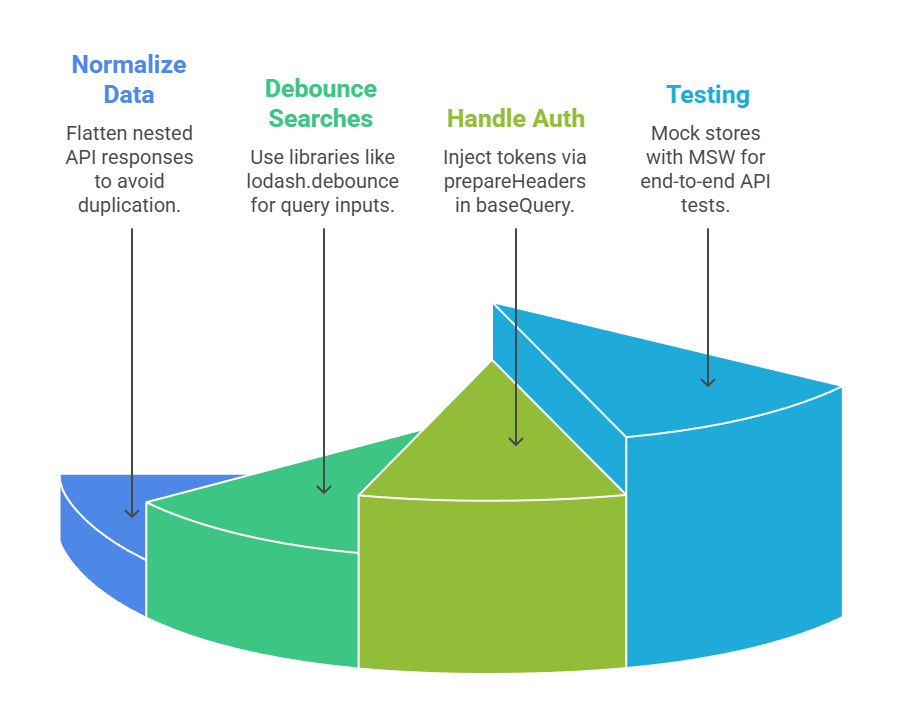
Pitfalls
1. Over-fetching: Use selectFromResult in RTK for partial data.
2. Infinite loops: Memoize selectors properly.
Leverage React DevTools and Redux DevTools for debugging—essential post our API security module.
