Orchestration with open-source tools enables Linux administrators and DevOps teams to automate, manage, and coordinate complex operational tasks across diverse environments. By combining scripting with orchestration platforms, organizations can deploy, configure, and maintain systems reliably at scale, ensuring consistency, efficiency, and compliance.
Role of Orchestration in Modern IT
Orchestration automates multi-step processes across multiple systems, not just individual tasks. It combines provisioning, configuration, patching, compliance checks, and service management into unified, repeatable workflows. Scripts integrate with these tools to extend capabilities, manage custom procedures, or adapt to organization-specific requirements.
Prominent Open-Source Orchestration Tools
These orchestration tools simplify large-scale system management by enabling repeatable, automated workflows. They integrate seamlessly with shell scripts to support real-world operational use cases.
1. Ansible
Ansible is an agentless automation platform that uses SSH for communication and YAML-based playbooks to define automation workflows. It enables the execution of complex tasks across multiple hosts by organizing actions into reusable roles and tasks. Within playbooks, Shell or Python scripts can also be executed using modules such as script or command, allowing flexible integration with existing automation logic.
Example use: Run a custom backup script across all web servers.
- hosts: webservers

  tasks:

    - name: Run backup script

      script: /usr/local/bin/backup.sh
2. SaltStack (Salt)
It is a scalable automation and configuration management tool built on a master–minion architecture. It uses YAML-based SLS files to define configurations and can execute ad hoc shell commands or scripts on target minions as needed. Salt also supports event-driven automation and integrates easily with Bash scripts through its execution modules, enabling responsive and flexible infrastructure management.
Example: Run a shell script during state application.
run_backup:

  cmd.script:

    - source: salt://scripts/backup.sh
3. Rundeck
Rundeck is an automation and orchestration platform designed for job scheduling, workflow automation, and self-service operations. Jobs are defined as structured sequences of steps that commonly invoke shell scripts, integrated commands, or remote tasks across systems. Its role-based access control allows organizations to safely delegate operational tasks while maintaining strong governance and security controls.
Example: Scheduled execution of an audit script and notification of results.
Define a Rundeck job to run /usr/local/bin/audit_users.sh on specified nodes and send report by email.
Integration Patterns and Best Practices
Integrating scripts with orchestration platforms requires careful attention to security and control. The following practices help protect credentials, ensure auditability, and reduce operational risk..png)
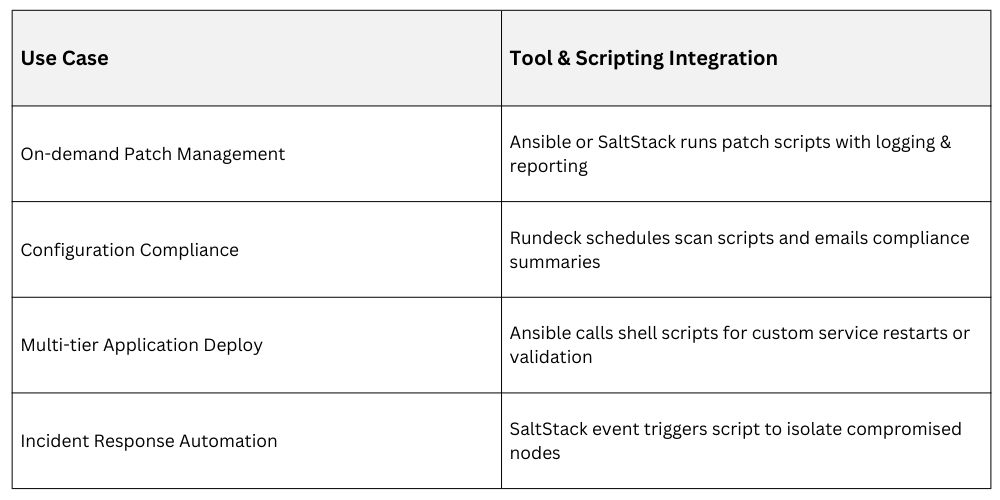
Example Use Cases

Class Sessions
Sales Campaign

We have a sales campaign on our promoted courses and products. You can purchase 1 products at a discounted price up to 15% discount.