Routing, dynamic URLs, and template rendering with Jinja2 are core concepts in building web applications using Flask.
Routing connects specific URLs to Python functions, dynamic URLs allow applications to handle variable data in web addresses, and Jinja2 enables the creation of dynamic HTML pages.
These features help developers build interactive and user-friendly web applications.
Understanding Routing in Flask
Routing is the mechanism that maps user requests (like typing a URL) to specific functions in your code, acting like a traffic director for your web app.
It tells your server which page or action to trigger when someone visits a particular path, making your site organized and intuitive.
What is a Route?
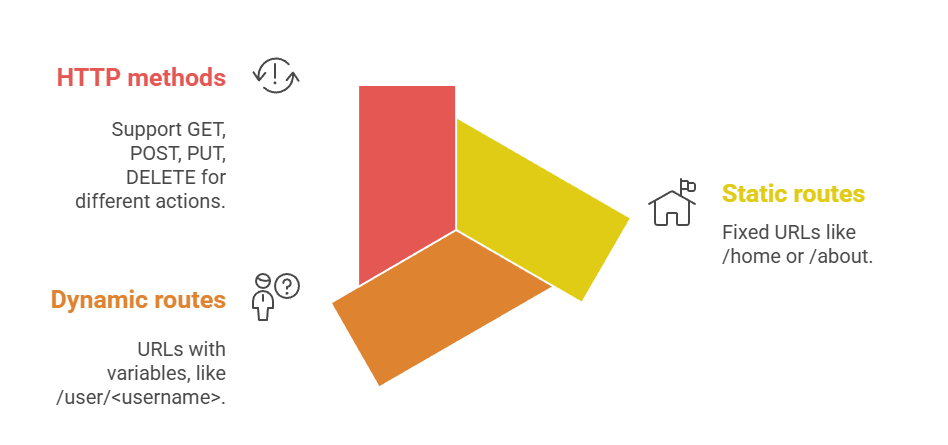
A route is essentially a URL pattern linked to a view function—a Python function that returns content to the browser. Flask uses the @app.route() decorator to define these mappings.
For Example, consider a simple blog app
@app.route('/')

def home():

    return '<h1>Welcome to My Blog!</h1>'


@app.route('/post/<int:post_id>')

def show_post(post_id):

    return f'<h1>Post #{post_id}</h1>'
Visiting /post/42 dynamically renders content based on the post_id
Route Parameters and Dynamic URLs
Dynamic URLs capture variable data from the URL, turning static paths into flexible ones. Flask extracts these as function arguments, enabling personalized content without hardcoding.
Key Parameters

Best Practice: Always validate parameters to prevent errors. Use int or float converters for numeric data to auto-handle invalid inputs (Flask returns 404).
Practical Example for a product catalog
@app.route('/product/<int:product_id>')

@app.route('/product/<int:product_id>/<string:category>')

def product_detail(product_id, category=None):

    return f"Showing {category} product ID {product_id}"
This handles /product/101/electronics or just /product/101.
Jinja2 Template Rendering Basics
Jinja2 is Flask's default templating engine, blending Python logic with HTML to create dynamic pages without writing raw HTML strings in Python. It keeps your code clean, reusable, and maintainable—perfect for scaling from simple sites to complex apps.
Why Use Templates: Templates separate presentation (HTML/CSS/JS) from logic (Python), following the MVC pattern. Jinja2 compiles templates into efficient Python code, rendering them with data passed from your routes.
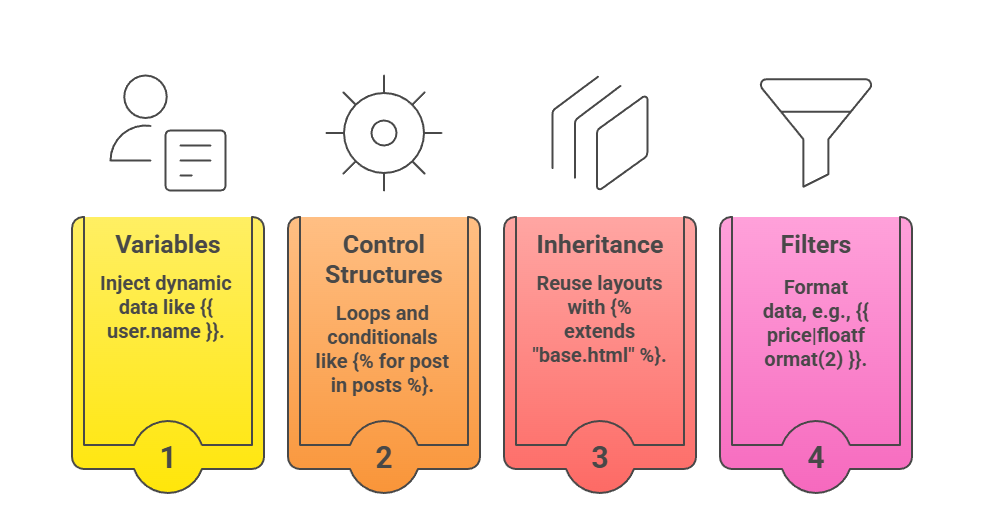
Core Advantages
Passing Data from Routes to Templates
Routes render templates by passing a Python dictionary via the render_template() function. Flask looks for .html files in a templates/ folder.
Step-by-Step Process:
1. Create a route with data.
2. Call render_template('filename.html', **context).
3. Jinja2 fills placeholders in the HTML.
Example route for a user dashboard
@app.route('/dashboard/<username>')

def dashboard(username):

    user_data = {

        'name': username,

        'posts': ['First Post', 'ML Tutorial', 'Web Dev Tips'],

        'is_premium': True

    }

    return render_template('dashboard.html', user=user_data)
dashboard.html snippet
<h1>Welcome, {{ user.name }}!</h1>

{% if user.is_premium %}

    <p>You have premium access!</p>

{% endif %}

<ul>

{% for post in user.posts %}

    <li>{{ post }}</li>

{% endfor %}

</ul>
This generates personalized HTML on each request.
Advanced Routing and Templating Techniques
Take your skills further with URL building, custom filters, and macros for professional apps.
URL Building and Reverse Routing: Hardcoding URLs like href="/user/123" breaks if paths change. Use Flask's url_for() to generate them dynamically.
Benefits
1. Refactors Easily
Refactoring becomes easier because a well-structured routing and URL management approach allows developers to update or reorganize application logic without breaking existing functionality.
routes are clearly defined and decoupled from internal code structure, changes can be applied smoothly, improving maintainability and reducing the risk of errors during updates.
2. Handles Dynamic Parameters
Handling dynamic parameters enables applications to process variable data directly from URLs, such as user IDs or product details.
This flexibility allows a single route to manage multiple requests efficiently, supports personalized responses, and makes the application more scalable without creating numerous static routes.
3. Works with Query Strings
Working with query strings allows applications to receive additional information through the URL, such as filters, search keywords, or pagination values.
This helps in building interactive and user-driven features while keeping the application logic organized and the URLs clean and easy to share.
# In template

<a href="{{ url_for('show_post', post_id=123) }}">Post 123</a>

<!-- Outputs: /post/123 -->


# With query params

{{ url_for('search', q='flask', page=2) }}

<!-- Outputs: /search?q=flask&page=2 -->
Pro Tip: Always use url_for in templates and redirects for maintainable code.
Jinja2 Filters, Macros, and Inheritance
Filters transform variables: {{ name|title }} or {{ date|datetimeformat('%Y-%m-%d') }}.
Macros are reusable template snippets, like buttons
{% macro render_button(url, label) %}

    <a href="{{ url }}" class="btn">{{ label }}</a>

{% endmacro %}
Template Inheritance creates a Base Layout:
1. base.html: Common <header>, <nav>, <footer>
2. Child templates: {% block content %}{% endblock %}
Error Handling and Best Practices
Robust apps handle missing pages gracefully.
Custom error pages
@app.errorhandler(404)

def not_found(error):

    return render_template('404.html'), 404
Best Practices
1. Use blueprints: for large apps to organize routes.
2. Validate inputs: from werkzeug.routing import BuildError
3. Security: Escape user data with {{ user_input|safe }} only when needed.
4. Performance: Cache templates with app.jinja_env.auto_reload = False in production.
Quick Checklist for Dynamic routes
1. Define converters (e.g., <int:id>).
2. Pass data to render_template().
3. Use url_for() everywhere.
4. Test edge cases (invalid IDs).
This foundation lets you build apps like a task manager or blog with user-specific views.
