Handling forms, file uploads, and user sessions are essential features in modern web applications that enable user interaction and data management.
Forms allow users to submit information, file uploads make it possible to transfer documents or media to the server, and user sessions help maintain user state across multiple requests.
Together, these features support dynamic, personalized, and interactive web experiences.
Forms: The Foundation of User Input
HTML forms capture user data reliably while JavaScript adds interactivity and validation. Understanding form anatomy ensures your applications handle input securely and efficiently.
Creating Robust HTML Forms
Start with semantic HTML5 form elements for maximum accessibility and functionality.
<form id="contactForm" novalidate>

  <label for="name">Full Name:</label>

  <input type="text" id="name" name="name" required

         pattern="[A-Za-z\s]{2,50}" maxlength="50">


  <label for="email">Email:</label>

  <input type="email" id="email" name="email" required>


  <label for="message">Message:</label>

  <textarea id="message" name="message" rows="5" required></textarea>


  <button type="submit">Send Message</button>

</form>
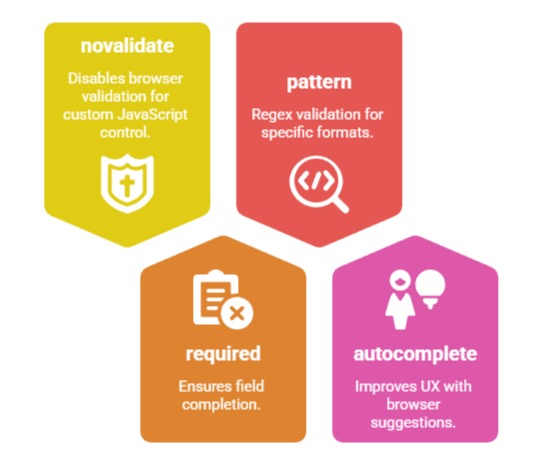
Key Form Attributes to Master
JavaScript Form Validation and Submission
Modern validation combines HTML5 constraints with JavaScript for comprehensive coverage.
const form = document.getElementById('contactForm');


form.addEventListener('submit', async function(e) {

  e.preventDefault();


  // Client-side validation

  if (!validateForm()) {

    showError('Please fix the errors above');

    return;

  }


  try {

    const formData = new FormData(form);

    const response = await fetch('/api/contact', {

      method: 'POST',

      body: formData

    });


    if (response.ok) {

      showSuccess('Message sent successfully!');

      form.reset();

    }

  } catch (error) {

    showError('Network error. Please try again.');

  }

});


function validateForm() {

  const email = document.getElementById('email').value;

  const emailRegex = /^[^\s@]+@[^\s@]+\.[^\s@]+$/;

  return emailRegex.test(email);

}
File Uploads: Secure and Efficient Handling
File uploads power modern web apps from profile pictures to document sharing. Proper implementation ensures security, performance, and great user experience.
HTML5 File API Fundamentals
The File API provides native browser support for file handling without plugins.
Core File API properties
const fileInput = document.getElementById('fileUpload');

fileInput.addEventListener('change', handleFiles);


function handleFiles(e) {

  const files = Array.from(e.target.files);


  files.forEach(file => {

    console.log(`Name: ${file.name}`);

    console.log(`Size: ${formatBytes(file.size)}`);

    console.log(`Type: ${file.type}`);


    // Preview images

    if (file.type.startsWith('image/')) {

      previewImage(file);

    }

  });

}


function formatBytes(bytes) {

  return (bytes / 1024 / 1024).toFixed(2) + ' MB';

}
Drag-and-Drop Upload Implementation
Modern UIs expect intuitive drag-and-drop functionality.
<div id="dropZone" class="drop-zone">

  <p>Drag files here or <span>click to browse</span></p>

  <input type="file" id="fileInput" multiple accept="image/*,.pdf">

</div>.drop-zone {
border: 3px dashed #ccc;
padding: 40px;
text-align: center;
transition: all 0.3s ease;
}
.drop-zone.dragover {
border-color: #007bff;
background: #f8f9fa;
}const dropZone = document.getElementById('dropZone');
['dragenter', 'dragover', 'dragleave', 'drop'].forEach(event => {
dropZone.addEventListener(event, handleDragEvents, false);
});
function handleDragEvents(e) {
e.preventDefault();
e.stopPropagation();
if (e.type === 'dragenter' || e.type === 'dragover') {
dropZone.classList.add('dragover');
} else {
dropZone.classList.remove('dragover');
}
if (e.type === 'drop') {
const files = e.dataTransfer.files;
processFiles(files);
}
}Progress Tracking and Upload Management
Real-time feedback prevents user frustration during uploads.
async function uploadFiles(files) {

  const formData = new FormData();


  for (let file of files) {

    formData.append('files', file);

  }


  const xhr = new XMLHttpRequest();


  xhr.upload.addEventListener('progress', function(e) {

    if (e.lengthComputable) {

      const percent = (e.loaded / e.total) * 100;

      updateProgress(percent);

    }

  });


  xhr.addEventListener('load', function() {

    if (xhr.status === 200) {

      showUploadComplete();

    }

  });


  xhr.open('POST', '/api/upload');

  xhr.send(formData);

}
File Upload Security Checklist
1. Validate file types on server-side
2. Scan for malware
3. Limit file sizes (typically 10-50MB)
4. Store outside web root
5. Generate unique filenames
User Sessions: Maintaining State Across Requests
Sessions enable personalized experiences by remembering user data between page loads. Understanding session lifecycle ensures smooth, secure user flows.
Client-Side Session Management with localStorage
Perfect for non-sensitive data that persists across browser sessions.
// Store user preferences

function saveSessionData(key, value) {

  localStorage.setItem(`session_${key}`, JSON.stringify(value));

}


// Retrieve session data

function getSessionData(key) {

  const data = localStorage.getItem(`session_${key}`);

  return data ? JSON.parse(data) : null;

}


// Shopping cart example

function addToCart(productId, quantity) {

  const cart = getSessionData('cart') || {};

  cart[productId] = (cart[productId] || 0) + quantity;

  saveSessionData('cart', cart);

}


// Clear session on logout

function clearSession() {

  Object.keys(localStorage).forEach(key => {

    if (key.startsWith('session_')) {

      localStorage.removeItem(key);

    }

  });

}
Session Tokens and Authentication
Secure authentication requires proper token handling.
// Store JWT token securely

function setAuthToken(token) {

  // Use httpOnly cookies for maximum security (server-side)

  document.cookie = `authToken=${token}; Secure; HttpOnly; SameSite=Strict`;

}


// Check authentication status

function isAuthenticated() {

  return getCookie('authToken') !== null;

}


async function protectedRequest(url) {

  const token = getCookie('authToken');


  const response = await fetch(url, {

    headers: {

      'Authorization': `Bearer ${token}`

    }

  });


  if (response.status === 401) {

    redirectToLogin();

  }


  return response.json();

}
Session Timeout and Auto-Renewal
Prevent unauthorized access with intelligent timeout management.
let sessionTimeout;


function startSessionTimer(timeoutMinutes = 30) {

  const timeoutMs = timeoutMinutes * 60 * 1000;


  sessionTimeout = setTimeout(() => {

    logoutUser();

  }, timeoutMs);


  // Extend on user activity

  document.addEventListener('mousemove', extendSession);

  document.addEventListener('keydown', extendSession);

}


function extendSession() {

  clearTimeout(sessionTimeout);

  startSessionTimer();

}
Best Practices and Security Considerations
Secure implementation separates good developers from great ones.
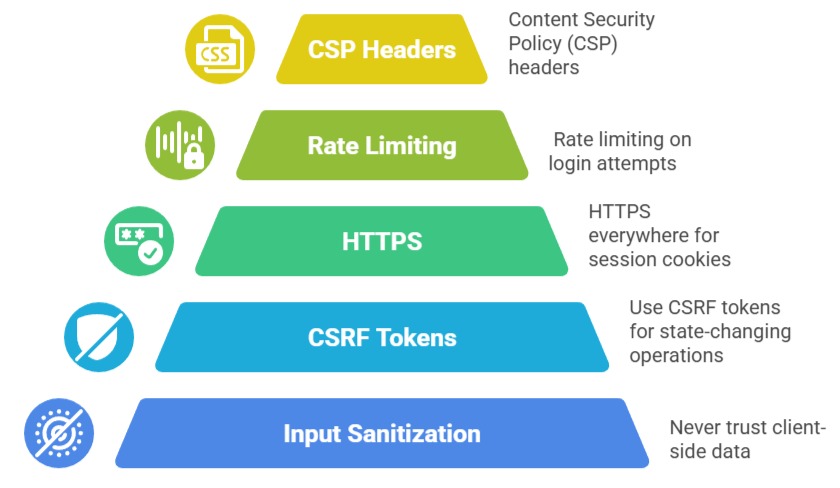
Essential Security Measures
Performance Optimization Tips
1. Lazy-load large file previews

2. Compress images before upload

3. Use service workers for offline form recovery

4. Debounce rapid form submissions

5. Batch multiple file uploads
This comprehensive toolkit equips you to build production-ready interactive features that users love and security teams approve.
