RESTful API design and JSON handling are fundamental concepts for building modern web services that enable communication between different applications.
RESTful APIs follow standard principles that use HTTP methods to perform operations on resources, while JSON serves as a lightweight and widely used data format for exchanging information.
Together, they help create scalable, efficient, and interoperable web systems.
RESTful API Fundamentals
RESTful APIs use standard HTTP methods to perform CRUD operations (Create, Read, Update, Delete) on resources, treating data like nouns (e.g., /users) rather than verbs.
This module introduces core concepts with JavaScript examples, preparing you to consume APIs in your projects.
What Makes an API "RESTful"?
A truly RESTful API follows six constraints from Fielding's dissertation, ensuring predictability and scalability.

For Example, Twitter's API (now X) uses /tweets for resources, aligning with REST principles.
HTTP Methods in REST
REST leverages HTTP verbs for actions. Here's a table comparing common methods:
 Best Practice: Always return appropriate status codes—200 OK for success, 201 Created for POST, 404 Not Found for missing resources (per RFC 7231).
JSON: The Universal Data Format
JSON (JavaScript Object Notation), defined in ECMA-404, is a lightweight, human-readable format for exchanging data between client and server.
It's native to JavaScript, making it perfect for web devs—no libraries needed for parsing.
JSON Structure and Syntax Rules
JSON supports six data types: strings, numbers, booleans, arrays, objects, and null. Here's a quick reference:
{

  "user": {

    "id": 42,

    "name": "Ada Lovelace",

    "email": "ada@example.com",

    "active": true,

    "hobbies": ["coding", "math"],

    "scores": [95, 87, null]

  }

}
Key Rules
1. Use double quotes for keys and strings.
2. No trailing commas.
3. Objects use {}; arrays use [].
Practical Tip: Validate JSON with tools like jsonlint.com during development.
Parsing and Stringifying JSON in JavaScript
JavaScript's built-in methods handle conversion effortlessly.
1. Parse JSON string to object: JSON.parse(jsonString)
2. Stringify object to JSON: JSON.stringify(obj, null, 2) (the 2 adds indentation)
Example: Fetching and displaying user data
fetch('https://api.example.com/users/42')

  .then(response => response.json())  // Parses JSON automatically

  .then(user => {

    document.getElementById('user-name').textContent = user.name;

    console.log(JSON.stringify(user, null, 2));  // Pretty-print for debugging

  })

  .catch(error => console.error('API call failed:', error));
Error Handling: Wrap JSON.parse() in try-catch for malformed JSON
try {

  const data = JSON.parse(response);

} catch (e) {

  console.error('Invalid JSON:', e);

}
Designing Your Own RESTful APIs
Now, apply concepts by designing endpoints for a simple blog app. Focus on best practices like versioning and security.
URL Design Best Practices
Craft intuitive, hierarchical URLs.
1. Use nouns: /posts not /getPosts.
2. Nest resources: /posts/123/comments.
3. Versioning: /api/v1/posts (prevents breaking changes).
4. Pagination: /posts?page=2&limit=10.
5. Filtering: /posts?author=ada&status=published.
Example Structure
GET    /api/v1/posts           // List all posts

GET    /api/v1/posts/123       // Single post

POST   /api/v1/posts           // Create post

PUT    /api/v1/posts/123       // Update post

DELETE /api/v1/posts/123       // Delete post
Handling Errors and Edge Cases
Robust APIs respond gracefully. Use standard HTTP codes and JSON error bodies
{

  "error": {

    "code": 400,

    "message": "Invalid email format",

    "details": ["Email must include @ symbol"]

  }

}
Security Essentials
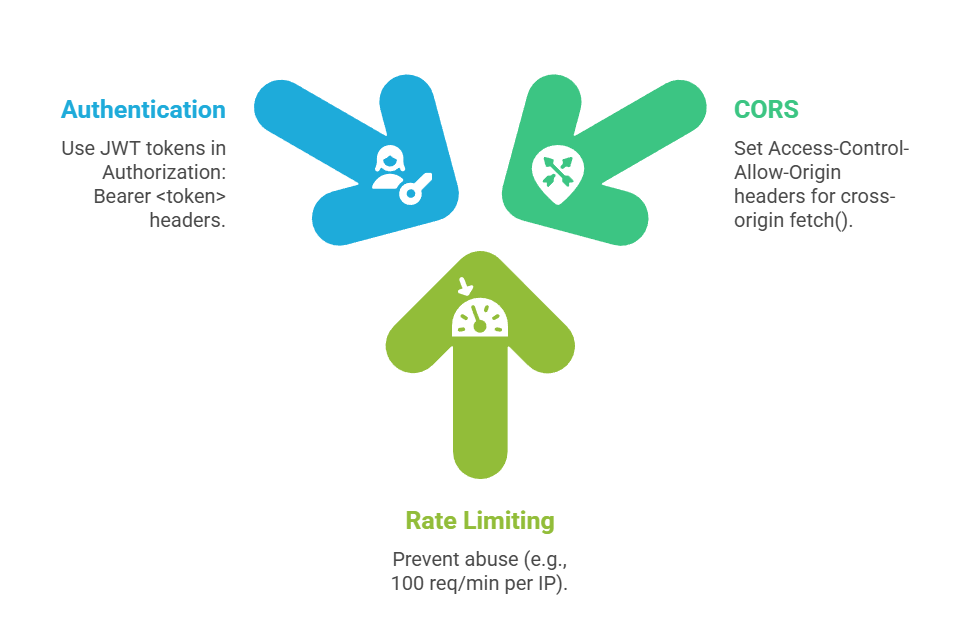
Pro Tip: Test with Postman or Insomnia—tools every web dev needs.
Integrating REST APIs in JavaScript Projects
Tie it together with async patterns for your HTML/JS apps.
Complete Fetch Workflow
1. Send Request
const createPost = async (title, body) => {

  const postData = { title, body };

  try {

    const response = await fetch('/api/v1/posts', {

      method: 'POST',

      headers: { 'Content-Type': 'application/json' },

      body: JSON.stringify(postData)

    });

    if (!response.ok) throw new Error(`HTTP ${response.status}`);

    return await response.json();

  } catch (error) {

    alert('Failed to create post: ' + error.message);

  }

};
2. Update UI: Append new post to DOM list.
3. Handle Loading States: Show spinners during requests.
Modern Alternative: Use async/await over .then() for readability (ES2017+).
