Static files, asset pipelines, and Bootstrap integration are essential for managing the visual and interactive aspects of web applications.
Static files such as CSS, JavaScript, images, and fonts define the look and behavior of a site, asset pipelines help organize, optimize, and serve these files efficiently, and Bootstrap provides a ready-to-use framework for responsive and consistent user interface design.
Understanding Static Files in Web Development
Static files are unchanging resources your web server delivers directly to browsers without server-side processing.
Think of them as the building blocks: CSS files for styling, JavaScript files for interactivity, images for visuals, and fonts for typography.
These files live outside your dynamic HTML templates, enabling browsers to cache them for faster subsequent loads.
In a typical project structure, you'll organize them in dedicated folders like /static/css/, /static/js/, or /static/images/.
Why Static Files Matter for Performance
Browsers request static files separately from HTML, so poor management leads to slow sites. For instance, unoptimized images can balloon page weights by megabytes.
Key Benefits

Pro Tip: Always minify CSS/JS (remove whitespace/comments) and compress images using tools like ImageOptim or TinyPNG.
Serving Static Files: A Step-by-Step Guide
Here's how to set up static files in a basic HTML project:
1. Create a project folder: my-website/static/.
2. Add subfolders: css/, js/, images/, fonts/.
3. Link in HTML: <link rel="stylesheet" href="static/css/style.css">.
4. Test locally with a simple server: python -m http.server 8000.
5. Deploy to hosting: (e.g., Netlify, Vercel) which auto-serves /static/.
For frameworks like Flask or Django, configure URL patterns:
# Flask example

app.static_folder = 'static'

<link rel="stylesheet" href="{{ url_for('static', filename='css/style.css') }}">
Asset Pipelines: From Development to Production
An asset pipeline automates the transformation of raw assets (source CSS, JS, images) into optimized production files.
It handles minification, concatenation, versioning, and even image optimization—essential for scaling beyond simple sites.
Without pipelines, you'd manually uglify files before each deploy, risking errors. Tools like Webpack, Vite, or Parcel make this seamless, bundling everything into few, efficient files.
Core Components of an Asset Pipeline
Asset pipelines follow a workflow:

Example: Vite (lightning-fast bundler) setup
npm init vite@latest

npm install

npm run dev  # Development server with HMR

npm run build  # Production bundle
This outputs /dist/assets/index-abc123.js—perfect for caching.
Building Your First Pipeline with Vite
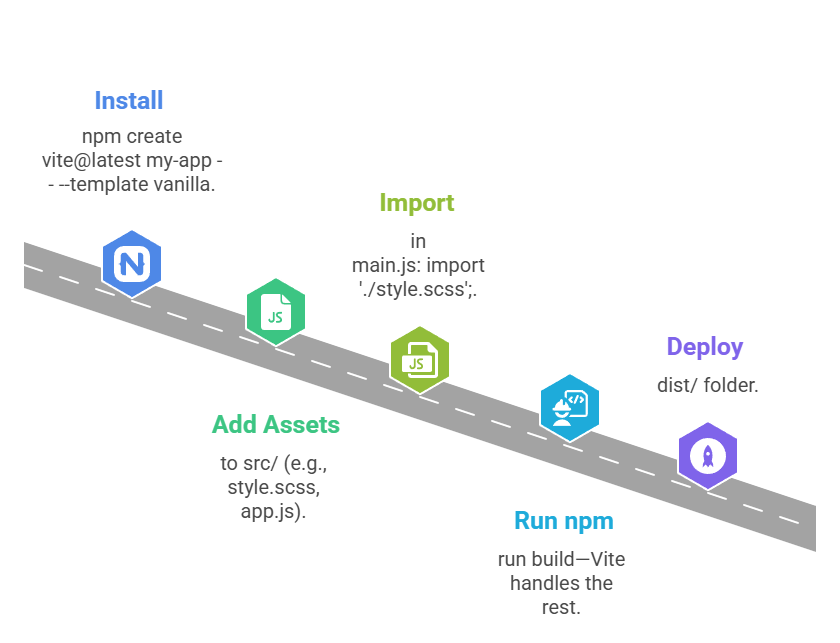
Real-World Win: Pipelines cut initial load times by 50-70% via techniques like code splitting (load JS only when needed).
Bootstrap Integration: Rapid Responsive Design
Bootstrap is the world's most popular frontend framework, providing pre-built CSS/JS components for responsive layouts, buttons, navbars, modals, and more.
Version 5.3+ (current as of 2025) emphasizes CSS custom properties, no-jQuery dependency, and mobile-first design.
Integrating Bootstrap accelerates prototyping while teaching responsive principles like flexbox and grid.
Getting Started with Bootstrap 5
Download or use CDN for instant setup—no build tools needed initially.
CDN Links (add to <head>)
<link href="https://cdn.jsdelivr.net/npm/bootstrap@5.3.3/dist/css/bootstrap.min.css" rel="stylesheet">

<script src="https://cdn.jsdelivr.net/npm/bootstrap@5.3.3/dist/js/bootstrap.bundle.min.js"></script>
Quick Example: Responsive navbar
<nav class="navbar navbar-expand-lg bg-body-tertiary">

  <div class="container-fluid">

    <a class="navbar-brand" href="#">MySite</a>

    <button class="navbar-toggler" type="button" data-bs-toggle="collapse" data-bs-target="#navbarNav">

      <span class="navbar-toggler-icon"></span>

    </button>

    <div class="collapse navbar-collapse" id="navbarNav">

      <ul class="navbar-nav">

        <li class="nav-item"><a class="nav-link" href="#">Home</a></li>

      </ul>

    </div>

  </div>

</nav>
Customizing Bootstrap with Asset Pipelines
For production, compile custom Bootstrap themes via Sass and your pipeline.
1. Install: npm install bootstrap sass.
2. Create custom.scss:
@import "bootstrap/scss/bootstrap";


$primary: #your-brand-color;

$enable-shadows: true;
3. Import in Vite: import './custom.scss';.
4. Build—outputs: tailored bootstrap-custom.min.css.
Utility Classes


Class Sessions
Sales Campaign

We have a sales campaign on our promoted courses and products. You can purchase 1 products at a discounted price up to 15% discount.