Advanced database usage with PostgreSQL integration and migrations enables applications to manage complex data reliably and at scale.
PostgreSQL offers powerful features such as advanced indexing, constraints, and data integrity, while migrations provide a structured way to evolve the database schema over time.
Together, they help maintain consistency, performance, and stability in growing applications.
Why PostgreSQL for Web Developers?
PostgreSQL stands out in modern web development for its robustness and extensibility, making it ideal for JavaScript-based stacks like Node.js with Express.
It handles everything from simple CRUD operations to advanced geospatial data and full-text search, outperforming lighter databases like SQLite for production use.
Key Advantages Over Other Databases
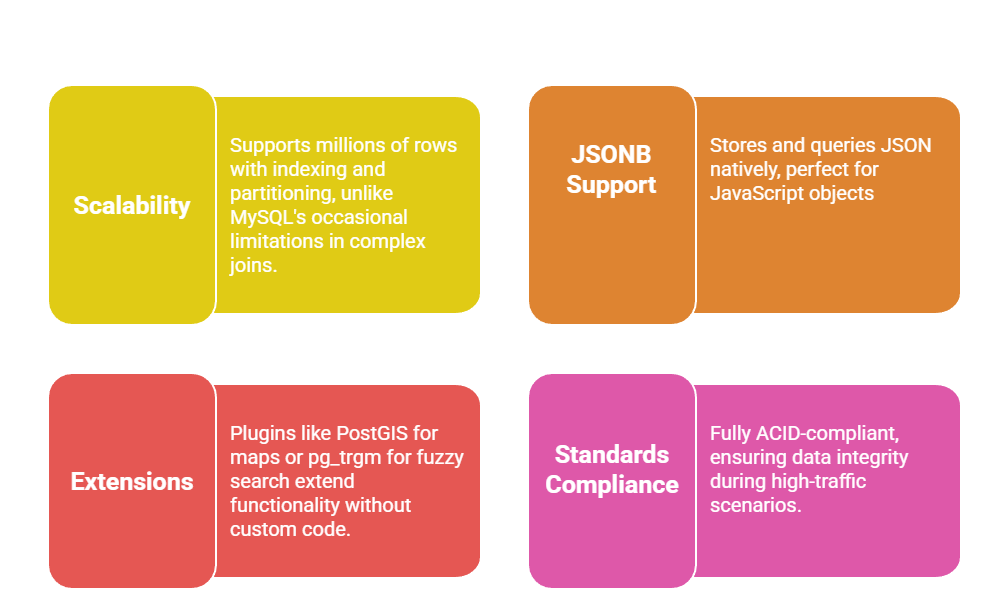
Setting Up PostgreSQL with Node.js
Start by installing PostgreSQL (version 16+, the latest as of 2025) via official docs or Docker for easy local setup: docker run --name postgres -e POSTGRES_PASSWORD=pass -p 5432:5432 -d postgres:16.
Use the pg library in Node.js for integration—it's lightweight and battle-tested.
Step-by-Step Installation and Connection
1. Initialize a Node.js project: npm init -y && npm install pg dotenv.
2. Create a .env file: DB_HOST=localhost DB_PORT=5432 DB_NAME=myapp DB_USER=postgres DB_PASS=pass.
3. Set up connection pool in db.js:
const { Pool } = require('pg');

require('dotenv').config();


const pool = new Pool({

  host: process.env.DB_HOST,

  port: process.env.DB_PORT,

  database: process.env.DB_NAME,

  user: process.env.DB_USER,

  password: process.env.DB_PASS,

});


module.exports = pool;
4. Test query: pool.query('SELECT NOW()').then(res => console.log(res.rows[0]));.
This setup ensures secure, reusable connections.
For your JavaScript apps, query user data from a frontend form submission—like fetching profiles via Fetch API.
Implementing Migrations for Schema Management
Migrations are version-controlled scripts that evolve your database schema safely, preventing manual errors in team environments.
Tools like Knex.js (industry standard for Node.js) automate this, supporting rollbacks and environment-specific configs.
Creating and Running Your First Migration
Knex migrations follow a timestamped naming convention for ordering.
1. Install: npm install knex && npx knex init.
2. Configure knexfile.js for PostgreSQL:
module.exports = {

  development: { client: 'pg', connection: { host: 'localhost', database: 'myapp' } },

};
3. Generate migration: npx knex migrate:make create_users_table.
4. Edit the file (e.g., 202512241209_create_users_table.js):
exports.up = function(knex) {

  return knex.schema.createTable('users', table => {

    table.increments('id').primary();

    table.string('email').unique().notNullable();

    table.jsonb('profile');  // For JS objects

    table.timestamps(true, true);

  });

};


exports.down = function(knex) {

  return knex.schema.dropTable('users');

};
5. Run: npx knex migrate:latest (or :rollback to undo).
Advanced Integration: Queries and Best Practices
With setup complete, dive into dynamic queries that power your web apps.
Leverage PostgreSQL's window functions and indexes for performance.
Building CRUD Operations with Transactions
Wrap multi-step ops in transactions for reliability:
const pool = require('./db');


async function createUserAndPost(userData, postData) {

  const client = await pool.connect();

  try {

    await client.query('BEGIN');

    const userRes = await client.query('INSERT INTO users (email, profile) VALUES ($1, $2) RETURNING id', [userData.email, userData.profile]);

    await client.query('INSERT INTO posts (user_id, title) VALUES ($1, $2)', [userRes.rows[0].id, postData.title]);

    await client.query('COMMIT');

  } catch (err) {

    await client.query('ROLLBACK');

    throw err;

  } finally {

    client.release();

  }

}
Best Practices
 For your course projects, integrate this with a JavaScript frontend: POST form data to an Express route that runs these queries.
Handling Migrations in Production
1. Use seeding: npx knex seed:make 01_users for initial data.
2. CI/CD Integration: Tools like GitHub Actions run migrate:latest on deploy.
3. Version Control: Track knex_migrations table locks to avoid conflicts.
This ensures zero-downtime deploys, a staple in modern web dev.
