Deployment to cloud platforms such as Heroku, Vercel, and AWS with CI/CD enables applications to be released quickly, reliably, and at scale.
Cloud platforms provide the infrastructure needed to run applications globally, while CI/CD pipelines automate building, testing, and deploying code changes.
This combination helps teams deliver updates faster with fewer errors.
Why Cloud Deployment Matters for Frontend Developers
Cloud platforms handle hosting, scaling, domain management, and security—freeing you to focus on building features.
They offer free tiers perfect for learning and small projects, scaling seamlessly as your app grows.
The Deployment Challenge Solved by Cloud Platforms
Manually uploading files via FTP is error-prone and doesn't scale. Cloud platforms provide:
1. One-click deployments from Git repositories
2. Automatic scaling during traffic spikes
3. Built-in HTTPS and custom domains
4. Global CDN for fast load times worldwide
Platform Comparison: Heroku, Vercel, and AWS
Each platform excels in different scenarios. Here's a quick comparison to help you choose:
 Deploying to Vercel
Vercel dominates frontend deployment with lightning-fast builds and preview deployments. It's perfect for React, Next.js, Vue, or vanilla JavaScript projects.
Step-by-Step Vercel Deployment
1. Push your code to GitHub
git add .

git commit -m "Ready for deployment"

git push origin main
2. Connect Vercel to your repository
Visit vercel.com → Import GitHub repo
No configuration needed—Vercel auto-detects frameworks
3. Customize build settings
Build Command: npm run build

Output Directory: dist

Install Command: npm install
4. Deploy instantly
Click Deploy → Live URL ready in ~30 seconds
Every future git push auto-deploys
Pro Tip: Vercel creates preview deployments for every pull request—perfect for team reviews.
Vercel Environment Variables
# In Vercel Dashboard → Settings → Environment Variables

API_URL=https://api.yourapp.com

MAPBOX_TOKEN=pk.your_token_here
Deploying to Heroku
Heroku shines for apps needing backend services alongside frontend. It's beginner-friendly with excellent documentation.
Heroku Deployment Process
1. Install Heroku CLI
# macOS

brew tap heroku/brew && brew install heroku


# Verify installation

heroku --version
2. Prepare your project
Create these files in your project root:

├── static.json (serves your built files)

├── Procfile (defines web process)

└── package.json (with start script)
3. Create and deploy
heroku create your-app-name

git push heroku main

heroku open  # Opens your live app
Sample static.json for frontend apps
{

  "root": "dist/",

  "routes": {

    "/**": "index.html"

  }

}
AWS Amplify: Enterprise-Ready Deployment
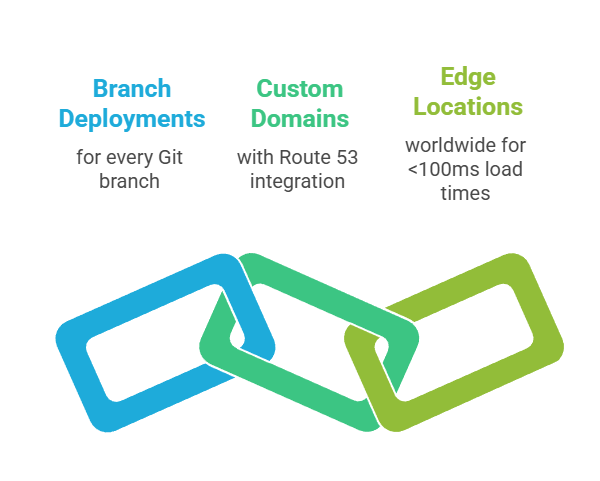
AWS Amplify offers unlimited free hosting with advanced features like A/B testing and analytics.
Amplify Quick Deployment
1. Connect GitHub repo at console.aws.amazon.com/amplify
2. Auto-configuration detects your framework
3. Deploy → https://main.d123xyz.amplifyapp.com live instantly
Key Amplify Features
Implementing CI/CD Pipelines
Continuous Integration/Continuous Deployment (CI/CD) automates testing and deployment on every code change. No more manual uploads!
GitHub Actions CI/CD Example
Create .github/workflows/deploy.yml
name: Deploy to Vercel

on:

  push:

    branches: [ main ]

jobs:

  deploy:

    runs-on: ubuntu-latest

    steps:

    - uses: actions/checkout@v3


    - name: Setup Node.js

      uses: actions/setup-node@v3

      with:

        node-version: '18'


    - name: Install dependencies

      run: npm ci


    - name: Run tests

      run: npm test


    - name: Build

      run: npm run build


    # Vercel auto-deploys from GitHub pushes
Benefits of CI/CD:
1. Zero-downtime deployments
2. Automated testing catches bugs early
3. Rollback to previous versions instantly
4. Team collaboration without deployment conflicts
Custom Domains and HTTPS (All Platforms)
All three platforms offer free HTTPS and custom domains.
Domain Setup Steps
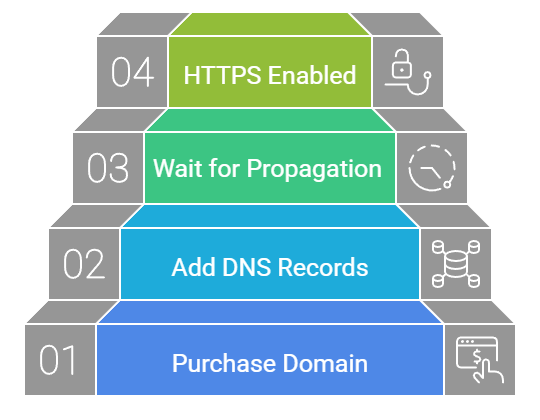
Example DNS records for Vercel
CNAME: www → cname.vercel-dns.com

A: @ → 76.76.21.21 (Vercel IP)
Monitoring and Analytics
Post-deployment monitoring ensures your app stays healthy.

