WebSockets and real-time features with Starlette enable applications to support instant, two-way communication between clients and servers.
Unlike traditional HTTP requests, WebSockets maintain persistent connections, making them ideal for real-time updates such as chats, notifications, and live dashboards.
Starlette provides a lightweight and efficient framework for building these asynchronous, real-time web features.
What Are WebSockets?
WebSockets revolutionized web communication by establishing a full-duplex channel over a single TCP connection.
Unlike HTTP's request-response model, WebSockets remain open, allowing seamless data exchange in both directions.
The WebSocket Protocol Basics
WebSocket connections begin with an HTTP handshake, then upgrade to the ws:// or wss:// (secure) protocol. This upgrade happens via specific headers:
Connection: Upgrade

Upgrade: websocket

Sec-WebSocket-Key: [random base64 value]
Once established, both client and server can send framed messages (text/binary) at any time. The protocol handles pings/pongs for connection health and supports message fragmentation for large payloads.
Key WebSocket Characteristics
1. Persistent connection: No repeated HTTP handshakes
2. Low latency: Sub-50ms message delivery typical
3. Bidirectional: Server can push data without client requests
4. Lightweight: Minimal overhead after handshake (2-byte frame headers)
WebSockets V/S Traditional Methods

Starlette: The Perfect WebSocket Framework
Starlette shines for real-time apps with its clean ASGI design, automatic dependency injection, and zero-boilerplate WebSocket support.
Built by the FastAPI creator, it handles connection management, scoping, and graceful disconnections out of the box.
Setting Up Your Starlette WebSocket Project
Start with a minimal setup using pip install starlette uvicorn:
from starlette.applications import Starlette

from starlette.routing import Route, WebSocketRoute

from starlette.websockets import WebSocket, WebSocketDisconnect

import uvicorn


async def websocket_endpoint(websocket: WebSocket):

    await websocket.accept()

    try:

        while True:

            # Receive and broadcast messages

            data = await websocket.receive_text()

            await websocket.send_text(f"Echo: {data}")

    except WebSocketDisconnect:

        print("Client disconnected")


app = Starlette(routes=[

    WebSocketRoute("/ws", websocket_endpoint),

])


if __name__ == "__main__":

    uvicorn.run(app, host="0.0.0.0", port=8000)
Run With: uvicorn main:app --reload
Starlette WebSocket Lifecycle
Starlette manages the complete WebSocket flow automatically:
1. Connection: Client connects to /ws → websocket.accept()
2. Scope: Access websocket.scope for client IP, headers, etc.
3. Messaging: Use receive_text(), receive_json(), receive_bytes()
4. Broadcasting: Store connections in sets for multi-client apps
5. Disconnection: Handle WebSocketDisconnect exception gracefully
Pro Tip: Always wrap WebSocket logic in try/except to handle disconnects cleanly.
Building a Real-Time Chat Application
Let's create a broadcast chat room where messages reach all connected clients instantly—perfect for demonstrating WebSocket power.
Backend: Managing Multiple Connections
from typing import Set

from starlette.websockets import WebSocketState


# Global connection manager (use Redis for production)

class ConnectionManager:

    def __init__(self):

        self.active_connections: Set[WebSocket] = set()


    async def connect(self, websocket: WebSocket):

        await websocket.accept()

        self.active_connections.add(websocket)


    def disconnect(self, websocket: WebSocket):

        self.active_connections.discard(websocket)


    async def broadcast(self, message: str):

        # Send to all connected clients

        disconnected = set()

        for connection in self.active_connections:

            if connection.client_state == WebSocketState.CONNECTED:

                try:

                    await connection.send_text(message)

                except:

                    disconnected.add(connection)

        # Clean up dead connections

        for conn in disconnected:

            self.active_connections.discard(conn)


manager = ConnectionManager()


async def chat_websocket(websocket: WebSocket):

    await manager.connect(websocket)

    try:

        while True:

            data = await websocket.receive_text()

            await manager.broadcast(f"{websocket.scope['user']}: {data}")

    except WebSocketDisconnect:

        manager.disconnect(websocket)
Frontend: JavaScript WebSocket Client
Connect from your HTML/JS frontend (integrates perfectly with course HTML5 skills):
<!DOCTYPE html>

<html>

<head>

    <title>Starlette Chat</title>

    <style>

        #messages { height: 300px; overflow-y: scroll; border: 1px solid #ccc; padding: 10px; }

        #messageInput { width: 300px; }

    </style>

</head>

<body>

    <div id="messages"></div>

    <input type="text" id="messageInput" placeholder="Type a message...">

    <button onclick="sendMessage()">Send</button>


    <script>

        const ws = new WebSocket("ws://localhost:8000/ws/chat");

        const messages = document.getElementById('messages');

        const input = document.getElementById('messageInput');


        ws.onmessage = function(event) {

            const msg = document.createElement('div');

            msg.textContent = event.data;

            messages.appendChild(msg);

            messages.scrollTop = messages.scrollHeight;

        };


        function sendMessage() {

            ws.send(input.value);

            input.value = '';

        }


        input.addEventListener('keypress', function(e) {

            if (e.key === 'Enter') sendMessage();

        });

    </script>

</body>

</html>
Test it: Open multiple browser tabs—messages appear instantly across all!
Advanced Features and Best Practices
Scale your real-time apps with these production-ready techniques.
Connection State Management
# Robust connection tracking

async def secure_websocket(websocket: WebSocket):

    # Authentication via query params or headers

    token = websocket.query_params.get("token")

    if not verify_token(token):

        await websocket.close(code=1008)  # Policy violation

        return


    await websocket.accept()

    user_id = get_user_id(token)

    websocket.scope['user'] = user_id  # Store for broadcasting
Broadcasting Strategies
1. Room-based: rooms = defaultdict(set) for topic channels
2. User-specific: Direct message by client ID
3. Pub/Sub: Integrate Redis pubsub for horizontal scaling
Error Handling and Reconnections
1. Client-side: Implement exponential backoff
2. Server-side: Use websocket.client_state checks
3. Ping/Pong: Starlette handles automatically
4, Graceful shutdown: Drain connections on app restart
Frontend reconnection example:
function connect() {

    ws = new WebSocket(url);

    ws.onclose = () => setTimeout(connect, 1000 * Math.pow(2, reconnectAttempts));

}
Production Deployment Considerations
Security First:
1. Always use WSS (WebSocket Secure) in production
2. Validate origins with websocket.scope["headers"]
3. Rate-limit connections per IP
4. Implement proper authentication
Scaling Strategies:
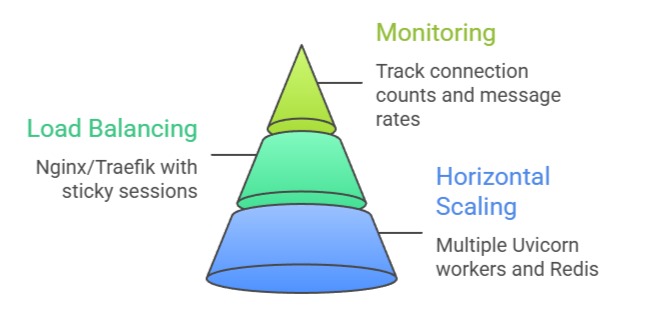
Popular Production stacks
Starlette + Redis + PostgreSQL + Nginx

FastAPI + Socket.IO + Kafka (high throughput)
Class Sessions
Sales Campaign

We have a sales campaign on our promoted courses and products. You can purchase 1 products at a discounted price up to 15% discount.