Caching with Redis and session management helps improve application performance and scalability by reducing repeated computations and database queries.
Redis acts as a fast in-memory data store, while session management uses it to store and retrieve user session data efficiently.
This combination enables faster response times and smoother user experiences in high-traffic applications.
Why Redis for Caching and Sessions?
Redis stands out as the world's most popular in-memory database, powering giants like Twitter, GitHub, and Stack Overflow.
It excels at sub-millisecond response times and supports diverse data structures beyond simple key-value pairs.
Key Advantages
1. Speed: Data lives in RAM, bypassing slower disk storage
2. Versatility: Handles strings, lists, sets, hashes, and even pub/sub messaging
Redis vs Traditional Databases
 Setting Up Redis for Your Web App
Getting Redis running takes minutes, and integrating it with your JavaScript backend (Node.js/Express) is straightforward.
This setup prepares you for production-grade caching and session handling.
Installation and Basic Connection
1. Install Redis:
# macOS (Homebrew)

brew install redis


# Ubuntu/Debian

sudo apt update && sudo apt install redis-server


# Windows: Use WSL or Redis Cloud
2. Start Redis server:
redis-server3. Test connection (Redis CLI)
redis-cli ping

# Response: PONG
Node.js Integration with Redis
Install the redis package and connect
const redis = require('redis');

const client = redis.createClient({

  url: 'redis://localhost:6379'

});


client.on('error', err => console.log('Redis Client Error', err));

await client.connect();


// Test: Set and get key-value

await client.set('welcome', 'Hello Redis!');

const value = await client.get('welcome');

console.log(value); // "Hello Redis!"
Implementing Caching Strategies
Caching stores computed results to avoid expensive database queries. Redis reduces your app's database load by 80-90% for read-heavy operations.
Common Caching Patterns
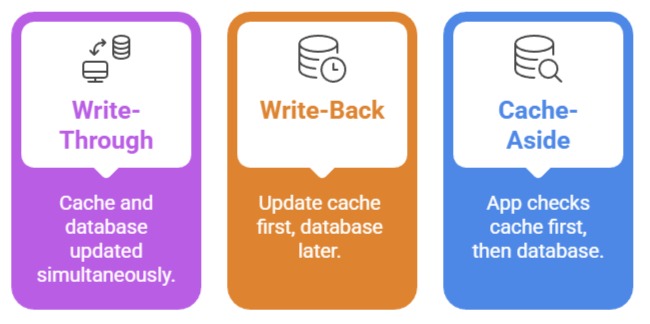
Practical Example: API Response Caching
Imagine a product catalog API hit 1000x/minute. Cache results for 5 minutes:
app.get('/api/products', async (req, res) => {

  const cacheKey = 'products:all';


  // Check cache first

  let products = await client.get(cacheKey);

  if (products) {

    return res.json(JSON.parse(products));

  }


  // Cache miss: Query database

  products = await db.query('SELECT * FROM products LIMIT 50');

  await client.setEx(cacheKey, 300, JSON.stringify(products)); // 5 min TTL


  res.json(products);

});
Session Management with Redis
HTTP is stateless, but users expect personalized experiences (shopping carts, login states). Redis sessions solve this elegantly.
Why Redis Beats In-Memory Sessions?
1. Horizontal Scaling: Multiple app servers share one Redis instance
2. Persistence: Sessions survive server restarts
3. Expiration: Automatic cleanup of expired sessions
Express Session with Redis Store
npm install express-session connect-redisconst session = require('express-session');
const RedisStore = require('connect-redis')(session);
const store = new RedisStore({ client });
app.use(session({
store,
secret: 'your-secret-key',
resave: false,
saveUninitialized: false,
cookie: {
secure: false, // true in production HTTPS
maxAge: 24 * 60 * 60 * 1000 // 24 hours
}
}));
// Usage in routes
app.post('/login', async (req, res) => {
const { username, password } = req.body;
// Validate credentials...
req.session.userId = user.id;
req.session.username = username;
res.json({ success: true });
});
app.get('/profile', (req, res) => {
if (!req.session.userId) {
return res.status(401).json({ error: 'Unauthorized' });
}
res.json({ user: req.session.username });
});Advanced Redis Features for Web Apps
Beyond basic caching, Redis offers powerful data structures for complex scenarios.
Real-Time Features with Redis Pub/Sub
// Publisher (notify all connected clients)

await client.publish('chatroom', JSON.stringify({

  user: 'Alice',

  message: 'Hello everyone!'

}));


// Subscriber

const subscriber = client.duplicate();

await subscriber.subscribe('chatroom', (message) => {

  console.log('New message:', message);

});
Leaderboards with Sorted Sets
// Track user scores

await client.zAdd('leaderboard', {

  score: 1500,

  member: 'player123'

});


// Top 10 players

const topPlayers = await client.zRevRange('leaderboard', 0, 9, {

  BY: 'SCORE'

});
Best Practices and Monitoring
Production readiness requires careful configuration and monitoring.
Key Configuration Tips
1. Memory Management
# redis.conf

maxmemory 2gb

maxmemory-policy allkeys-lru
2. Security:
Bind to 127.0.0.1 or use firewall
Enable requirepass yourstrongpassword
Use TLS in production
Monitoring Commands
redis-cli monitor        # Real-time commands

redis-cli info memory    # Memory usage

redis-cli slowlog get 10 # Slow queries