The DevOps lifecycle is the backbone of how modern software is planned, built, tested, delivered, and monitored.
It represents a continuous, never-ending loop of activities that development and operations teams perform together to ensure software is always improving and always available.
Unlike traditional software development, which followed a linear path from start to finish, the DevOps lifecycle is circular and continuous — meaning the process never truly ends.
Each phase feeds into the next, creating a rhythm of constant delivery and improvement.
The Concept of Continuous in DevOps
Before diving into each phase, it is important to understand why the word "continuous" appears so frequently in DevOps.
In traditional development, tasks like testing, integration, and deployment happened occasionally, often at the very end of a long development cycle. In DevOps, these activities happen continuously and automatically, reducing risk and accelerating delivery.
The DevOps lifecycle is often visualized as an infinity loop (∞) — symbolizing the endless cycle of development and operations working together without interruption.
Phases of the DevOps Lifecycle
The DevOps lifecycle is commonly broken down into 7 to 8 key phases. Each phase has a clear purpose and involves specific tools and practices.
Phase 1: Plan
Every great product starts with a plan. In this phase, teams define what needs to be built, why it needs to be built, and how it will be prioritized.
1. Business requirements are gathered and analyzed.
2. Work is broken into smaller tasks or user stories.
3. Teams use Agile methodologies like Scrum or Kanban to manage work.
4. Timelines, goals, and responsibilities are established.
Common Tools: Jira, Trello, Azure Boards, Confluence
Planning ensures that development efforts are aligned with business goals and user needs.
Phase 2: Develop (Code)
This is where developers write the actual code for the application or feature. In DevOps, coding is done in a collaborative and disciplined way.
 - visual selection-Picsart-CropImage.png)
Common Tools: Git, GitHub, GitLab, Bitbucket, VS Code, IntelliJ IDEA
Phase 3: Build
Once code is written, it needs to be compiled, packaged, and made ready for testing. This is the build phase.
1. Source code is compiled into executable software.
2. Dependencies are resolved and packaged together.
3. Build processes are automated so they run every time new code is submitted.
4. If the build fails, developers are notified immediately to fix issues.
Common Tools: Maven, Gradle, npm, Docker, Jenkins
An automated build process ensures that code is always in a working, deployable state.
Phase 4: Test
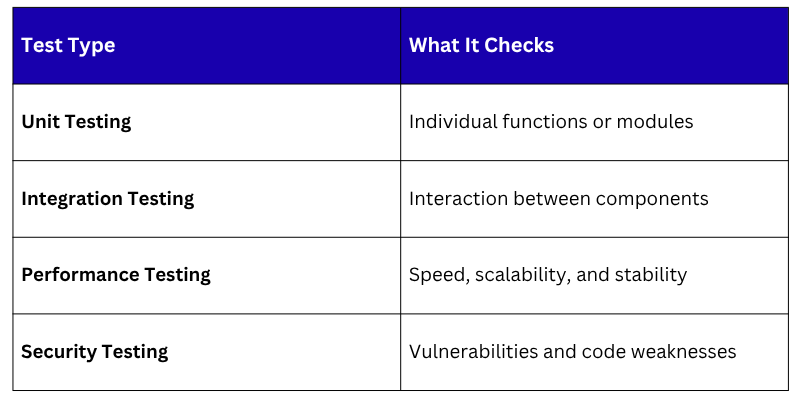
Testing in DevOps is continuous and automated, not a one-time activity done at the end of a project.
1. Unit tests check individual pieces of code.
2. Integration tests verify that different components work together.
3. Performance tests ensure the application handles load properly.
4. Security tests scan for vulnerabilities in the code.
5. All tests are run automatically as part of the pipeline.
Common Tools: Selenium, JUnit, TestNG, SonarQube, OWASP ZAP
Phase 5: Release
The release phase is where the tested and approved software is prepared for deployment to production. This phase acts as a gateway between development and live deployment.
1. All tests must pass before a release is approved.
2. Release notes and version information are documented.
3. In mature DevOps pipelines, releases can happen automatically with no manual intervention
4. Some organizations use feature flags to control which users see new features.
Common Tools: Jenkins, GitHub Actions, GitLab CI/CD, Spinnaker
Phase 6: Deploy
Deployment is the phase where software is actually delivered to the production environment — meaning real users can now access it.
1. Deployments are automated to reduce human error
2. Strategies like Blue-Green Deployment and Canary Releases are used to reduce risk
3. Blue-Green: Two identical environments run side by side; traffic switches from old to new instantly
4. Canary: New version is released to a small percentage of users first, then gradually rolled out
Common Tools: Kubernetes, Docker, Ansible, Terraform, AWS CodeDeploy
Automated deployments make releasing software as simple and safe as pressing a button.
Phase 7: Operate
Once software is deployed, the operations team ensures that it runs smoothly in the production environment.
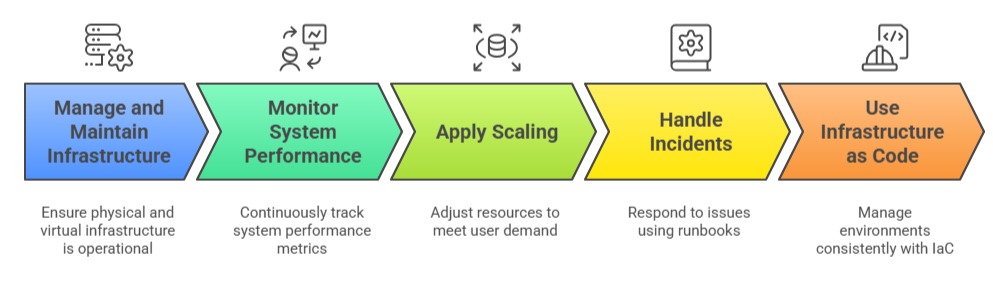
Common Tools: Terraform, Ansible, Chef, Puppet, AWS, Azure, GCP
Phase 8: Monitor
Monitoring is perhaps one of the most critical phases in the DevOps lifecycle. It ensures that the team always knows how the application and infrastructure are performing.
1. Application performance, uptime, and error rates are tracked
2. Logs are collected and analyzed for issues
3. Alerts notify teams immediately when something goes wrong
4. User behavior and experience are also measured
5. Insights from monitoring feed directly back into the Plan phase, completing the loop
Common Tools: Prometheus, Grafana, ELK Stack (Elasticsearch, Logstash, Kibana), Datadog, New Relic
Why the Lifecycle is a Loop, Not a Line
In traditional models like Waterfall, development moved in one direction, from requirements to deployment, and stopped. In DevOps, the process is a continuous feedback loop:
1. Monitoring reveals an issue → feeds back into Planning.
2. User feedback suggests improvements → new features are Developed.
3. A bug is found in production → it is fixed, Tested, and Deployed again.
This loop never stops. That is precisely what makes DevOps so powerful, software is always evolving, always improving, and always being delivered.
