As software systems grew more complex and release cycles became shorter, this manual approach became unsustainable.
Build and test automation solves this by replacing those manual steps with fast, consistent, and repeatable automated processes that run every single time code changes.
The result is software that is built the same way every time, tested thoroughly on every change, and ready for delivery with far greater speed and confidence than any manual process could achieve.
What is Build Automation?
Build automation is the process of automatically converting source code written by developers into a deployable artifact, such as an executable file, a packaged application, a Docker image, or a compiled binary — without any manual intervention.
In software development, "building" an application involves several steps that must happen in the correct order:
1. Fetching and resolving all dependencies and libraries the application needs.
2. Compiling source code into machine-readable form (for compiled languages like Java or C++).
3. Linking components and modules together.
4. Packaging everything into a distributable format (e.g., a JAR, WAR, ZIP, or Docker image).
5. Generating assets such as minified JavaScript or compiled CSS (for web applications).
Doing all of this manually every time a developer makes a change is slow, inconsistent, and error-prone. Build automation handles all of it automatically, reliably, and in seconds.
Why Build Automation Matters
Without build automation, the following problems arise frequently:
1. "Works on my machine" syndrome: Code builds successfully on one developer's machine but fails on another's due to environment differences
2. Inconsistent builds: Manual steps are skipped or performed differently each time
3. Slow feedback: Developers wait a long time to find out whether their code even compiles correctly
4. Human error: A missed step in a manual build process can introduce subtle, hard-to-diagnose issues
Build automation eliminates all of these problems by defining the build process as code, a script or configuration file that runs identically every time, on any machine.
How Build Automation Works
A build tool reads a configuration file that defines the steps required to build the project. When triggered either manually or automatically by a CI pipeline, it executes those steps in order and produces the final artifact.
Here is a simplified view of an automated build process:

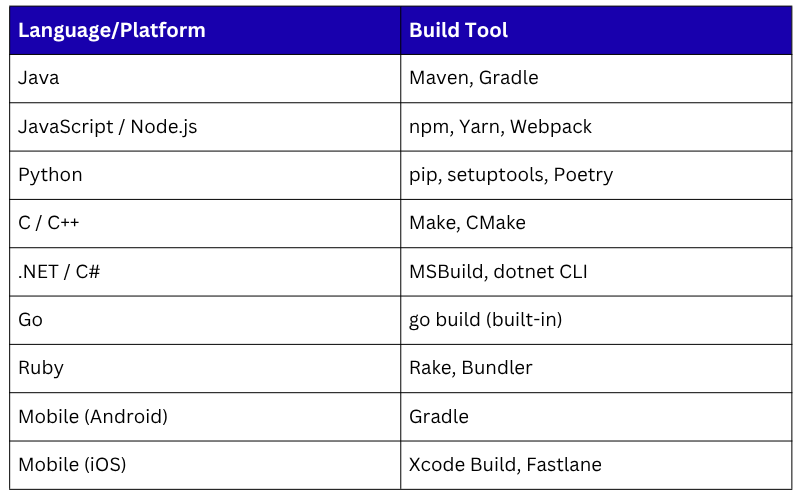
Common Build Tools by Language/Platform
What is Test Automation?
Test automation is the practice of using software tools and scripts to execute tests against an application automatically — without human involvement, and report whether the application behaves as expected.
Manual testing requires a human tester to open the application, perform actions, and observe results. This is slow, inconsistent, and impossible to scale when releases happen multiple times a day.
Test automation replaces this with scripts that simulate user behavior and system interactions, running hundreds or thousands of checks in seconds.
In a CI/CD pipeline, tests run automatically every time code is pushed, providing instant feedback on whether a change has broken anything.
The Test Pyramid — Layers of Automated Testing
One of the most important concepts in test automation is the Test Pyramid, a model that guides how different types of tests should be structured and prioritized in an automated test suite.
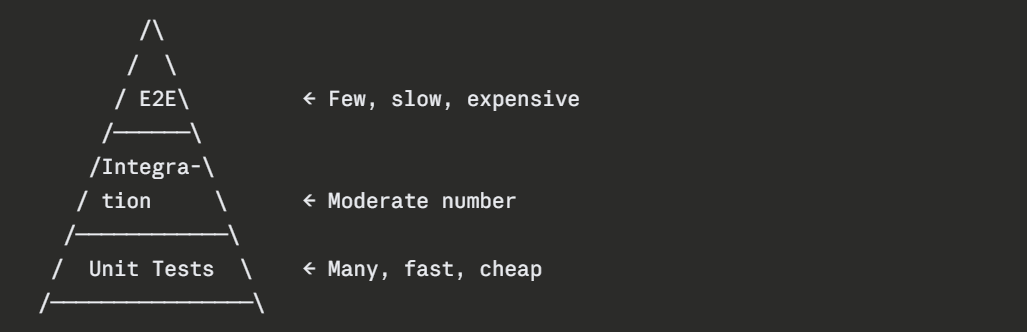
The Pyramid has Three Layers
Unit Tests — The Foundation
Unit tests are the most granular level of testing. They test individual functions, methods, or classes in complete isolation — without connecting to databases, APIs, or other external systems.
1. They are extremely fast — a full suite of thousands of unit tests can run in seconds.
2. They are cheap to write and maintain.
3. They pinpoint exactly which piece of code is broken when a test fails.
4. Every developer is expected to write unit tests alongside their code.
Example — A unit test in Python using pytest:
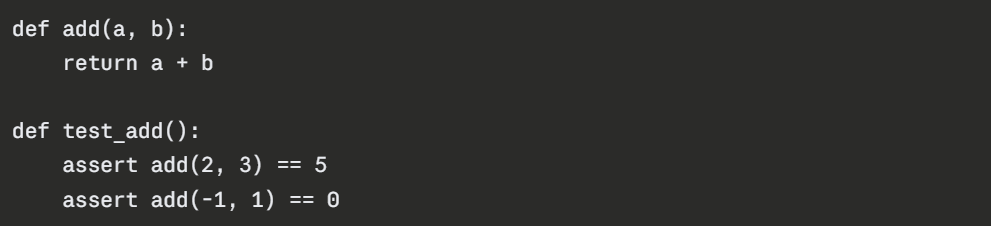
Running all tests with pytest:

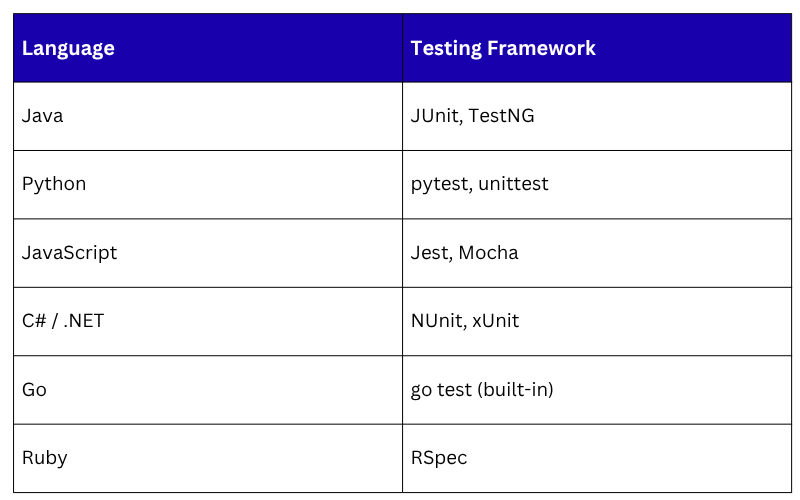
Common Unit Testing Framework
Integration Tests — Testing Components Together
Integration tests verify that multiple components or systems work correctly together.
While unit tests check individual pieces in isolation, integration tests check the connections between them, such as the interaction between application code and a database, or between two microservices.
1. They are slower than unit tests because they involve real connections and dependencies
2. They catch a different class of bugs, ones that only appear when components interact.
3. They should be run after unit tests pass in the CI pipeline.
Examples of what integration tests check:
1. Does the application correctly save and retrieve data from the database?
2. Does the API endpoint return the correct response when called with valid input?
3. Does the payment service communicate correctly with the order service?
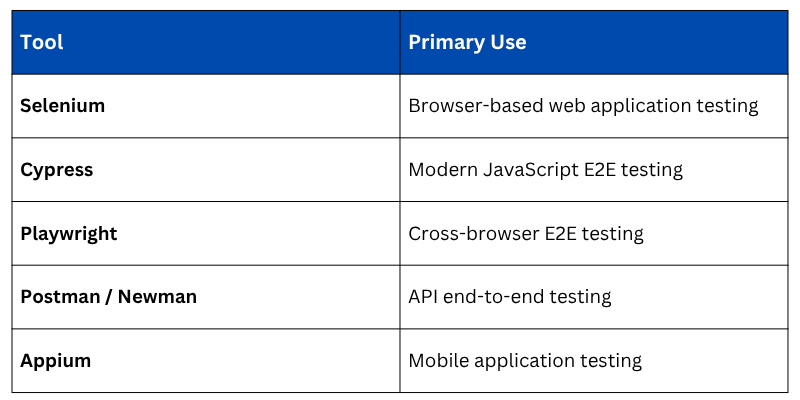
End-to-End (E2E) Tests — Testing the Full User Journey
End-to-end tests simulate real user behavior through the entire application, from the user interface down through the backend and database — exactly as a real user would experience it.
1. They are the slowest and most expensive tests to write and run.
2. They provide the highest level of confidence that the application works as a whole.
3. They should be used sparingly, covering critical user flows rather than every possible scenario.
4. They typically run in a staging environment after deployment.
Common E2E Testing Tools
Additional Types of Automated Testing
A comprehensive automated test strategy goes beyond just checking whether features work. Several additional types of automated tests play important roles:
Performance Testing
Checks how the application performs under load — measuring response times, throughput, and resource usage when many users access the system simultaneously.
Tools: Apache JMeter, Gatling, k6
Security Testing (SAST and DAST)
1. Static Application Security Testing (SAST) — Analyzes source code for security vulnerabilities without running the application.
2. Dynamic Application Security Testing (DAST) — Tests the running application for security weaknesses by simulating attacks.
Tools: SonarQube, OWASP ZAP, Snyk
Code Quality and Coverage Analysis
1. Checks that code meets defined quality standards — complexity, duplication, and maintainability.
2. Measures test coverage — the percentage of code that is exercised by automated tests.
Tools: SonarQube, Codecov, Istanbul
Smoke Testing
A quick, minimal set of tests run immediately after a deployment to verify that the most critical functions of the application are working before running the full test suite.
Build and Test Automation in a CI/CD Pipeline
Build and test automation do not operate in isolation, they are the core engine of every CI/CD pipeline. Here is how they work together in a typical automated pipeline triggered by a code push:
1. Developer pushes code to repository
↓
2. CI system detects the push and triggers the pipeline
↓
3. BUILD STAGE
- Dependencies resolved and downloaded
- Code compiled and packaged
- Artifact created
↓
4. UNIT TEST STAGE
- All unit tests run automatically
- Pipeline fails immediately if any test fails
↓
5. CODE QUALITY STAGE
- Static analysis and security scanning run
- Coverage report generated
↓
6. INTEGRATION TEST STAGE
- Application connected to test database and services
- Integration tests run
↓
7. STAGING DEPLOYMENT
- Artifact deployed to staging environment automatically
↓
8. E2E TEST STAGE
- End-to-end tests run against staging environment
↓
9. RESULT REPORTED
- Pass: Pipeline continues toward production
- Fail: Developer notified immediately with details
Every stage acts as a quality gate — if any stage fails, the pipeline stops and the team is notified. Only code that passes every gate moves forward.
Best Practices for Build and Test Automation
Having automation in place is valuable — but doing it well requires following proven practices:
1. Keep builds fast: A pipeline that takes an hour to run will slow down the entire team. Aim for build and unit test stages to complete in under 10 minutes.
2. Make builds reproducible: The same code should always produce the same artifact, regardless of when or where the build runs. Use fixed dependency versions and containerized build environments.
3. Fail fast: Run the fastest tests first (unit tests) so developers get feedback as quickly as possible. Run slower tests (E2E) later in the pipeline.
4. Write tests alongside code: Do not treat testing as an afterthought. Tests should be written at the same time as the feature code — ideally following Test-Driven Development (TDD).
5. Maintain your test suite: Delete or update tests that are no longer relevant. A flaky or outdated test suite is worse than no tests at all.
6. Never ignore a failing test: A failing test is a signal. Skipping or disabling tests to make the pipeline pass defeats the entire purpose of automation.
7. Aim for high but realistic test coverage: 80% code coverage is a commonly cited target, but quality of tests matters more than the percentage alone.

Class Sessions
Sales Campaign

We have a sales campaign on our promoted courses and products. You can purchase 1 products at a discounted price up to 15% discount.