When it comes to running applications in isolated, reproducible environments, two technologies dominate the conversation — Virtual Machines (VMs) and Containers.
Both solve the same fundamental problem: how to run applications consistently across different systems without conflicts.
However, they approach this problem in fundamentally different ways, with different trade-offs in terms of speed, resource usage, isolation, and portability.
What is a Virtual Machine?
A Virtual Machine is a software-based emulation of a complete physical computer. It runs on a physical host machine through a layer of software called a hypervisor, which allocates a portion of the host's CPU, memory, storage, and networking resources to each VM.
Each VM contains:
1. A full operating system — its own kernel, system libraries, and processes.
2. Virtualized hardware — emulated CPU, memory, disk, and network interfaces.
3. The application and all its dependencies.
Popular hypervisors include VMware ESXi, Microsoft Hyper-V, KVM, and Oracle VirtualBox.
There are two types of hypervisors:
Type 1 (Bare-metal) — Runs directly on physical hardware with no underlying OS. Used in enterprise data centers. Examples: VMware ESXi, Microsoft Hyper-V
Type 2 (Hosted) — Runs on top of an existing operating system. Used on developer workstations. Examples: VirtualBox, VMware Workstation
What is a Container?
A container is a lightweight, isolated environment that packages an application together with its dependencies — libraries, configuration files, and runtime. But shares the host operating system's kernel rather than including its own.
Containers are made possible through two Linux kernel features:
1. Namespaces: Provide isolation between containers (process IDs, network, file system).
2. Control Groups (cgroups): Limit and manage resource usage per container.
The most widely used container platform is Docker, though container technology is also fundamental to Kubernetes and other orchestration platforms.
How They Differ Architecturally
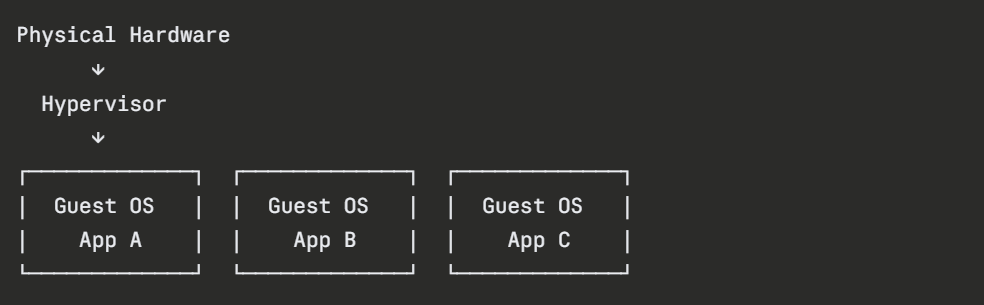
Virtual Machine Stack:
Container Stack:
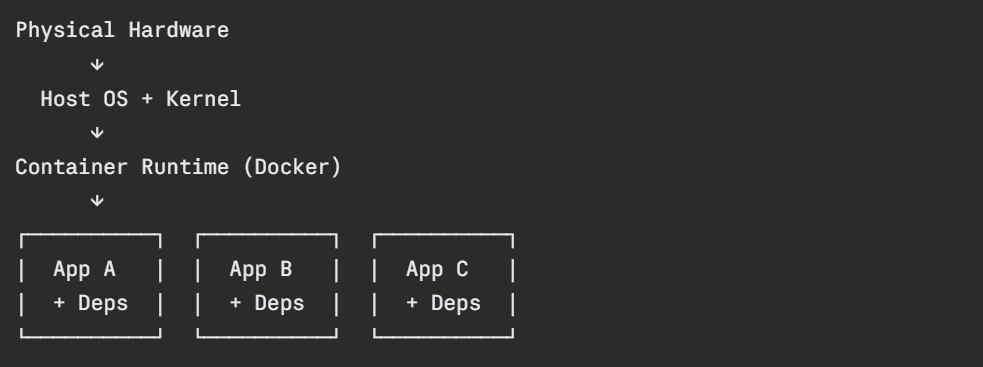
The critical architectural difference is clear — VMs carry a full OS per instance, while containers share the host OS kernel and only package what the application itself needs.
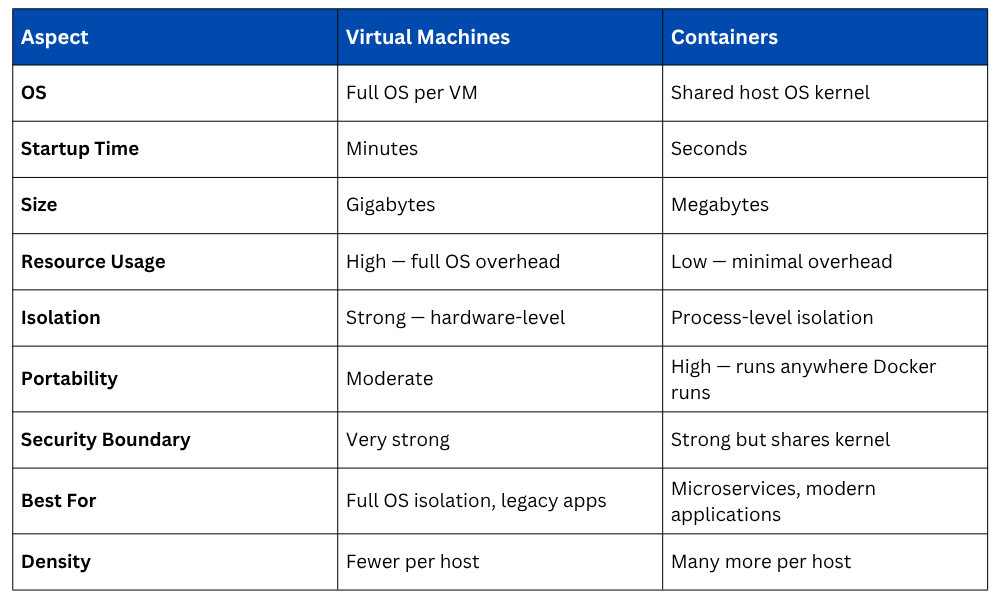
Containers vs Virtual Machines
Strengths of Virtual Machines
Despite the rise of containers, virtual machines remain essential in several scenarios:
1. Strong security isolation: Each VM has its own kernel, making it significantly harder for a compromise in one VM to affect another. This matters in multi-tenant environments and regulated industries.
2. Running different operating systems: VMs can run Windows on a Linux host or vice versa. Containers always share the host OS kernel.
3. Legacy application support: Applications that require specific OS configurations, kernel versions, or drivers are better suited to VMs.
4. Full OS-level testing: When testing requires a complete, isolated operating system environment.
5. Longer-running, stateful workloads: VMs are well-suited to persistent workloads that require dedicated, stable resources.
Strengths of Containers
Containers have become the dominant deployment unit in modern DevOps for compelling reasons:
1. Speed: Containers start in seconds, making rapid scaling, deployment, and recovery practical in ways VMs cannot match.
2. Efficiency: Sharing the host kernel means containers consume far less memory and CPU than equivalent VMs. A host that runs ten VMs might run hundreds of containers.
3. Portability: A container image packages everything the application needs. It runs identically on a developer's laptop, a CI/CD runner, and a production cloud server, eliminating environment inconsistencies.
4. Consistency: The same image is used from development through to production, removing the "works on my machine" problem entirely.
5. CI/CD integration: Containers build, test, and deploy rapidly, fitting naturally into automated pipelines.
6. Microservices architecture: Containers are the natural deployment unit for microservices, where each service runs independently and scales individually.
Can They Work Together?
In practice, containers and virtual machines are frequently used together, each playing to its strengths. Most cloud infrastructure runs containers inside virtual machines:
1. Cloud providers provision VMs as the underlying compute layer.
2. Container orchestration platforms like Kubernetes run on those VMs.
3. Application workloads run as containers on top of Kubernetes.
This architecture combines the strong security isolation and flexibility of VMs at the infrastructure level with the speed, efficiency, and portability of containers at the application level.
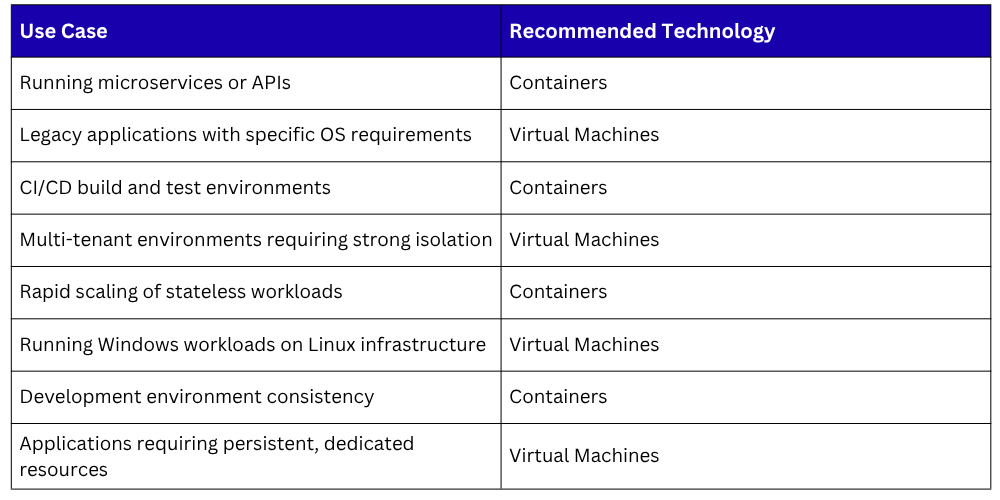
When to Use Which