When it comes to provisioning and managing cloud infrastructure through code, Terraform stands out as the most widely adopted and trusted tool in the DevOps ecosystem.
Developed by HashiCorp and first released in 2014, Terraform is an open-source Infrastructure as Code tool that allows engineers to define, provision, and manage infrastructure across virtually any cloud provider or on-premises platform using a simple, human-readable configuration language.
What is Terraform?
Terraform is an open-source IaC provisioning tool that uses a declarative configuration language called HCL — HashiCorp Configuration Language — to describe infrastructure resources.
Engineers write configuration files describing what infrastructure should exist, and Terraform communicates with cloud provider APIs to make that infrastructure a reality.
Terraform is maintained by HashiCorp and is available in two forms:
1. Terraform Open Source: The free, community-supported version used by the majority of practitioners
2. HCP Terraform / Terraform Enterprise: A paid, managed platform offering remote state management, team collaboration features, and policy enforcement for larger organizations
Terraform works with an enormous range of platforms and services through providers — plugins that enable Terraform to communicate with specific cloud or service APIs.
There are official providers for AWS, Microsoft Azure, Google Cloud Platform, Kubernetes, GitHub, Datadog, and hundreds more.
Why Terraform?
Several characteristics have made Terraform the dominant IaC tool in the industry:
1. Cloud-agnostic: A single tool manages infrastructure across multiple cloud providers simultaneously, avoiding vendor lock-in.
2. Declarative syntax: Engineers describe the desired state; Terraform determines what needs to change to reach it.
3. Execution plan: Before making any changes, Terraform shows a detailed preview of exactly what it will create, modify, or destroy.
4. State management: Terraform maintains a record of the infrastructure it manages, enabling accurate change detection and updates.
5. Large ecosystem: Thousands of providers and reusable modules are available through the Terraform Registry.
6. Strong community: A vast community of practitioners contributes modules, examples, and support.
7. Works with existing infrastructure: Terraform can import and manage resources that already exist, not just newly created ones.
How Terraform Works
Terraform's workflow is elegantly simple and follows three fundamental steps that every Terraform practitioner learns from day one.
Step 1 — Write
The engineer writes configuration files using HCL that describe the desired infrastructure. These files have a .tf extension and live in a project directory. A typical Terraform project might have:
1. A main.tf file defining the primary infrastructure resources.
2. A variables.tf file declaring input variables for reusability.
3. An outputs.tf file defining values to display after provisioning.
4. A provider.tf file configuring the cloud provider connection.
Step 2 — Plan
Before making any changes to real infrastructure, Terraform generates an execution plan, a detailed preview showing exactly what actions it will take.
This plan clearly shows which resources will be created, modified, or destroyed, giving the engineer full visibility before committing to any changes.

The output uses clear symbols to indicate intended actions:
+ means a resource will be created.
~ means a resource will be modified.
- means a resource will be destroyed.
Reviewing the plan carefully before applying is considered a critical best practice, it is the infrastructure equivalent of reviewing code before merging.
Step 3 — Apply
Once the plan is reviewed and confirmed, the engineer applies it. Terraform executes all the necessary API calls to the cloud provider and provisions the infrastructure exactly as described.

Terraform asks for confirmation before proceeding. Once confirmed, it provisions all defined resources and reports the outcome — how many resources were added, changed, or destroyed.
Key Terraform Concepts
Understanding Terraform's core concepts is essential before writing any configuration. These concepts form the vocabulary of Terraform and appear in every configuration file.
Providers
A provider is a plugin that enables Terraform to interact with a specific cloud platform or service. Every Terraform configuration starts by declaring which providers it needs. The provider block tells Terraform which platform to connect to and how to authenticate.

Terraform downloads the required provider automatically when terraform init is run. Providers are versioned, allowing teams to pin to specific versions for stability.
Resources
A resource is the most fundamental building block in Terraform. It represents a single piece of infrastructure -a virtual machine, a database, a storage bucket, a network, a DNS record, and so on. Every resource has a type and a name.
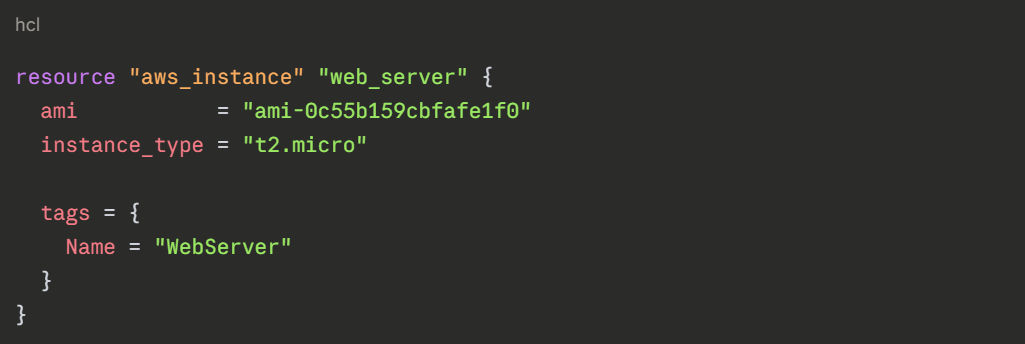
The resource type (aws_instance) tells Terraform what kind of infrastructure to create. The local name (web_server) is used to reference this resource elsewhere in the configuration.
Variables
Variables make Terraform configurations reusable and flexible by replacing hardcoded values with named inputs. Instead of writing the same region or instance type in every file, variables allow these values to be defined once and changed in a single place.
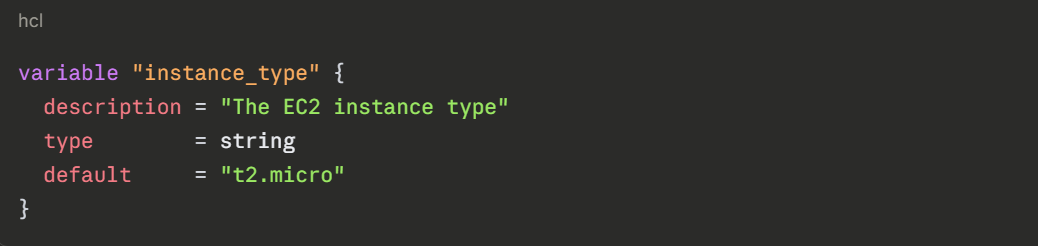
Variables can be referenced throughout the configuration using var.variable_name syntax, and their values can be supplied through variable files, environment variables, or command-line input.
Outputs
Outputs define values that Terraform displays after provisioning is complete, such as a server's IP address, a database connection string, or a resource ID.
They are useful for sharing information between different parts of an infrastructure configuration and for displaying important values to the engineer.

State
Terraform's state is a critical concept that distinguishes it from simple scripting tools. Terraform maintains a state file — by default named terraform.tfstate that records the current state of all infrastructure it manages.
The state file serves several essential purposes:
1. It allows Terraform to know what infrastructure already exists so it does not try to recreate it.
2. It enables Terraform to calculate the precise difference between the desired state and the current state.
3. It tracks metadata and resource dependencies that Terraform needs to manage infrastructure correctly.
In team environments, the state file must be stored in a remote backend, such as AWS S3, Azure Blob Storage, or HCP Terraform — so all team members share the same state. Storing state locally is only suitable for individual experimentation.
Modules
A module is a reusable, self-contained package of Terraform configurations. Instead of writing the same infrastructure patterns repeatedly across multiple projects, a module encapsulates that pattern once and can be called from anywhere.
Modules Promote:
1. Reusability: Write infrastructure patterns once, use them many times.
2. Consistency: All teams provision infrastructure using the same tested patterns.
3. Maintainability: Updates to a module propagate to all configurations that use it.
The Terraform Registry at registry.terraform.io hosts thousands of community and official modules for common infrastructure patterns, from VPC networking to Kubernetes clusters.
Essential Terraform Commands
Terraform is operated through a command-line interface. A small set of core commands covers the vast majority of day-to-day Terraform work.
terraform init initializes a Terraform working directory. It downloads the required provider plugins, sets up the backend for state storage, and prepares the directory for use. This is always the first command run in a new or cloned Terraform project.
terraform plan generates and displays an execution plan showing exactly what Terraform will create, modify, or destroy. No changes are made to real infrastructure at this stage. Reviewing the plan output carefully before applying is a critical professional practice.
terraform apply executes the planned changes and provisions the infrastructure. Terraform requests confirmation before proceeding unless the -auto-approve flag is provided. After completion, it displays the outputs defined in the configuration.
terraform destroy removes all infrastructure managed by the current Terraform configuration. It generates a destruction plan first and requires confirmation. This command is particularly useful for tearing down temporary or development environments cleanly.
terraform fmt automatically formats all .tf files in the current directory to follow Terraform's canonical style conventions, ensuring consistent and readable code across the team.
terraform validate checks the configuration files for syntax errors and internal consistency without connecting to any cloud provider. It is a quick way to catch mistakes before running a plan.
terraform output displays the output values defined in the configuration after infrastructure has been provisioned, without needing to re-apply the configuration.
terraform state list shows all resources currently tracked in the Terraform state file, useful for understanding what infrastructure Terraform is currently managing.
A Complete Basic Example
Here is a complete, minimal Terraform configuration that provisions an AWS EC2 instance with a variable for the instance type and an output for the public IP address:
hcl
# provider.tf
provider "aws" {
region = "us-east-1"
}
# variables.tf
variable "instance_type" {
description = "EC2 instance type"
type = string
default = "t2.micro"
}
# main.tf
resource "aws_instance" "app_server" {
ami = "ami-0c55b159cbfafe1f0"
instance_type = var.instance_type
tags = {
Name = "AppServer"
Environment = "Development"
}
}
# outputs.tf
output "server_public_ip" {
value = aws_instance.app_server.public_ip
description = "Public IP of the application server"
}
```
The workflow to provision this infrastructure:
```
terraform init
terraform plan
terraform apply
After apply completes, Terraform displays the server_public_ip output — the public IP address of the newly created server.
Terraform Best Practices
1. Always review the plan before applying: Never run terraform apply without first reviewing the execution plan output thoroughly.
2. Store state remotely: In any team environment, state must be stored in a shared remote backend, never in a local file.
3. Use variables for all environment-specific values: Avoid hardcoding values like region, instance size, or account IDs directly in resource blocks.
4. Use modules for repeated patterns: Encapsulate common infrastructure patterns in modules rather than copying and pasting configurations.
5. Pin provider versions: Specify explicit provider version constraints to prevent unexpected breaking changes from provider updates.
6. Never commit the state file to Git: The state file may contain sensitive information and must be excluded from version control using .gitignore
7. Use workspaces or separate directories for environments: Keep development, staging, and production infrastructure configurations clearly separated.
8. Format and validate before committing: Run terraform fmt and terraform validate before every commit to maintain code quality.
