Two of the most widely used and respected CI/CD tools in the DevOps world are Jenkins and GitHub Actions.
Both tools serve the same fundamental purpose, automating the building, testing, and deployment of software, but they approach it differently, have different strengths, and suit different kinds of teams and projects.
Jenkins
Jenkins is an open-source automation server written in Java, originally released in 2011. It is one of the oldest and most widely adopted CI/CD tools in the industry, trusted by thousands of organizations worldwide, from small development teams to large enterprises.
Jenkins allows teams to automate virtually every aspect of the software delivery process, from building and testing code to deploying applications across complex infrastructure.
What makes Jenkins particularly powerful is its flexibility. It is not tied to any specific programming language, cloud provider, or development platform. If you need to automate it, Jenkins can almost certainly do it.
Jenkins is self-hosted, meaning you install and run it on your own server or virtual machine — giving your team full control over the environment, configuration, and data.
How Jenkins Works
At its core, Jenkins works by monitoring a source code repository for changes and responding to those changes by running predefined jobs or pipelines.
Here is the basic flow of how Jenkins operates:
1. A developer pushes code to a version control repository such as GitHub or GitLab.
2. Jenkins detects the change through a webhook or by polling the repository.
3. Jenkins triggers the configured job or pipeline automatically.
4. The pipeline runs through its defined stages build, test, deploy in order.
5. Results are reported back to the team through the Jenkins dashboard, email, or messaging integrations.
6. If any stage fails, Jenkins stops the pipeline and notifies the responsible developer.
Jenkins Architecture
Understanding Jenkins architecture helps explain why it is so scalable and flexible.
Jenkins Master (Controller)
The Jenkins master is the central server that manages the overall system. It is responsible for:
1. Scheduling and coordinating build jobs.
2. Serving the Jenkins web interface where users configure and monitor pipelines.
3. Distributing work to agents for execution.
4. Storing build history, logs, and configuration.
Jenkins Agents (Nodes)
Agents are separate machines, physical servers, virtual machines, or containers that connect to the Jenkins master and actually execute the pipeline jobs. This distributed architecture allows Jenkins to:
1. Run multiple pipelines simultaneously across different machines.
2. Use different operating systems or environments for different jobs.
3. Scale horizontally by adding more agents as workload increases.
This master-agent model is one of the key reasons Jenkins remains relevant even as newer tools have emerged — it can scale to handle enormous workloads across diverse infrastructure.
Jenkins Key Features
Jenkins has accumulated a rich set of features over its long history. Here are the most important ones for a DevOps practitioner to understand:
1. Pipelines as Code with Jenkinsfile
Jenkins pipelines are defined in a file called a Jenkinsfile, which lives in the root of the project repository. This file describes all the stages and steps of the pipeline in code, making it version-controlled, reviewable, and consistent.
It supports two pipeline syntaxes — Declarative (simpler, structured, recommended for most teams) and Scripted (more flexible, written in Groovy, suited for complex needs).
2. Plugin Ecosystem
Jenkins has one of the largest plugin ecosystems of any CI/CD tool, with over 1,800 plugins available.
These plugins extend Jenkins to integrate with virtually any tool, platform, or service — including Git, Docker, Kubernetes, AWS, Slack, SonarQube, and hundreds more.
This extensibility is one of Jenkins' greatest strengths, though it also means that plugin management requires attention.
3. Distributed Builds
Through its master-agent architecture, Jenkins can distribute build jobs across multiple machines simultaneously. This allows large teams to run many pipelines in parallel without waiting in a queue, dramatically reducing overall build times.
4. Rich Web Interface
Jenkins provides a comprehensive web-based dashboard where teams can view the status of every pipeline, inspect build logs, manage configurations, and drill into the details of any job — all from a browser.
5. Triggers and Scheduling
Jenkins supports multiple ways to trigger a pipeline.
These include webhook-based triggers that fire immediately when code is pushed, scheduled builds that run at defined times using cron-like syntax, manual triggers initiated from the dashboard, and triggers based on the completion of another job.
6. Extensive Integration Support
Beyond its plugin ecosystem, Jenkins integrates natively with all major version control systems, cloud providers, containerization tools, notification platforms, and deployment targets, making it adaptable to virtually any technology stack.
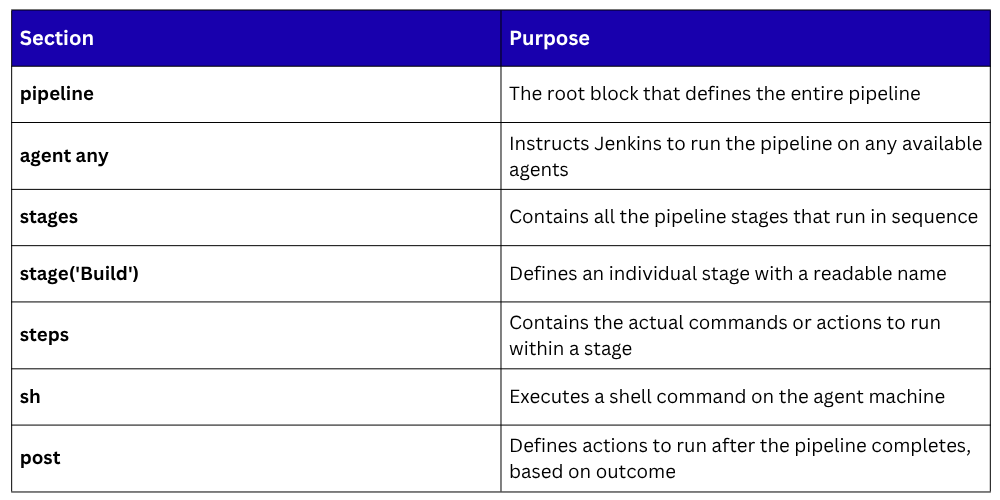
A Basic Jenkinsfile — Declarative Pipeline
Here is an example of a simple declarative Jenkinsfile that defines a three-stage pipeline:
groovy
pipeline {
agent any
stages {
stage('Build') {
steps {
echo 'Building the application...'
sh 'npm install'
sh 'npm run build'
}
}
stage('Test') {
steps {
echo 'Running automated tests...'
sh 'npm test'
}
}
stage('Deploy') {
steps {
echo 'Deploying to staging...'
sh './deploy.sh'
}
}
}
post {
success {
echo 'Pipeline completed successfully!'
}
failure {
echo 'Pipeline failed. Please check the logs.'
}
}
}
GitHub Actions
GitHub Actions is a cloud-native CI/CD and automation platform built directly into GitHub, launched in 2019.
It allows developers to automate their software workflows, including building, testing, and deploying applications without ever leaving the GitHub interface or setting up external infrastructure.
What makes GitHub Actions fundamentally different from Jenkins is that it is fully integrated into the platform where code already lives.
There is no separate server to install, no plugins to manage for basic use, and no external service to connect. Everything lives together — the code, the pipeline configuration, and the execution results all within GitHub.
How GitHub Actions Works
GitHub Actions is built around a straightforward set of concepts that are intuitive once understood.
Workflows
A workflow is an automated process defined in a YAML file stored in the .github/workflows/ directory of the repository. A repository can have multiple workflow files, each serving a different purpose — for example, one for CI testing and another for deployment.
Events
Every workflow is triggered by an event, something that happens in or to the repository. Events can be a code push, a pull request being opened, a scheduled time, a manual trigger, or even an external webhook. The event system is what makes GitHub Actions reactive and automatic.
Jobs
A workflow contains one or more jobs. Each job runs on its own runner, a virtual machine provided by GitHub (or a self-hosted machine). Jobs within a workflow run in parallel by default, though dependencies between jobs can be defined to force sequential execution.
Steps
Each job contains a series of steps — the individual tasks that run in order within the job. A step can either run a shell command directly or use a pre-built action.
Actions
An action is a reusable unit of automation — a packaged set of steps that performs a specific task.
GitHub maintains a Marketplace with thousands of community-built actions covering common tasks like setting up programming language environments, deploying to cloud providers, sending notifications, and much more.
Using actions dramatically reduces the amount of custom scripting needed.
Runners
A runner is the machine that executes the jobs in a workflow. GitHub provides hosted runners with Ubuntu, Windows, and macOS environments, maintained, updated, and scaled by GitHub automatically.
Teams can also configure self-hosted runners on their own infrastructure for custom requirements or cost optimization.
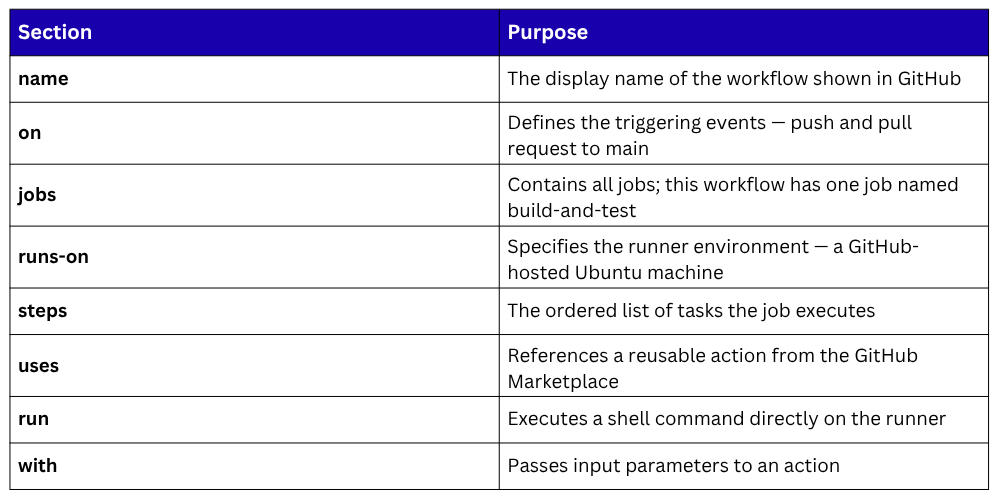
A Basic GitHub Actions Workflow
Here is a practical GitHub Actions workflow for a Python application:
yaml
name: Python CI Pipeline
on:
push:
branches: [main]
pull_request:
branches: [main]
jobs:
build-and-test:
runs-on: ubuntu-latest
steps:
- name: Checkout repository
uses: actions/checkout@v3
- name: Set up Python
uses: actions/setup-python@v4
with:
python-version: '3.11'
- name: Install dependencies
run: pip install -r requirements.txt
- name: Run tests
run: pytest tests/
- name: Upload test results
uses: actions/upload-artifact@v3
with:
name: test-results
path: test-results/
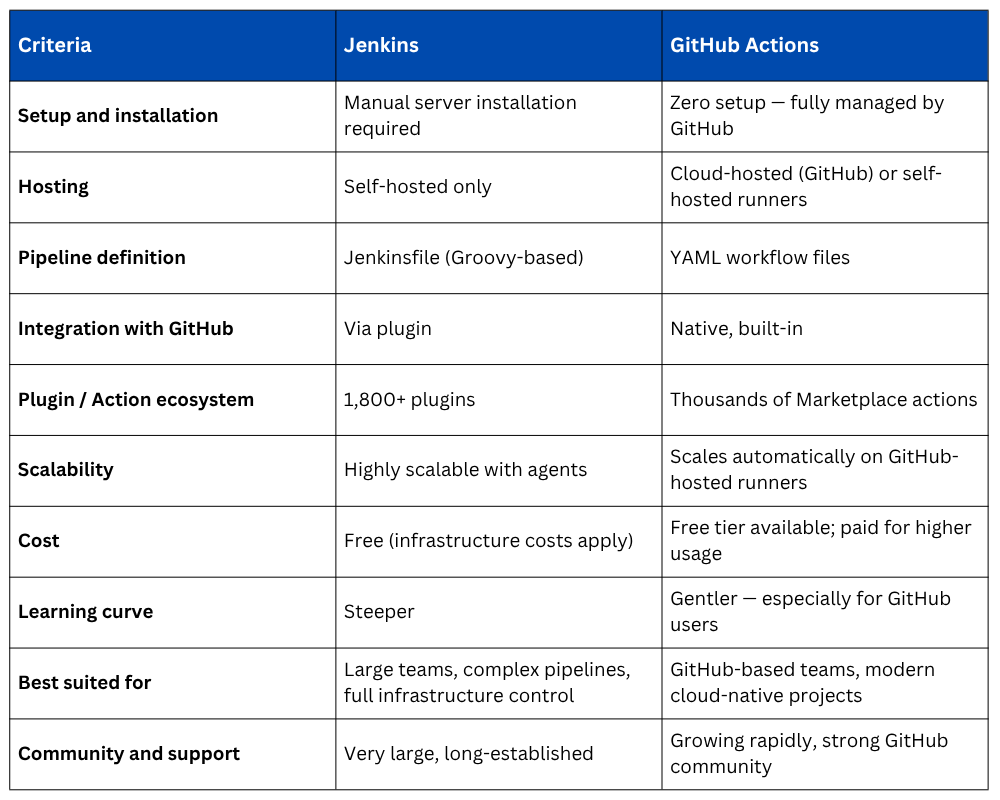
Jenkins vs. GitHub Actions
Both tools are excellent, the right choice depends on your team's size, infrastructure, existing toolchain, and specific requirements.
How These Tools Fit into the Broader DevOps Ecosystem
Both Jenkins and GitHub Actions do not operate in isolation. They are the orchestration layer that connects and coordinates all other DevOps tools and practices:
1. They pull code from Git repositories (GitHub, GitLab, Bitbucket).
2. They run build tools like Maven, Gradle, and npm.
3. They execute test frameworks like JUnit, pytest, and Selenium.
4. They build and push Docker images to container registries.
5. They trigger infrastructure provisioning through Terraform or Ansible.
6. They deploy applications to cloud platforms like AWS, Azure, or GCP.
7. They send notifications to Slack, email, or Microsoft Teams.
8. They integrate with monitoring tools to verify deployments post-release.
Understanding Jenkins and GitHub Actions is therefore not just about learning two tools, it is about understanding how CI/CD automation connects the entire DevOps toolchain into a coherent, automated delivery system.

Class Sessions
Sales Campaign

We have a sales campaign on our promoted courses and products. You can purchase 1 products at a discounted price up to 15% discount.