The real challenge in any production environment is managing that infrastructure over time, And keeping it consistent, handling changes safely, scaling it when needed, and ensuring it never drifts into an unknown or broken state.
Managing infrastructure through code means applying the same engineering discipline to infrastructure operations that software development applies to application code — using version control, automated pipelines, peer review, and tested processes to handle every infrastructure change.
This approach transforms infrastructure management from an unpredictable, manual activity into a controlled, repeatable, and auditable practice that scales with the organization.
What Managing Infrastructure Through Code Really Means
Many teams begin their IaC journey by writing Terraform or CloudFormation to provision resources for the first time.
But true infrastructure management through code goes much further, it means that every change, update, scaling action, and decommission happens through code, never through manual console access or ad-hoc commands.
This discipline means:
1. No engineer logs into a cloud console to manually create or modify resources.
2. Every infrastructure change is written in a configuration file, reviewed, and applied through automation.
3. The codebase always reflects the true, current state of the infrastructure.
4. Any environment can be rebuilt from scratch using only the code in the repository.
The Infrastructure Lifecycle Through Code
Managing infrastructure through code covers the complete lifecycle of every resource:
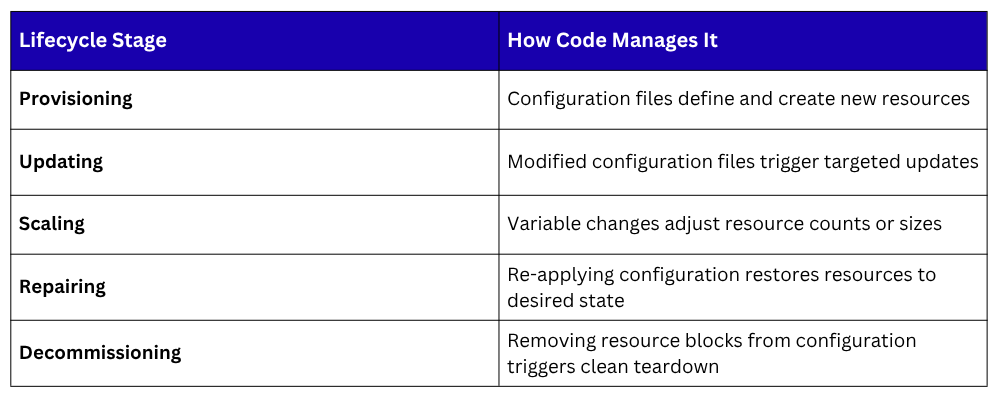
Every stage is handled through the same code-based workflow — write, review, plan, apply.
Configuration Drift and How to Prevent It
Configuration drift occurs when the actual state of infrastructure gradually diverges from the state defined in code.
This typically happens when team members make quick manual changes directly in a cloud console — bypassing the IaC workflow or when automated processes modify resources outside of the defined configuration.
Drift is dangerous because:
1. The codebase no longer accurately represents what is running in production.
2. Manual changes are undocumented and invisible to the rest of the team.
3. Rebuilding or replicating the environment from code produces a different result than what is actually running.
4. Debugging becomes significantly harder when the real state is unknown.
How to prevent configuration drift:
The most effective prevention strategy is enforcing a strict policy that all infrastructure changes must flow through the IaC workflow — no exceptions.
Supporting practices include running terraform plan regularly in a scheduled pipeline job to detect any differences between the code and the real infrastructure.
When drift is detected, the team reviews whether the real infrastructure should be updated to match the code, or whether the code should be updated to capture an intentional change.
Tools like Terraform Cloud and Atlantis provide drift detection features that automatically alert teams when infrastructure has changed outside of the normal workflow.
Restricting direct console access through IAM policies and cloud permission controls further reduces the risk of unauthorized manual changes.
Managing Multiple Environments
Most applications run across multiple environments, development, staging, and production, each requiring its own infrastructure. Managing these environments through code ensures they remain structurally identical while allowing environment-specific values such as instance sizes, replica counts, and domain names to differ.
There are two widely used approaches to managing multiple environments with Terraform:
1. Workspaces
Terraform workspaces allow a single configuration to manage multiple environments by maintaining a separate state file for each workspace.
The same configuration files are reused, with environment-specific values controlled through variable files. This approach works well for environments that are structurally identical.
2. Separate Directories per Environment
Many teams prefer to maintain a separate directory for each environment, each with its own configuration files and state. This provides complete isolation between environments and makes it easy to apply changes to staging without any risk of affecting production.
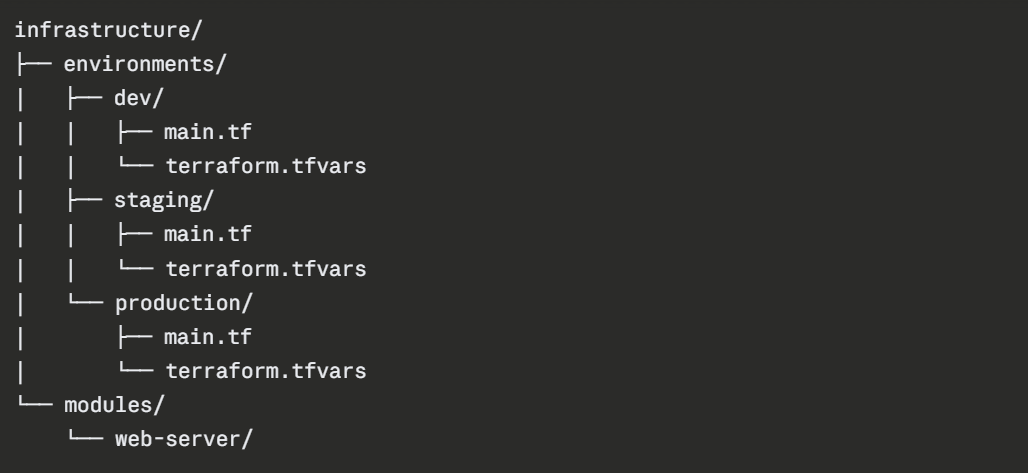
Shared infrastructure patterns are defined once as modules and referenced by each environment, ensuring consistency without code duplication.
Using Modules for Reusability
As infrastructure grows, the same patterns appear repeatedly. a web server configuration, a database cluster, a networking setup.
Rather than duplicating this code across environments and projects, Terraform modules allow teams to define a pattern once and reuse it with different inputs wherever it is needed.
A module is simply a directory of Terraform configuration files with defined input variables and outputs.
Teams can use modules from the Terraform Registry — a public library of community-built modules or write their own internal modules tailored to their specific standards.
Benefits of using modules:
1. Infrastructure standards are enforced consistently across all projects.
2. Changes to a shared pattern are made in one place and propagate everywhere the module is used.
3. New environments can be provisioned quickly using pre-built, tested module combinations.
4. Code reviews focus on the module definition rather than repeated boilerplate.
Integrating Infrastructure into CI/CD
Infrastructure code is most effectively managed when it flows through a CI/CD pipeline — subject to the same automated checks, peer reviews, and controlled deployment process as application code.
A typical infrastructure CI/CD pipeline works as follows. When an engineer writes or modifies a Terraform configuration, they commit the change to a feature branch and open a pull request.
The pipeline automatically runs terraform validate to check for syntax errors and terraform plan to generate a preview of all changes.
The plan output is posted as a comment on the pull request so reviewers can see exactly what infrastructure changes will result from approving the merge.
Once the pull request is reviewed and approved, it is merged into the main branch, which triggers the pipeline to run terraform apply and implement the approved changes in the target environment.
Post-apply steps verify infrastructure health through monitoring checks before the pipeline is marked as successful.
Tools that support this workflow include Atlantis — an open-source pull-request automation tool for Terraform, and Terraform Cloud, which provides a managed pipeline experience with remote state, policy enforcement, and team collaboration features built in.
Remote State Management
When multiple engineers work on the same infrastructure, the Terraform state file must be stored in a shared remote backend — not on any individual's local machine.
Remote state ensures that everyone on the team works from the same understanding of current infrastructure.
Popular remote backends include AWS S3 with DynamoDB for state locking, Terraform Cloud, Azure Blob Storage, and Google Cloud Storage.
A basic remote backend configuration using AWS S3 looks like this:
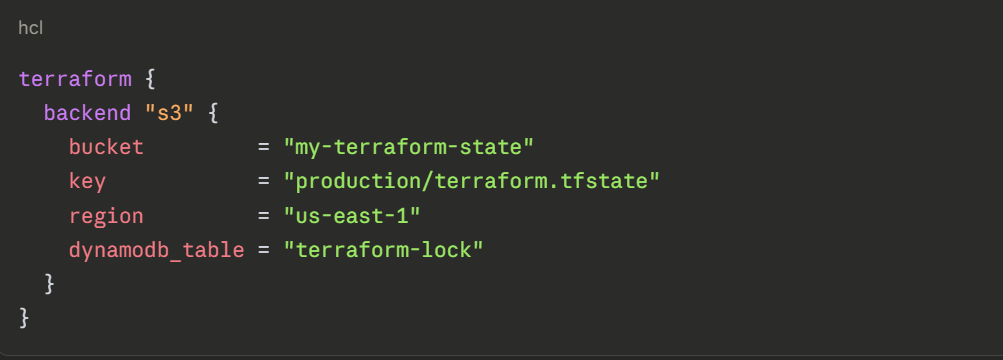
State locking — provided by DynamoDB in this example, prevents two engineers from running terraform apply simultaneously, which could corrupt the state file and cause unpredictable infrastructure changes.
Best Practices for Managing Infrastructure Through Code
1. Always store infrastructure code in version control and treat it with the same review discipline as application code.
2. Never make manual changes to infrastructure outside of the IaC workflow — enforce this through access controls.
3. Use remote state with locking enabled for all team environments.
4. Run scheduled plan checks to detect drift before it becomes a problem.
5. Keep modules small, focused, and well-documented so they are easy to understand and reuse.
6. Separate environment configurations clearly so a change to development cannot accidentally affect production.
7. Tag all cloud resources consistently through IaC to support cost tracking, auditing, and governance.
