Every application needs infrastructure to run — servers, networks, databases, storage, firewalls, and more.
Traditionally, setting up and managing this infrastructure was a manual process — system administrators would log into servers, click through web consoles, run commands, and configure environments by hand.
This approach was slow, inconsistent, difficult to repeat, and nearly impossible to scale.
Infrastructure as Code (IaC) fundamentally changes this by treating infrastructure the same way developers treat application code — writing it, versioning it, reviewing it, and automating it.
Instead of configuring servers manually, you define your entire infrastructure in code files, and tools use those files to automatically provision and manage everything.
What is Infrastructure as Code?
Infrastructure as Code is the practice of defining, provisioning, and managing IT infrastructure — such as virtual machines, networks, load balancers, databases, and cloud services, using machine-readable configuration files rather than manual processes or interactive tools.
In simple terms, instead of logging into a cloud console and clicking buttons to create a server, you write a file that describes the server you want — its size, operating system, network configuration, and any other settings, and a tool reads that file and creates the server automatically.
These configuration files are:
1. Written in human-readable languages like YAML, JSON, or HCL (HashiCorp Configuration Language).
2. Stored in version control repositories alongside application code.
3. Reviewed, tested, and approved like any other code change.
4. Executed by IaC tools that communicate with cloud providers and infrastructure platforms to make the described state a reality.
If you can write it in a file and commit it to Git, it is Infrastructure as Code.
The Problem IaC Solves
To truly appreciate IaC, it is worth understanding the very real problems it was designed to address.
1. Manual Configuration is Slow
Provisioning a server manually — logging into a console, filling in forms, configuring settings — can take hours. With IaC, the same server can be provisioned in minutes through automation.
2. Environments Become Inconsistent
When multiple people manually configure different environments — development, staging, production — small differences inevitably creep in.
One environment has a different software version, a slightly different network rule, or a missing configuration. These differences cause bugs that are notoriously difficult to diagnose. This problem is so common it has a name — configuration drift.
3. No History or Audit Trail
Manual changes made through a web console leave no record of who changed what, when, and why. When something breaks, tracing the root cause is extremely difficult.
4. Hard to Reproduce
If a manually configured server fails, rebuilding it from scratch requires remembering every step that was taken to set it up originally — an unreliable and stressful process.
5. Impossible to Scale
Manually managing ten servers is manageable. Managing a hundred or a thousand is not. Modern cloud applications may require infrastructure that scales dynamically — something only automation can handle reliably.
IaC addresses every one of these problems directly.
Core Principles of Infrastructure as Code
IaC is guided by a set of core principles that define how it should be practiced:
1. Idempotency
One of the most important principles in IaC is idempotency — the property that running the same configuration multiple times always produces the same result, regardless of how many times it is applied.
If the infrastructure already matches the desired state, an idempotent tool simply does nothing. This means you can safely run your IaC tool repeatedly without fear of creating duplicate resources or causing unintended changes.
2. Desired State Configuration
IaC tools work on the concept of desired state. You define what your infrastructure should look like, and the tool figures out what changes need to be made to reach that state from wherever it currently is.
You do not need to write step-by-step instructions for how to get there; you simply describe the destination.
3. Version Control Everything
All infrastructure configuration files should be stored in a version control system like Git.
This provides a complete history of every infrastructure change, enables code reviews for infrastructure modifications, and makes it possible to roll back to a previous infrastructure state when needed.
. Consistency Across Environments
The same IaC configuration files should be used to provision all environments — development, staging, and production.
This guarantees that all environments are identical in structure, eliminating the environment-specific bugs that plague manually managed systems.
5. Automation Over Manual Intervention
Infrastructure changes should flow through automated pipelines, not be applied manually. This ensures consistency, reduces human error, and provides an auditable record of every change.
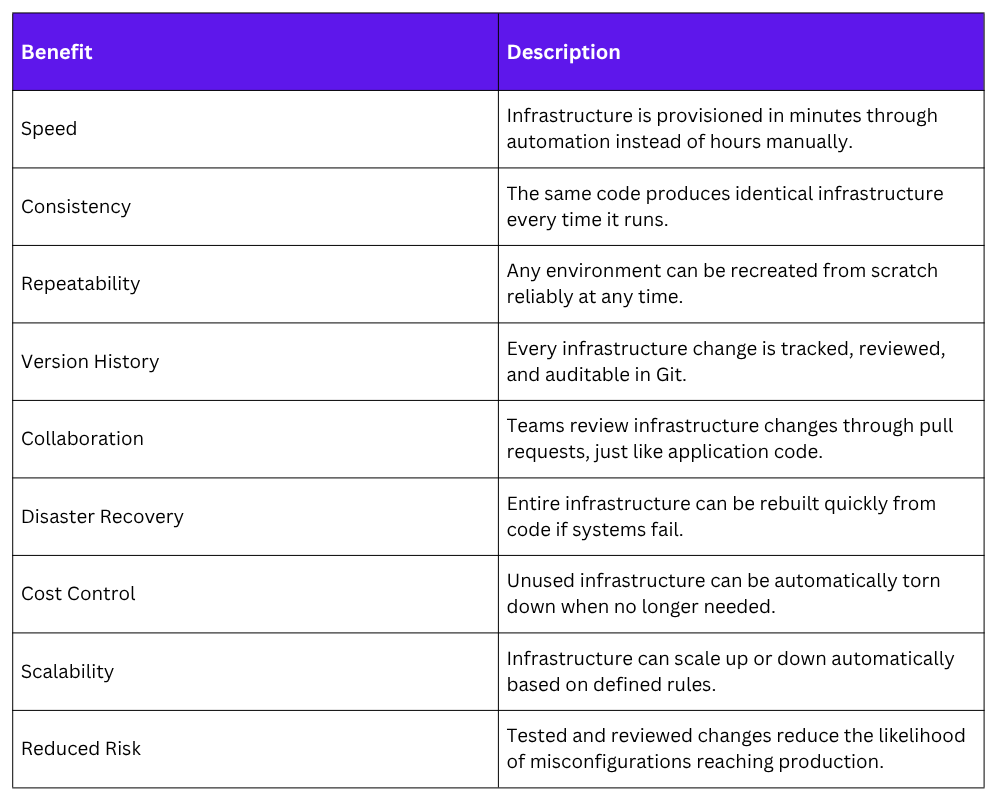
Benefits of Infrastructure as Code
The adoption of IaC brings tangible, measurable benefits to teams and organizations:
How IaC Fits into the DevOps Workflow
In a mature DevOps environment, infrastructure code and application code live side by side in the same repository — or in a dedicated infrastructure repository managed with the same discipline and rigor.
Here is how IaC integrates into a typical DevOps workflow:
1. A developer or platform engineer writes or modifies an IaC configuration file.
2. The change is committed to a Git branch and a pull request is opened.
3. Teammates review the proposed infrastructure change, just as they would a code change.
4. An automated pipeline runs plan or dry-run checks to preview what changes will be made.
5. Once approved and merged, the pipeline automatically applies the changes to the target environment.
6. Monitoring systems verify that the infrastructure is healthy after the change.
7. The full history of every infrastructure change is preserved in Git for future reference.
This workflow brings the same discipline, transparency, and automation to infrastructure management that CI/CD brought to application delivery.
Types of IaC Tools
IaC tools generally fall into two categories based on what layer of infrastructure they manage:
Provisioning Tools
These tools are responsible for creating and managing the underlying infrastructure resources — virtual machines, networks, databases, cloud services, and so on. They work directly with cloud provider APIs to bring resources into existence.
1. Terraform: The most widely used open-source provisioning tool, supporting all major cloud providers.
2. AWS CloudFormation: AWS-native IaC service for provisioning AWS resources.
3. Azure Resource Manager (ARM) / Bicep: Microsoft Azure's native provisioning tools.
4. Google Cloud Deployment Manager: Google Cloud's native provisioning service.
5. Pulumi: A modern IaC tool that allows infrastructure to be defined in general-purpose programming languages like Python, TypeScript, and Go.
Configuration Management Tools
Once infrastructure is provisioned, configuration management tools handle installing software, applying settings, and maintaining the desired state of the operating system and applications running on that infrastructure.
1. Ansible: Agentless configuration management using YAML playbooks.
2. Chef: Configuration management using Ruby-based recipes and cookbooks.
3. Puppet: Declarative configuration management with its own domain-specific language.
4. SaltStack: High-speed configuration management and remote execution.
A Simple IaC Example — Terraform
To make the concept concrete, here is a simple example of what Infrastructure as Code looks like using Terraform — the most widely used IaC provisioning tool.
The following Terraform configuration creates a virtual machine on AWS:
hcl
provider "aws" {
region = "us-east-1"
}
resource "aws_instance" "web_server" {
ami = "ami-0c55b159cbfafe1f0"
instance_type = "t2.micro"
tags = {
Name = "WebServer"
Environment = "Production"
}
}
```
This small file completely describes the desired infrastructure — an AWS EC2 virtual machine in the US East region, using a specific machine image, with a defined size and descriptive tags. To apply this configuration and create the infrastructure:
```
terraform init
terraform plan
terraform apply
```
- `terraform init` — Initializes the working directory and downloads the required provider plugins
- `terraform plan` — Previews the changes Terraform will make without actually applying them
- `terraform apply` — Applies the configuration and creates the defined infrastructure
The `terraform plan` command is particularly valuable — it acts as a **dry run** that shows exactly what will be created, modified, or destroyed before any real changes are made. This preview step is the equivalent of reviewing a pull request before merging.
When the infrastructure is no longer needed, it can be completely destroyed with a single command:
```
terraform destroy
IaC and the Broader DevOps Ecosystem
IaC does not exist in isolation, it is deeply connected to and reinforces every other DevOps practice:
1. Version Control: IaC files live in Git, bringing infrastructure changes into the same collaborative review process as application code.
2. CI/CD Pipelines: Infrastructure changes flow through automated pipelines that run plan checks, apply changes, and verify outcomes.
3. Containerization: IaC provisions the underlying cloud infrastructure on which container orchestration platforms like Kubernetes run.
4. Configuration Management: Tools like Ansible configure the software running on infrastructure that IaC tools like Terraform have provisioned.
5. Monitoring: Infrastructure changes trigger monitoring checks to verify system health after provisioning.
6. DevSecOps: Security policies and compliance rules are defined as code and enforced automatically through the IaC pipeline.
Common Challenges and How to Address Them
While IaC brings enormous benefits, teams adopting it for the first time should be aware of common challenges:
1. Learning curve: Writing infrastructure in code requires learning new tools and languages. Starting with simple configurations and building complexity gradually is the recommended approach.
2. State management: Tools like Terraform maintain a state file that tracks the current state of infrastructure. This file must be stored securely and shared among team members, typically using remote backends like AWS S3 or Terraform Cloud.
3. Handling secrets: Infrastructure code often needs sensitive values like API keys and passwords. These must never be hardcoded in configuration files and should be managed through dedicated secrets management tools like HashiCorp Vault or AWS Secrets Manager.
4. Drift detection: Even with IaC, manual changes sometimes occur outside the pipeline. Regularly running plan checks helps detect and correct configuration drift before it causes problems.
