Role-playing, structured output formats, and temperature control are prompt engineering techniques used to guide and control the behavior of generative AI models.
Role-playing assigns the model a specific persona or expertise (e.g., “act as a data scientist”), which helps produce more context-aware and relevant responses.
Structured output formats such as JSON and XML enforce a predefined response structure, making outputs easier to parse, validate, and integrate into applications.
Temperature control adjusts the randomness of model outputs: lower temperatures produce more deterministic and consistent responses, while higher temperatures encourage creativity and diversity.
Role-Playing in Prompt Design
Role-playing assigns a specific persona or context to the AI model, transforming its responses from generic to targeted and immersive.
This technique leverages the model's training on vast conversational data, making outputs more consistent and aligned with user expectations.
Imagine prompting a model to "explain quantum physics" versus "You are a friendly physicist tutoring a high school student explain quantum physics." The latter yields engaging, simplified explanations. Here's how to implement it effectively:
.png)
Benefits and Real-World Examples
Role-playing boosts response relevance by 30-50% in benchmarks from Hugging Face evaluations, as it mimics human-like specialization.
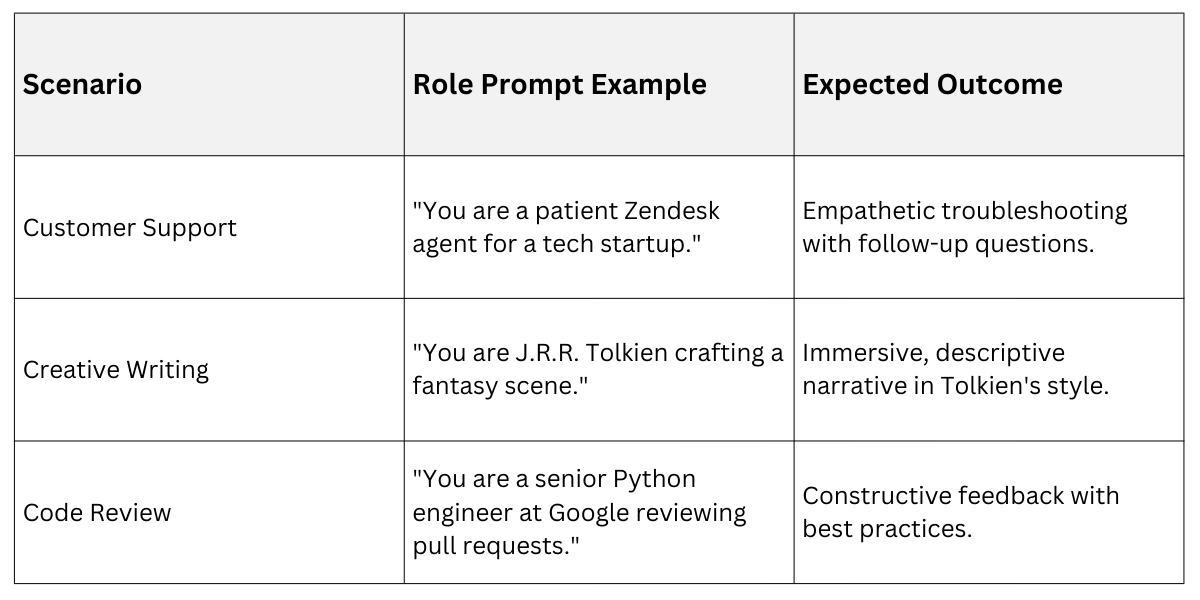
To refine, iterate by testing variations and measuring coherence via tools like LangChain's evaluators.
Structured Output Formats: JSON and XML
Structured outputs enforce machine-readable formats, turning free-form text into parseable data like JSON or XML. This is crucial for API integrations, where raw text fails but JSON feeds directly into databases.
Industry standards like JSON Schema (RFC 8259) and XML Schema Definition (XSD) guide validation, ensuring reliability.
Start every structured prompt with: "Respond only in valid JSON/XML format. Do not include extra text."
Implementing JSON Outputs: JSON's lightweight, hierarchical structure suits most AI use cases, from APIs to configs. OpenAI's structured outputs (via response_format) and Anthropic's tools enforce this natively.
Step-By-Step Process to Prompt for JSON
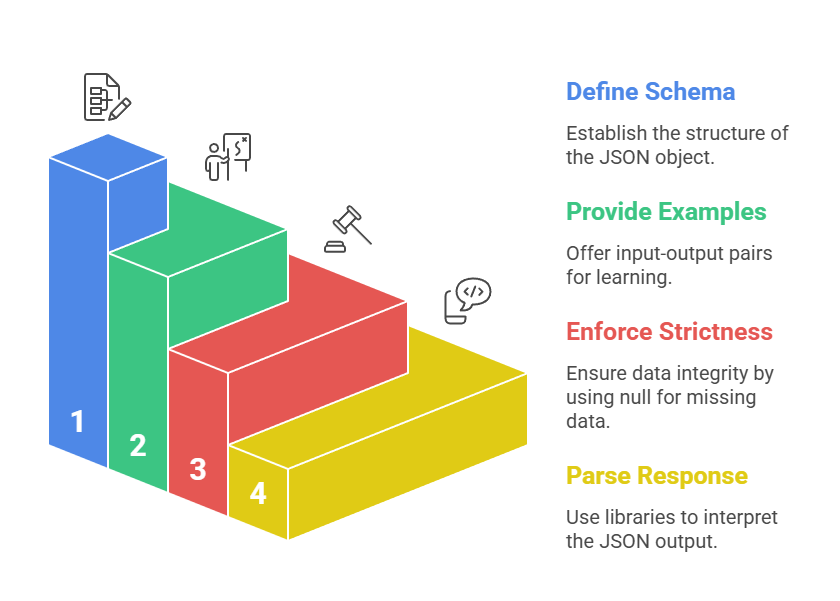
Example Prompt and Output
Prompt: Extract product details from: "iPhone 15 Pro, $999, features: A17 chip, 120Hz display."

Output:

{

  "product": "iPhone 15 Pro",

  "price": 999,

  "features": ["A17 chip", "120Hz display"]

}
JSON vs. XML: When to Choose Each
XML excels in verbose, self-descriptive scenarios like enterprise data exchange (e.g., SOAP APIs), while JSON dominates web apps.
.png)
Pro Tip: For complex nesting, use Pydantic models in LangChain to auto-generate schemas.
Temperature Control: Balancing Creativity and Precision
Temperature is a hyperparameter (0.0-2.0) that controls output randomness—low values yield deterministic, focused responses; high values spark creativity. Default is often 0.7; adjust via API params like OpenAI's temperature or Anthropic's temperature.
Think of it as a "creativity dial": At 0.0, the model picks the most probable tokens (reliable for facts); at 1.5, it explores wild variations (ideal for brainstorming).
Tuning Temperature for Different Tasks
Pair temperature with role-playing and structures for optimal results. Low temperature (0.1-0.3) suits structured JSON; higher (0.8-1.2) enhances role-play vividness.
Low Temperature (Precision Mode): Factual Q&A, code generation, data extraction.
Example: "You are a JSON-only API. Temperature: imply 0.1. List top 3 Python frameworks."
High Temperature (Creative Mode): Storytelling, ideation, marketing copy.
Example: "You are a sci-fi novelist. Generate 3 plot twists (temperature 1.2)."
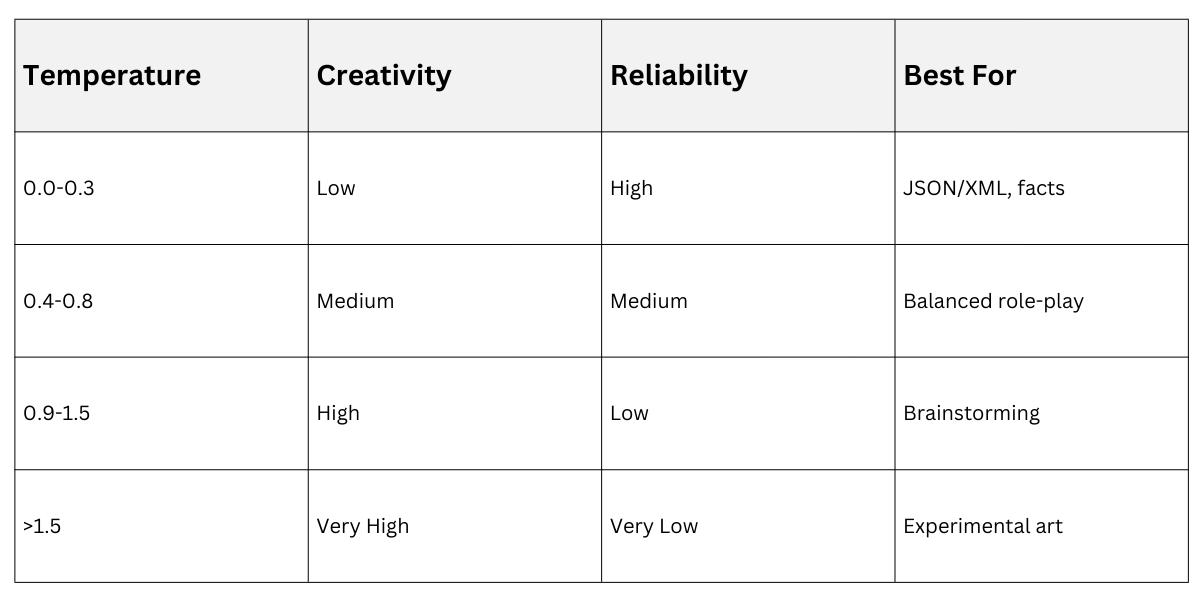
Test Iteratively: Run A/B prompts and score with metrics like semantic similarity (via Sentence Transformers).
Integrating All Three Techniques
Combine for powerhouse prompts:
You are a **data analyst** at a retail firm (role-playing).

Analyze sales text: "Q4 revenue $1.2M, top product shoes (40%)."

Output **only valid JSON** (structured): {"quarter": "str", "revenue": "num", "top_product": {"name": "str", "share": "num"}}

Use low temperature for precision.
This yields: {"quarter": "Q4", "revenue": 1200000, "top_product": {"name": "shoes", "share": 0.4}}.