Risk assessment basics involve systematically identifying vulnerabilities and understanding how threats can exploit them to cause harm.
This process helps organizations evaluate potential security risks by examining systems, applications, and processes for weaknesses.
Threat modeling provides a structured way to analyze how attackers might compromise assets, enabling teams to prioritize risks and design appropriate security controls.
What is Risk Assessment in Application Security?
Risk assessment forms the backbone of any security program, systematically evaluating potential threats to your application.
It goes beyond gut feelings, using structured methods to prioritize what could go wrong and how to fix it. Let's break it down.
In simple terms, risk is the combination of a threat's likelihood and its potential impact. Industry standards like NIST SP 800-30 guide this process, emphasizing qualitative and quantitative scoring.
For developers, it's about shifting from reactive patching to proactive planning.
Key Components
1. Assets: What you're protecting, like user data or business logic.
2. Threats: Potential dangers, such as hackers or misconfigurations.
3. Vulnerabilities: Weak spots that threats could exploit.

This table highlights how risks emerge when threats meet vulnerabilities—think of it as a lock (vulnerability) waiting for a thief (threat) to target your safe (asset).
Identifying Vulnerabilities: The First Line of Defense
Vulnerabilities are flaws in your code, configuration, or design that attackers can exploit. Spotting them early prevents headaches later, aligning with OWASP's vulnerability management practices.
Start with automated scans, but pair them with manual reviews for depth.
Why focus here? Unidentified vulnerabilities account for 60% of breaches (Verizon DBIR 2025). Tools like SAST (Static Application Security Testing) and DAST (Dynamic Application Security Testing) make this accessible even for beginners.
Common Vulnerability Types and How to Spot Them
Every app has blind spots. Here's a rundown of frequent culprits, drawn from the OWASP Top 10 (2021), which remains relevant amid rising API and supply chain risks.
1. Injection flaws: Attackers inject malicious code via inputs (e.g., SQLi where ' OR 1=1 -- tricks a database).
2. Broken authentication: Weak passwords or session hijacking, like predictable tokens.
3. Sensitive data exposure: Unencrypted PII leaked in transit.
4. Security misconfigurations: Default credentials left unchanged (e.g., AWS S3 buckets open to the world).
Process
.png)
Practical Example: Imagine a login form. A vulnerability scan reveals no input sanitization, scoring 8.5 CVSS for SQL injection risk. Fix it with prepared statements in your backend.
Threat Modeling: Mapping Risks Before They Happen
Threat modelling visualises how attackers might target your app, turning abstract risks into actionable plans. Popularised by Microsoft, it's now a best practice in DevSecOps pipelines.
Think of it as a security blueprint drawn from an adversary's perspective.
This technique gained traction with tools like the Microsoft Threat Modelling Tool (2024 update), which integrates STRIDE and data flow diagrams (DFDs). It's lightweight—do it in design phases or sprints.
Key Threat Modelling Methodologies
Choose based on your app's complexity. Here's a comparison
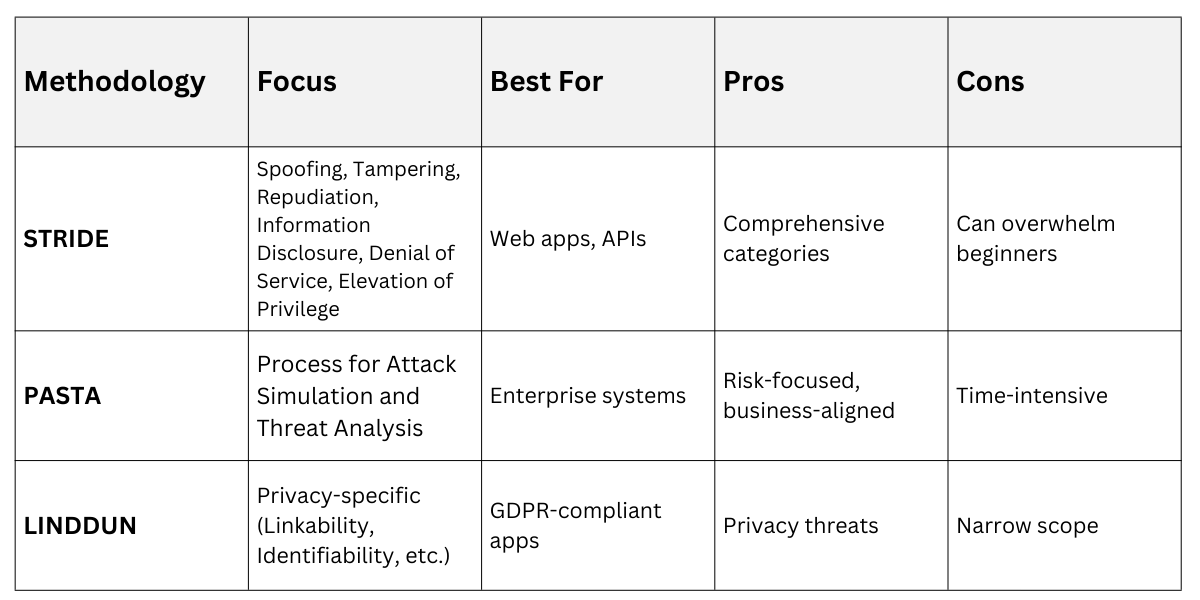
STRIDE is ideal for starters—pervasive and memorable.
Step-by-Step STRIDE Threat Modelling Process
1. Decompose the app: Draw a DFD showing components (e.g., user → login API → database).
2. Identify threats per STRIDE:
Spoofing: Fake user identity (mitigate with MFA).
Tampering: Alter data in transit (use TLS 1.3).
Repudiation: Deny actions (add audit logs).
Information Disclosure: Leak secrets (encrypt at rest).
Denial of Service: Overload resources (rate limiting).
Elevation of Privilege: Gain unauthorized access (principle of least privilege).
3. Assess risks: Score likelihood (Low/Med/High) x impact.
4. Mitigate: Brainstorm fixes, like input validation for tampering.
5. Validate: Review with peers or simulate attacks.
Real-World Example: For an e-commerce checkout flow, STRIDE reveals a "Denial of Service" threat via unlimited retries. Mitigation: CAPTCHA after 5 fails, cutting risk by 80%.
Integrating Risk Assessment into Your Workflow
Tie it all together by embedding these practices. Shift-left security—do it early in SDLC—saves 100x the cost of post-deployment fixes (per Gartner 2025).
1. Automate scans in CI/CD (e.g., GitHub Actions with Snyk).
2. Schedule quarterly threat models for updates.
3. Document in a risk register table
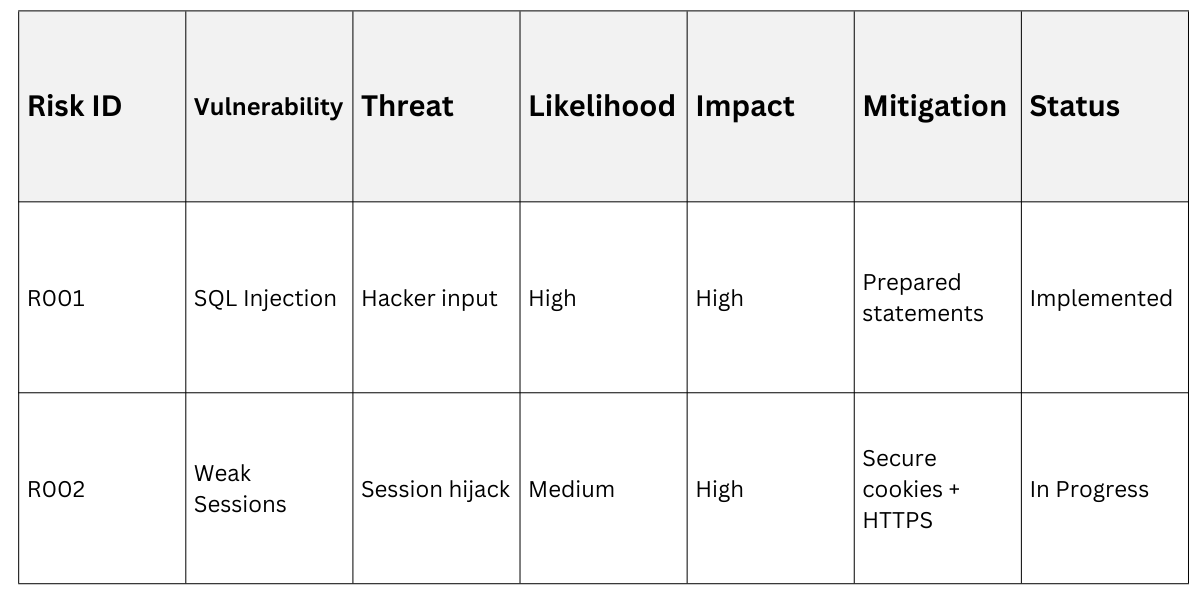
Foster a security-first culture through team workshops.
