Integrating security into CI/CD pipelines ensures that security checks are performed continuously throughout the software delivery process.
By embedding security tools and practices into automated build, test, and deployment workflows, teams can identify vulnerabilities early and prevent insecure code from reaching production.
This approach aligns security with development and operations, supporting faster and safer releases.
Why Secure CI/CD Pipelines?
CI/CD pipelines automate code integration, testing, building, and deployment, forming the backbone of modern DevOps.Without security integration, they become prime targets for attackers exploiting weak points from code commit to production.
High-profile incidents highlight the stakes: attackers injected malicious scripts into pipelines, leading to widespread compromises.
Securing them aligns with standards like OWASP's Top 10 CI/CD Security Risks, ensuring reliable, threat-resistant software delivery.
Shift Left Security Approach
Shift left moves security checks earlier in the development lifecycle, catching issues during coding rather than late-stage testing. This proactive strategy reduces costs and delays, as fixing vulnerabilities pre-deployment is far cheaper.
Teams implement it by embedding automated scans right after code commits. For instance, developers get instant feedback on flaws via IDE plugins or pull request checks.
Key Security Testing Tools
Security testing tools form the core of pipeline integration, scanning code and dependencies at various stages. Choose based on your stack—open-source options work well for beginners, while enterprise tools scale for complex apps.
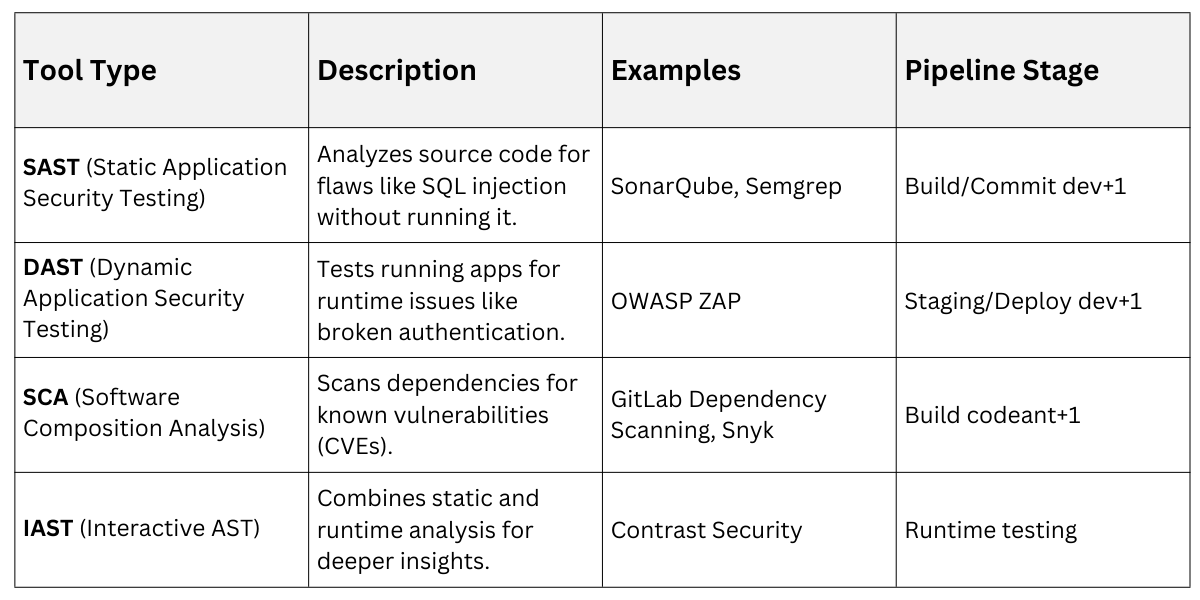
Integrate these via plugins in tools like GitHub Actions or Jenkins. Example: In GitHub Actions, add a SAST step that fails the build on high-severity issues.
Secure Configuration Practices
Proper configuration hardens pipelines against common pitfalls like misconfigurations or exposed services. Start by auditing defaults—vendors often ship with insecure settings that attackers exploit.
Follow These Guidelines
1. Enable MFA and protected branches in SCMs like GitHub or GitLab to block unauthorized merges.
2. Use ephemeral build agents that reset after runs, limiting persistence of malware.
3. Harden automation servers (e.g., Jenkins) with IP whitelisting and TLS 1.2+ for communications.
Version-control pipeline configs as code (e.g., Jenkinsfile or .github/workflows) for auditability.
Identity and Access Management
IAM prevents unauthorized access, a top OWASP CI/CD risk where weak controls allow malicious code injection. Apply least privilege: grant only necessary permissions per pipeline step.
Key Steps
-Picsart-CropImage.png)
Secrets management is critical—never hardcode API keys. Tools like HashiCorp Vault inject them dynamically, and scanners like git-secrets detect commits.
Pipeline Stages with Security Gates
Break pipelines into stages with enforced security gates that block progression on failures. This "fail-fast" model stops bad code early.
Here's a sample GitHub Actions pipeline
1. Trigger on push/PR.

2. Lint and SAST scan (Semgrep).

3. Unit tests + SCA (Snyk).

4. Build Docker image + container scan.

5. DAST on staging (OWASP ZAP).

6. Manual approval for prod deploy.

7. IaC scan (Checkov) + deploy.
1. Build stage: Pin dependencies with lockfiles (e.g., package-lock.json) and verify hashes to thwart dependency chain abuse.
2. Test/Deploy: Add policy-as-code for compliance checks.
3. Post-deploy: Monitor for drift with tools like Datadog.
For Jenkins, restrict permissions in workflows: permissions: { contents: read }.
Handling Third-Party Risks
Third-party code and plugins expand attack surfaces via supply chain attacks like SolarWinds. Vet dependencies rigorously.
Practices
1. Scan plugins for popularity, maintenance, and vulnerabilities before install.
2. Use private registries with scoped packages to avoid dependency confusion.
3. Generate SBOMs (Software Bill of Materials) for transparency—GitLab does this natively.
Limit forks on private repos and enforce immutable references.
Monitoring and Incident Response
Visibility catches stealthy attacks; insufficient logging ranks high in OWASP risks. Centralize logs in JSON to a SIEM like ELK Stack.
1. Set alerts for anomalies: unusual builds or secret exposures.
2. Automate containment: quarantine failed builds.
3. Develop playbooks: for breaches, including rollback and forensics.
Regular audits using tools like Legitify reveal misconfigs.
Popular Tools and Integrations
Leverage platforms with built-in security for seamless integration. GitHub Advanced Security or GitLab Ultimate offer SAST/DAST/SCA out-of-box.
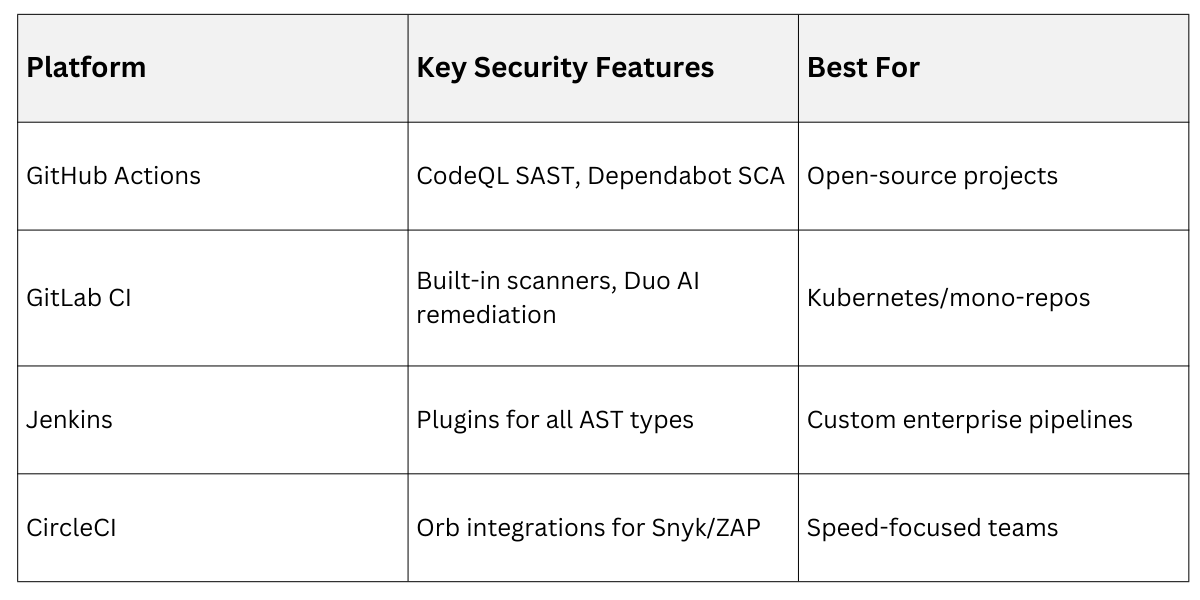
Start Small: Add one scanner per sprint, measure MTTR (mean time to remediate).

Class Sessions
Sales Campaign

We have a sales campaign on our promoted courses and products. You can purchase 1 products at a discounted price up to 15% discount.