Static Application Security Testing and Dynamic Application Security Testing are complementary approaches used to identify security vulnerabilities in software applications.
Static testing analyses source code, bytecode, or binaries without executing the application, allowing developers to detect issues early in the development process.
Dynamic testing evaluates a running application by simulating real-world attacks, helping uncover vulnerabilities that only appear during execution.
What is Static Application Security Testing (SAST)?
SAST scans source code or binaries without running the application, acting like a detective combing through blueprints for flaws before construction begins.
It's a cornerstone of shift-left security, where issues are caught early in the SDLC to save time and money.
Developers love SAST because it integrates seamlessly into IDEs and CI/CD pipelines, flagging problems during code commits. Imagine writing a Python web app with Flask—SAST spots insecure deserialization right in your editor.
Key Principles of SAST
SAST relies on static analysis techniques to parse code and model data flows, without executing it.
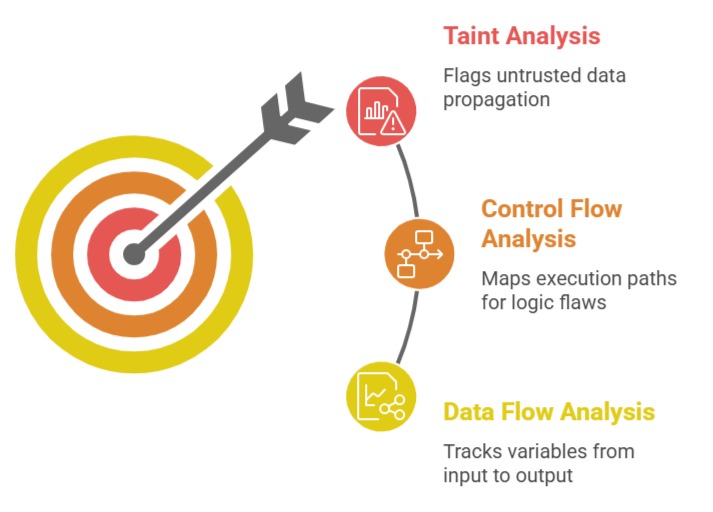
These principles align with NIST's emphasis on early vulnerability detection.
How SAST Works: Step-by-Step Process
Follow this numbered process to run a SAST scan in tools like SonarQube or Checkmarx:
1. Parse the Codebase: The tool builds an Abstract Syntax Tree (AST) from your source files (e.g., Java, Python, JavaScript).
2. Apply Rulesets: Match code against thousands of predefined rules for CWE (Common Weakness Enumeration) issues.
3. Generate Reports: Output severity-rated findings with code snippets, fix suggestions, and false positive flagging.
4. Remediate and Rescan: Developers fix issues, then trigger automated rescans in your GitHub Actions pipeline.
5. Track Metrics: Monitor over time using dashboards for vulnerability trends.
Practical Tip: In a Node.js project, SAST might flag eval(userInput) as a high-risk CWE-95 (code injection).
Benefits and Limitations of SAST
SAST excels in developer workflows but has trade-offs.
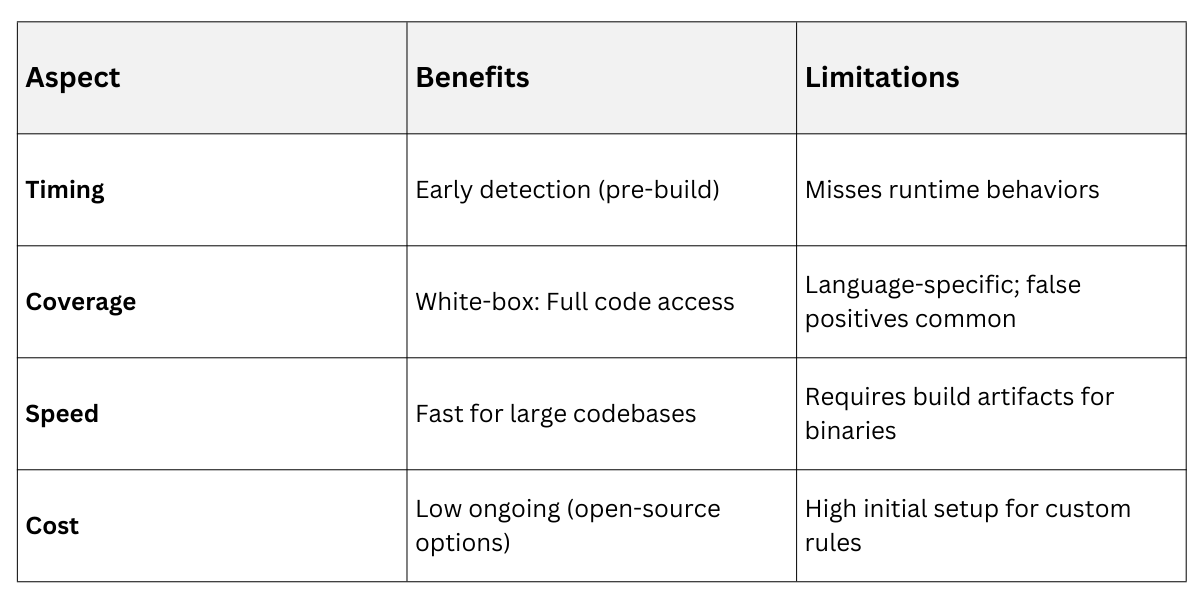
Pro Example: GitLab's SAST integration caught 40% more vulnerabilities in early 2025 case studies versus manual reviews.
What is Dynamic Application Security Testing (DAST)?
DAST tests a fully running application from the outside, simulating real attacker probes like a black-box penetration test.
It mimics how hackers interact with your live app, uncovering issues invisible to static scans.
This approach shines in staging environments, validating fixes post-deployment. For instance, probing a Django REST API endpoint, DAST injects payloads to expose cross-site scripting (XSS).
Core Mechanics of DAST
DAST crawls your app's attack surface—URLs, forms, APIs—then fuzzes inputs with malicious data.
-Picsart-CropImage.png)
Implementing DAST: A Practical Workflow
Here's how to deploy DAST using tools like OWASP ZAP or Burp Suite in your CI/CD:
1. Deploy to Test Environment: Spin up a staging instance (e.g., Dockerized FastAPI app).
2. Configure Scope: Define in-scope URLs and authentication (e.g., JWT tokens).
3. Run the Scan: Launch automated or guided scans, monitoring for anomalies.
4. Analyze Results: Review alerts with proof-of-concept exploits and risk scores.
5. Integrate and Alert: Hook into Slack/Jira for high-severity issues; automate retries.
Real-World Case: A 2025 fintech app used DAST to discover business-logic flaws in payment flows, blocking $2M in potential fraud.
Strengths and Challenges of DAST
DAST complements SAST but demands a runtime setup.

Best Practice: Pair with IAST (Interactive AST) for hybrid insights, as recommended by Gartner 2025 Magic Quadrant.
Comparing SAST and DAST: When to Use Each
SAST and DAST aren't rivals—they're teammates in a layered security strategy (defense-in-depth). SAST handles the "what's inside" view, while DAST checks "how it behaves" externally.
Choose based on your SDLC phase: SAST for dev, DAST for QA/staging. Together, they cover 85% of OWASP Top 10 vulns, per recent Synopsys research.
Integrating SAST and DAST into Your Workflow
Combine them for AppSec DevOps:
1. Dev Phase: Run SAST on pull requests.
2. Build Phase: SAST on full repo.
3. QA Phase: DAST on staging.
4. Production: Schedule DAST weekly + IAST monitoring.
5. Review: Triangulate findings in a central dashboard like DefectDojo.
Example: A ML web app team reduced vulns by 60% using this flow (Snyk 2025 benchmarks).
