Infrastructure as Code security scanning focuses on identifying security risks and misconfigurations in infrastructure definitions before they are deployed.
By treating infrastructure configuration files as code, teams can automatically analyze them for compliance, vulnerabilities, and best practices.
This proactive approach helps prevent insecure infrastructure setups from reaching production environments.
What is Infrastructure as Code and Why Scan It?
Infrastructure as Code (IaC) treats infrastructure setups as software code, enabling automation, versioning, and collaboration—think Git for your cloud resources.
Security scanning for IaC analyzes these code files statically (without running them) to spot risks, much like a code review but tailored for infrastructure configs.
IaC scanning matters because human errors in code—like forgetting to restrict public access—can lead to real-world exploits.
A single misconfigured AWS IAM policy, for instance, exposed 100 million records in a 2023 Capital One breach. By scanning early, teams enforce compliance with standards like CIS Benchmarks and avoid runtime surprises.
Key Benefits
.png)
In practice, tools parse your .tf files and flag violations, such as an S3 bucket without server-side encryption.
Common Security Risks in IaC
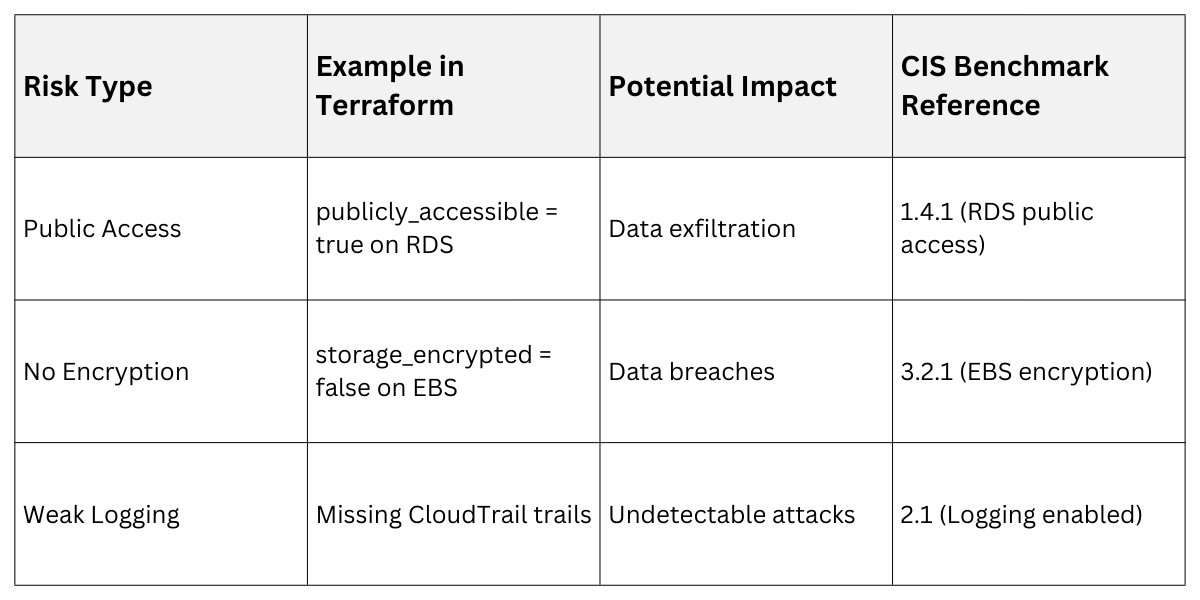
IaC code often harbors subtle risks that scanners are built to uncover, from overly permissive access to hardcoded secrets.
These vulnerabilities stem from misconfigurations rather than traditional bugs, making them sneaky but fixable with the right checks.
Hardcoded Secrets and Credentials
Exposing API keys or passwords directly in code is a top offender—scanners like TruffleHog detect them via regex patterns.
Example: In a Terraform file, aws_access_key = "AKIAIOSFODNN7EXAMPLE" screams for rotation.
Impact: Attackers scrape public repos, leading to unauthorized access.
Overly Permissive Policies
Resources with "allow all" rules invite abuse, violating principle of least privilege.
Common Pitfalls
1. Security groups open to 0.0.0.0/0 (public internet).
2. IAM roles granting * (wildcard) actions.
3. Kubernetes pods without network policies.
Compliance and Encryption Gaps
Failing standards like NIST 800-53 (e.g., no TLS enforcement) or skipping encryption exposes data at rest/transit.
 Popular IaC Security Scanning Tools
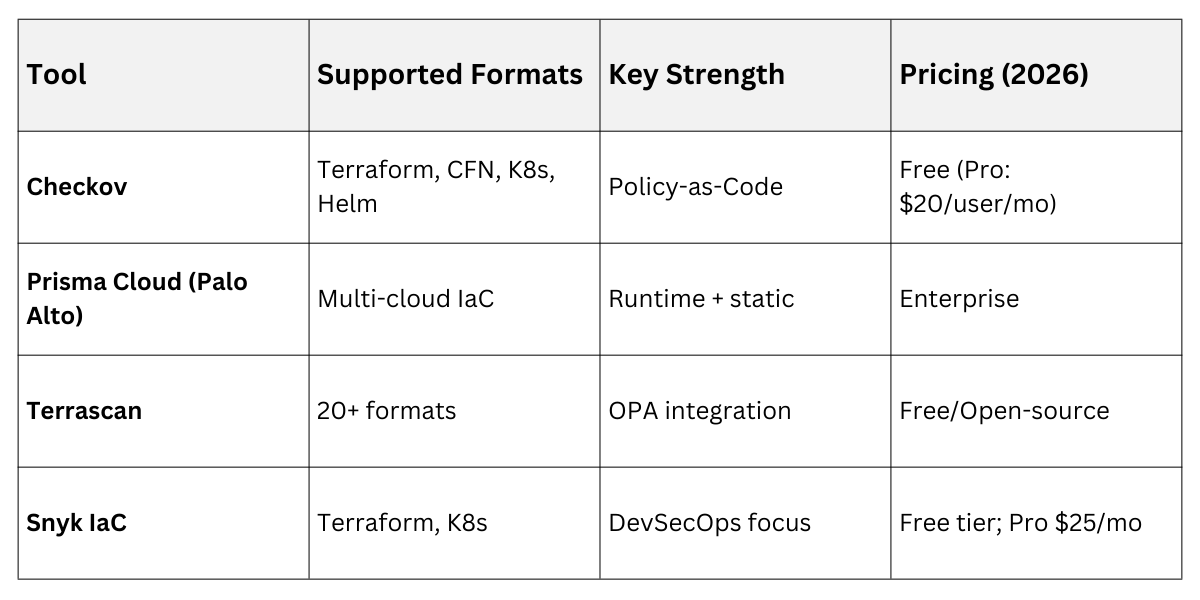
Dozens of tools exist, but the best integrate seamlessly into pipelines and support multiple IaC formats.
Choose based on your stack—open-source for flexibility, enterprise for advanced reporting.
Open-Source Leaders
1. Checkov: Scans Terraform, CloudFormation, Kubernetes, and more; supports 1000+ policies. Latest 2026 features include AI-powered false positive reduction.
2. tfsec: Terraform-focused, now superseded by Checkov but still lightweight.
3. KubeLinter: Kubernetes-specific, flags pod security risks per Kubernetes Pod Security Standards.
Enterprise and Cloud-Native Options
Paid tools add dashboards and auto-remediation.
Pro Tip: Start with Checkov—it's battle-tested and runs in under 10 seconds on large repos.
Implementing IaC Security Scanning: Step-by-Step
Integrating scans into your workflow turns security into a habit, not a hassle.
We'll walk through a GitHub Actions pipeline for Terraform, adaptable to GitLab or Jenkins.
Step 1: Set Up Your Environment
1. Install Checkov: pip install checkov (Python-based, works anywhere).
2. Initialize a sample Terraform project: terraform init in your infra dir.
3. Write a basic .tf file: e.g., an EC2 instance with a security group.
Step 2: Run Local Scans
Test before committing
checkov -d /path/to/terraform --framework terraformOutput flags issues like "Ensure AWS S3 bucket has default encryption enabled" with fix suggestions.
Step 3: Integrate into CI/CD Pipeline
Automate in GitHub Actions (.github/workflows/iac-scan.yml)
name: IaC Security Scan

on: [push, pull_request]

jobs:

  scan:

    runs-on: ubuntu-latest

    steps:

    - uses: actions/checkout@v4

    - name: Run Checkov

      uses: bridgecrewio/checkov-action@v12

      with:

        directory: ./terraform/

        framework: terraform

    - name: Upload SARIF

      uses: github/codeql-action/upload-sarif@v3

      with:

        sarif_file: results.sarif
This fails PRs on high-severity issues—shift-left in action.
Step 4: Customize Policies and Remediate
Edit Checkov's checkov.conf.yaml for custom rules (e.g., enforce MFA).
Remediate: For a flagged public bucket, add acl = "private" and rescan.
Real-World Example: At a fintech firm, this pipeline caught 150+ issues in a migration, averting a compliance violation.
Best Practices and Advanced Tips
Elevate your scans from basic to bulletproof with these habits.
Stay ahead by combining tools and monitoring trends like AI-driven scanning.
.png)
Advanced: Integrate with GitOps (ArgoCD) to block non-compliant deploys. Track metrics like "issues per 1000 lines" to measure improvement.
