Software teams have one big challenge, how do you build fast without breaking things?
For a long time, the people who wrote the code and the people who ran the systems barely talked to each other. That gap caused slow releases, frequent failures, and a lot of finger-pointing. DevOps was created to fix exactly that.
DevOps brings Development and Operations together, as one team, with one goal: deliver good software, quickly and reliably.
What Does DevOps Actually Mean?
The word "DevOps" is a combination of Development and Operations. But it is more than a name, it is a way of working.
DevOps is a culture, a mindset, and a set of practices that helps teams build, test, and release software faster and more reliably — by working together and automating the repetitive stuff.
Before DevOps, here is what typically happened:
1. Developers wrote code and handed it over to operations.
2. Operations had no context about the code and struggled to deploy it.
3. Something broke. Both teams blamed each other.
4. The customer waited and waited.
DevOps breaks this cycle. When both teams share responsibility from day one, things move faster and break less.
The Core Principles of DevOps
These principles are the foundation. Everything in DevOps connects back to them.
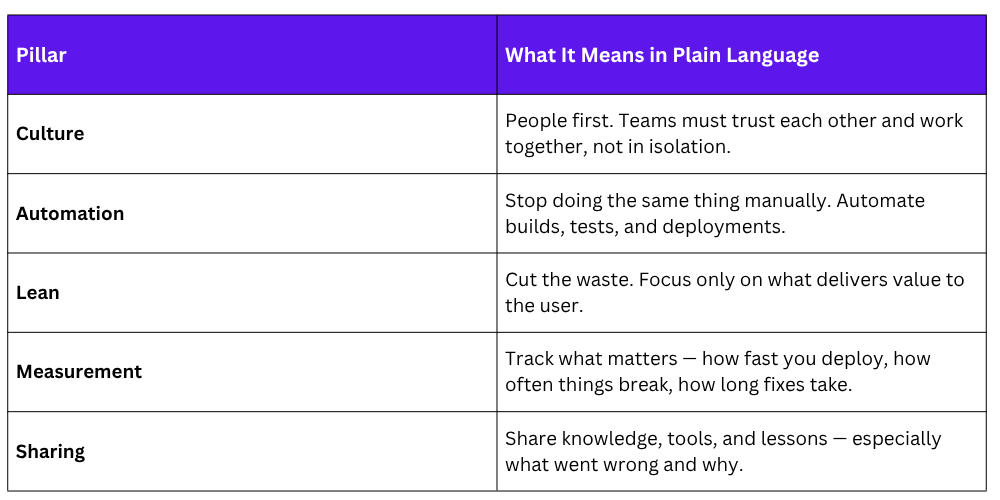
The CALMS Framework
Think of CALMS as the five pillars DevOps stands on:
The Three Ways
This model explains how work should flow in a DevOps team:
First Way — Flow: Work should move smoothly from developer → operations → customer. No bottlenecks, no handoff delays.
Second Way — Feedback: Problems should be caught early through fast feedback. The sooner you know something is broken, the cheaper it is to fix.
Third Way — Continuous Learning: Teams should keep improving. Experiment, learn from failures, and get better every cycle.
DevOps Culture
Culture is the hardest part of DevOps, and the most important.
1. No More Silos: A silo is when a team only cares about their own work and does not communicate with others. DevOps actively fights this. Teams are cross-functional — developers, testers, and operations people work side by side toward the same goal.
2. Shared Responsibility: In a DevOps team, a developer does not just write code and forget about it. They care about how it runs in production. And operations teams are involved from the beginning — not just when something breaks.
This shared ownership means problems get solved faster, because nobody is passing the blame.
3. Learning from Failure: In traditional teams, a failure meant someone got in trouble. In DevOps, a failure is a learning opportunity.
Teams run blameless post-mortems, a calm review of what went wrong, why it happened, and how to prevent it next time. No blame. Just improvement.
4. Psychological Safety: Team members should feel safe to say "I don't know", "I made a mistake", or "I think this can be done better." When people feel safe to speak up, problems surface early and good ideas actually get heard.
Key DevOps Practices
These are the practices that make DevOps real. Not theory, actual things teams do every day.
1. Continuous Integration (CI)
Developers merge their code into a shared repository frequently — sometimes multiple times a day. Every time they do, automated tests run immediately. This catches bugs early, before they pile up.
2. Continuous Delivery / Deployment (CD)
Once code passes all tests, it is ready to be released at any time. In Continuous Delivery, a human approves the final release. In Continuous Deployment, it goes live automatically. Either way, releases are small, frequent, and low-risk.
3. Infrastructure as Code (IaC)
Instead of setting up servers manually, teams write code to define and provision infrastructure. Tools like Terraform and AWS CloudFormation do this. The benefit? Infrastructure becomes consistent, repeatable, and version-controlled — just like application code.
4. Monitoring and Observability
After deployment, the job is not done. Teams continuously monitor their systems — tracking performance, error rates, and availability. If something goes wrong, they want to know before the user does.
5. Automation
If something is done more than once, it should be automated. This includes testing, security checks, building the code, and deploying it. Automation removes human error and keeps everything consistent.
