Terraform is the most widely adopted Infrastructure as Code tool in the industry.
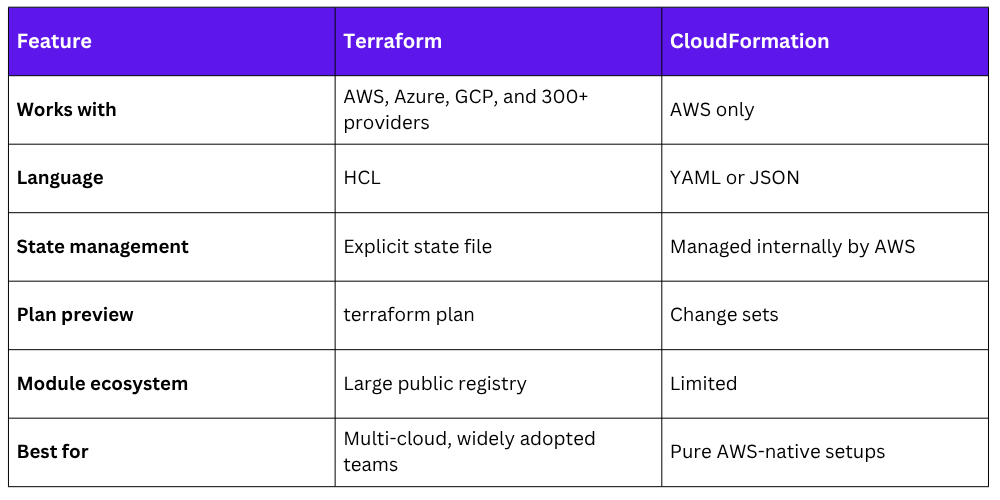
Unlike CloudFormation, which only works with AWS, Terraform works across multiple cloud providers — AWS, Azure, Google Cloud, and more — using the same language and workflow.
If you work in a multi-cloud environment or want a skill that travels across organisations, Terraform is essential to know.
How Terraform Works
Terraform uses a simple three-step workflow:
1. Write: Define your infrastructure in .tf files using HashiCorp Configuration Language (HCL).
2. Plan: Run terraform plan to see exactly what Terraform will create, change, or destroy — before touching anything.
3. Apply: Run terraform apply to make the changes. Terraform talks to AWS and provisions the infrastructure.
Write .tf files → terraform plan (preview) → terraform apply (create)
This plan-before-apply approach is similar to CloudFormation change sets — you always know what is going to happen before it happens.
Providers
A provider is what connects Terraform to a specific platform. For AWS, you use the AWS provider. It tells Terraform which cloud to talk to and how to authenticate.

Terraform authenticates with AWS using the same methods you already know — IAM roles (recommended for pipelines), environment variables, or the AWS CLI credentials file. Never hardcode access keys in your Terraform files.
Each provider is maintained either by HashiCorp or the cloud provider itself, and gives Terraform the ability to manage hundreds of AWS resource types — EC2, S3, VPC, IAM, Lambda, RDS, and everything else.
State Management
This is one of the most important concepts in Terraform. When you run terraform apply, Terraform creates a state file — terraform.tfstate — that records the current state of your infrastructure.
Every resource Terraform manages, its configuration, and its real AWS resource ID are stored in this file.
Terraform uses the state file to:
1. Know what already exists so it does not create duplicates.
2. Calculate what needs to change when you update your code.
3. Know what to delete when you remove a resource from your configuration.
The Problem with Local State
By default, the state file is stored locally on your machine. This creates serious problems for teams:
1. Other team members cannot access it.
2. If your machine crashes, the state is lost.
3. Two people running terraform apply at the same time can corrupt the state.
Remote State — The Solution
For any real project, store your state file remotely in an S3 bucket with state locking enabled via DynamoDB. This makes the state file shared, safe, and protected against simultaneous updates.
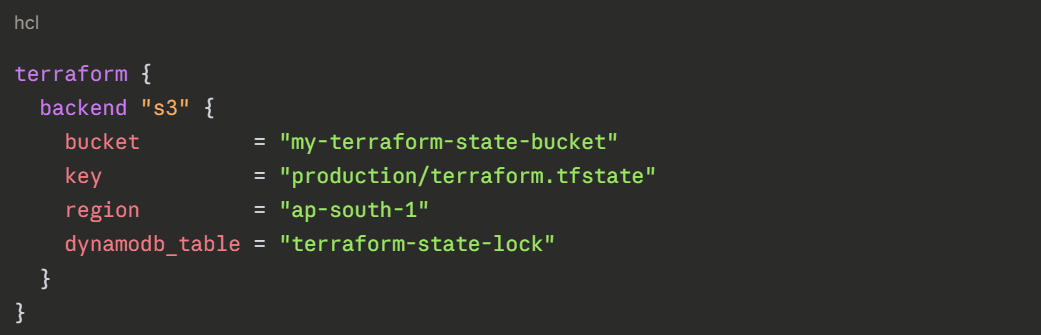
S3 stores the state file securely. DynamoDB provides locking — if one person is running terraform apply, it locks the state so nobody else can run it at the same time.
Important State Rules
1. Never manually edit the state file.
2. Never commit the state file to your repository — it can contain sensitive values.
3. Always use remote state for team projects.
4. Add terraform.tfstate and terraform.tfstate.backup to your .gitignore.
Modules
As your Terraform code grows, repeating the same resource definitions across multiple projects becomes inefficient and error-prone. Modules solve this.
A module is a reusable package of Terraform code. You write it once and use it in multiple places — passing in different values each time.
Think of a module like a function in programming. Instead of writing the same logic repeatedly, you define it once and call it wherever you need it.
Example — using a module to create a VPC:
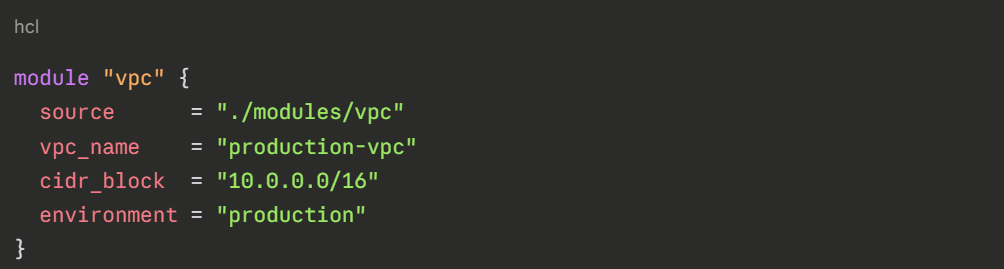
The module handles all the internal details — subnets, route tables, internet gateway. You just pass in the values that change between environments.
Types of Modules
1. Local modules: Stored inside your own repository under a modules/ folder. Best for organisation-specific patterns.
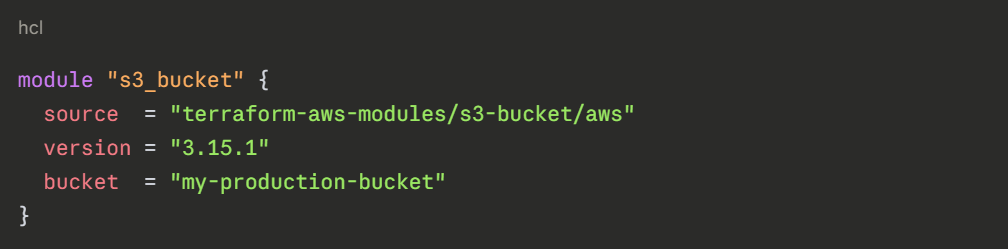
2. Public modules: Available on the Terraform Registry at registry.terraform.io. AWS, community contributors, and companies publish ready-made modules for common patterns — VPCs, EKS clusters, RDS databases.
You can use these directly instead of writing everything from scratch.