Writing code is only part of a DevOps engineer's day. There is infrastructure to define, pipelines to configure, scripts to automate, security policies to write, and tests to build.
AI coding tools led by Amazon CodeWhisperer on the AWS side are changing how this work gets done.
They do not replace engineers. They remove the repetitive, time-consuming parts so engineers can focus on decisions that actually require human judgment.
What is Amazon CodeWhisperer?
Amazon CodeWhisperer is an AI-powered coding assistant built by AWS. It integrates directly into your code editor — VS Code, JetBrains, or the AWS Cloud9 IDE, and provides real-time code suggestions as you type.
It understands the context of what you are building and suggests the next line, the next function, or an entire block of code based on your comments and existing code.
CodeWhisperer is trained on billions of lines of code and has specific knowledge of AWS APIs, SDKs, and services.
This makes it particularly useful for DevOps work — it knows how to write Lambda functions, interact with S3, configure IAM policies, and work with AWS CLI commands.
It is available as part of the AWS free tier for individual developers, and as a paid professional tier for teams with additional security features.
What CodeWhisperer Does Well
1. Boilerplate code generation: Writing the same patterns repeatedly — Lambda handlers, S3 upload functions, DynamoDB queries, error handling wrappers is exactly where CodeWhisperer saves the most time. Describe what you want in a comment and it generates the implementation.
2. AWS SDK usage: Remembering the exact method names, parameters, and response structures for every AWS SDK call is unrealistic. CodeWhisperer knows the AWS SDKs deeply and generates correct, complete API calls.
3. Infrastructure as Code: Writing Terraform modules, CloudFormation templates, and CDK constructs involves a lot of repetitive structure. CodeWhisperer accelerates this significantly.
4. Test generation: Describe a function and ask CodeWhisperer to generate unit tests for it. It produces test cases covering the main scenarios, which you then review and extend.
5. Security scanning: CodeWhisperer includes a built-in security scanner that detects vulnerabilities in your code — hardcoded credentials, SQL injection risks, insecure cryptography — as you write. It flags issues immediately rather than waiting for a separate security review.
Other AI Coding Tools in the Ecosystem
CodeWhisperer is the AWS-native option, but it is not the only tool DevOps engineers use. Understanding the broader landscape is useful:
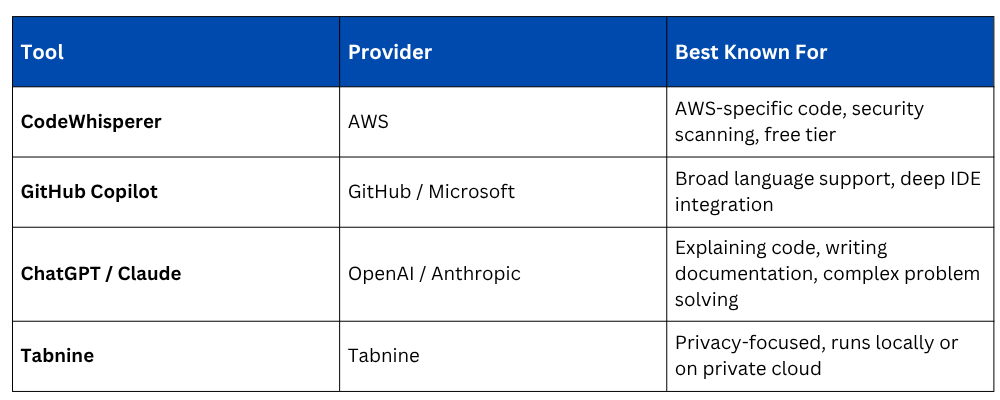
In practice, DevOps engineers often use more than one. CodeWhisperer for AWS-specific code inside the editor, and a conversational AI tool for explaining errors, generating documentation, and thinking through architecture decisions.
How AI Tools Fit Into a DevOps Workflow
AI coding tools are useful at every stage of the DevOps lifecycle:
1. Planning: Use conversational AI to draft architecture options, compare approaches, and generate checklists for deployment readiness.
2. Build: Use CodeWhisperer inside the editor to generate application code, Lambda functions, IaC templates, and SDK calls faster.
3. Test: Generate unit test skeletons automatically. Use AI to identify edge cases you might have missed.
4. CI/CD pipeline configuration: Generate GitHub Actions workflows, CodePipeline definitions, and buildspec.yml files from a description of what the pipeline should do.
5. Security: CodeWhisperer's security scanner catches issues in real time. Use AI tools to understand CVEs, generate IAM policy drafts, and review security group rules.
6. Operate and Monitor: Use AI to interpret CloudWatch logs, explain error messages, and suggest remediation steps when incidents occur.
What AI Tools Cannot Do
Understanding the limits of AI coding assistance is just as important as knowing its strengths.
1. AI tools make mistakes: Generated code is not always correct. It can be subtly wrong in ways that are hard to spot — incorrect API parameters, flawed logic, missing error handling. Everything generated must be reviewed before it is used.
2. They do not understand your system: AI tools have no knowledge of your specific architecture, your organisation's conventions, your security requirements, or your production constraints. Context that exists only in your head or your team's documentation will not be reflected in suggestions.
3. Security suggestions are not authoritative: CodeWhisperer's scanner is a useful first pass, but it is not a replacement for a proper security review or a dedicated SAST tool in your pipeline.
4. They do not make architectural decisions: AI can suggest patterns and generate implementations. Deciding which pattern is right for your system, your team's skills, and your operational requirements is still a human responsibility.
Best Practices for Using AI Tools in DevOps

