You learned how SageMaker handles individual stages of the ML workflow. But running each stage manually — triggering a training job, then evaluating, then registering, then deploying — does not scale.
SageMaker Pipelines connects all of these stages into a single automated, repeatable workflow.
It is CI/CD for machine learning, every time new data arrives or code changes, the entire pipeline runs automatically and a new model reaches production without manual intervention.
What is SageMaker Pipelines?
SageMaker Pipelines is a purpose-built CI/CD service for machine learning. It lets you define the entire ML workflow — data processing, training, evaluation, model registration, and deployment — as a series of connected steps.
Once defined, the pipeline runs automatically whenever triggered.
Every pipeline run is tracked, versioned, and auditable. You can see exactly what happened at every step, what inputs were used, what metrics were produced, and whether the model was approved and deployed.
Pipeline Steps
Each stage of the ML workflow becomes a step in the pipeline. SageMaker Pipelines provides built-in step types that map directly to SageMaker capabilities:
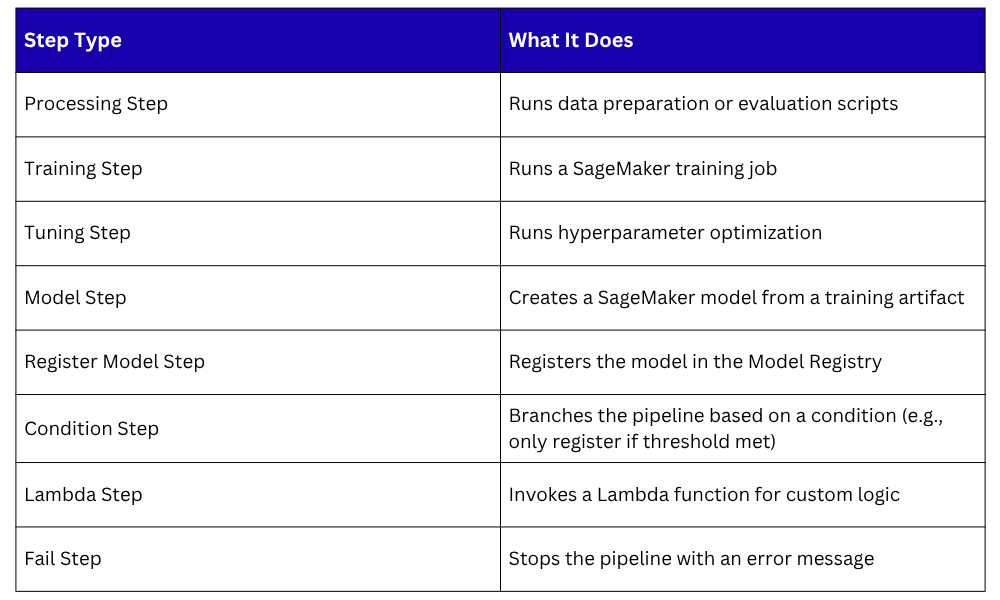
The Condition Step is particularly important. It is what makes an ML pipeline intelligent — if the new model does not outperform the current production model, the pipeline stops.
The model is not registered, not deployed, and an alert is sent. No human decision needed.
A Typical SageMaker Pipeline Structure
Data arrives in S3
│
▼
Processing Step — clean and prepare data
│
▼
Training Step — train the model
│
▼
Processing Step — evaluate model performance
│
▼
Condition Step — does new model beat current model?
│
├── No → Fail Step — alert team, stop pipeline
│
└── Yes → Register Model Step — add to Model Registry
│
▼
Lambda Step — trigger deployment to production
This is a complete, automated ML delivery pipeline. Code and data go in. A better model comes out or nothing changes if the new model is not good enough.
Pipeline Parameters
Pipelines accept parameters — values you pass in at runtime rather than hardcoding into the pipeline definition. Common parameters include:
1. The S3 location of the training data.
2. The instance type to use for training.
3. The performance threshold the model must exceed to be deployed.
4. The model approval status to set in the registry.
Parameters make the same pipeline reusable across different datasets, environments, and configurations without rewriting it.
Triggering Pipelines Automatically
A pipeline that requires manual triggering is only partially automated. The goal is for pipelines to trigger automatically in response to events:
1. New data arrives: An EventBridge rule detects a new file in S3 and triggers the pipeline. Every time fresh training data is uploaded, the pipeline retrains and evaluates automatically.
2. Code changes: A CodePipeline detects a change in the ML code repository and triggers the SageMaker Pipeline. Model code and training scripts go through the same review and automation process as application code.
3. Scheduled retraining: An EventBridge schedule triggers the pipeline on a fixed interval — weekly or monthly — to ensure the model stays fresh even if the data arrives gradually.
Connecting EventBridge or CodePipeline to SageMaker Pipelines creates a fully reactive ML system that requires no manual operation.
Pipeline Lineage and Tracking
Every pipeline execution is tracked in SageMaker ML Lineage Tracking. For every run, SageMaker records:
1. Which dataset was used.
2. Which training script version was used.
3. What hyperparameters were set.
4. What metrics the model achieved.
5. Whether the model was registered and deployed.
This lineage is stored automatically — no extra configuration needed. It gives you complete reproducibility.
You can always go back and recreate any model from any point in time using the exact same data, code, and configuration.
SageMaker Pipelines vs. Standard CI/CD Pipelines
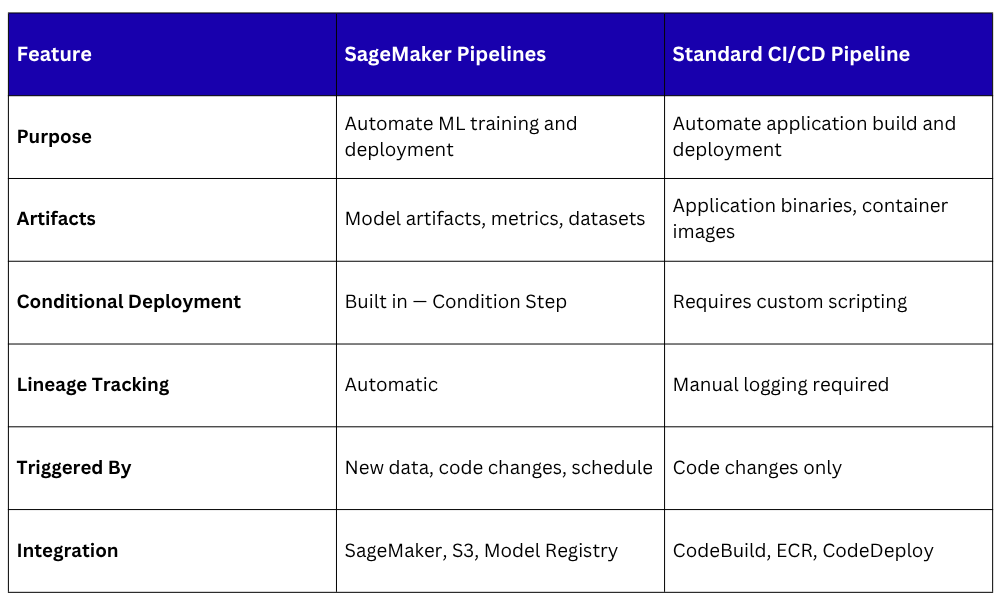
Both pipelines run in parallel in a mature MLOps environment — one delivering application updates, one delivering model updates.
