Getting code through CI is only half the job. How you deploy that code to production matters just as much. Deploy poorly and you risk downtime, broken user experiences, and a painful rollback.
The three strategies — Blue/Green, Canary, and Rolling — each solve the deployment problem differently. Knowing when to use each one is an essential skill for any DevOps engineer.
The Core Problem Deployment Strategies Solve
Every deployment carries risk. Something that worked perfectly in staging can behave differently in production. The question is — how do you get new code live while protecting users from that risk?
The answer depends on three things:
1. How quickly you need to roll back if something goes wrong.
2. How much downtime is acceptable.
3. How much infrastructure you are willing to run simultaneously.
Blue/Green Deployment
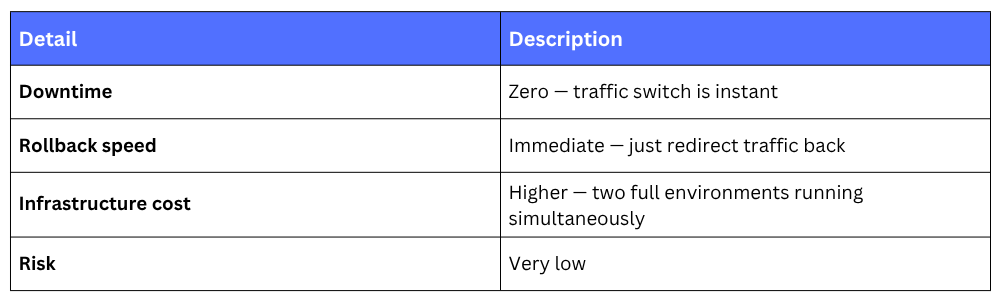
You maintain two identical production environments — Blue (current live version) and Green (new version). You deploy the new version to Green, test it, and then switch all traffic from Blue to Green in one move.

If something goes wrong after the switch, you flip traffic back to Blue instantly — rollback takes seconds.
Key Characteristics
When to Use It
1. Applications that cannot tolerate any downtime.
2. When you need the safest, fastest rollback option available.
3. Database schema changes need careful handling — both environments must be compatible with the same database during the switch.
On AWS: AWS CodeDeploy, Elastic Beanstalk, and Amazon ECS all support Blue/Green deployments natively.
Canary Deployment
Instead of switching all traffic at once, you release the new version to a small percentage of users first — say 5% or 10%. You monitor closely. If everything looks healthy, you gradually increase the percentage until 100% of traffic is on the new version.

The name comes from the old mining practice of sending a canary into a mine to detect danger before sending people in.
Key Characteristics
.png)
When to Use It
1. When you want to test new features with real users before full rollout.
2. High-traffic applications where even a small percentage represents meaningful validation.
3. When you have good monitoring in place to catch problems quickly.
On AWS: AWS CodeDeploy supports canary deployments with automatic rollback based on CloudWatch alarms. If error rates spike during the canary phase, CodeDeploy rolls back automatically without human intervention.
Rolling Deployment
You update instances one at a time — or in small batches — rather than all at once. At any given moment during the deployment, some instances are running the old version and some are running the new version.
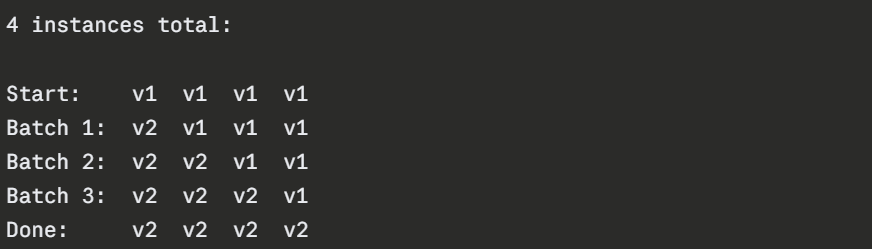
Key Characteristics
.png)
When to Use It
1. When infrastructure cost is a concern and you cannot afford to run two full environments.
2. Stateless applications where running two versions at once does not cause issues.
3. Kubernetes environments — rolling updates are the default deployment strategy in Kubernetes.
On AWS: Amazon ECS, AWS Elastic Beanstalk, and Kubernetes on EKS all support rolling deployments out of the box.
