ECS is a great container orchestration service, but there is another option that has become the industry standard for running containers at scale, Kubernetes.
Originally built by Google and now open-source, Kubernetes is the most widely adopted container orchestration platform in the world.
Amazon EKS is AWS's fully managed Kubernetes service, removing the complexity of setting up and maintaining Kubernetes yourself.
What is Kubernetes?
Kubernetes — often abbreviated as K8s — is an open-source system that automates the deployment, scaling, and management of containerised applications.
It does everything ECS does, but with more flexibility, more control, and a much larger ecosystem of tools and community support.
Kubernetes is the right choice when you need:
1. Fine-grained control over how containers are scheduled and managed.
2. Portability — the same Kubernetes configuration runs on AWS, Azure, Google Cloud, or on-premises.
3. A rich ecosystem of tooling — monitoring, security, networking, and deployment tools built specifically for Kubernetes.
Core Kubernetes Concepts
1. Node: A node is a single server — physical or virtual — that runs containers. A Kubernetes cluster is made up of multiple nodes. On EKS, nodes are EC2 instances or Fargate.
2. Pod: A pod is the smallest deployable unit in Kubernetes. It contains one or more containers that share the same network and storage. In most cases, one pod runs one container.
3. Deployment: A deployment defines how many replicas of a pod should run and manages rolling updates. If you want three copies of your application running at all times, you define a deployment with three replicas. If one pod fails, the deployment automatically replaces it.
4. Service: A Kubernetes service exposes your pods to network traffic. Because pods are temporary — they start and stop frequently — a service provides a stable endpoint that always routes traffic to healthy, running pods.
5. Namespace: A namespace is a way to divide a single cluster into separate virtual environments. Teams use namespaces to isolate dev, staging, and production workloads within the same cluster, or to separate different applications from each other.
6. ConfigMap and Secret: A ConfigMap stores non-sensitive configuration data — environment variables, configuration files — that pods can reference. A Secret stores sensitive data — passwords, API keys, tokens — in an encoded format.
On EKS, secrets are typically integrated with AWS Secrets Manager for proper security.
How Kubernetes Works
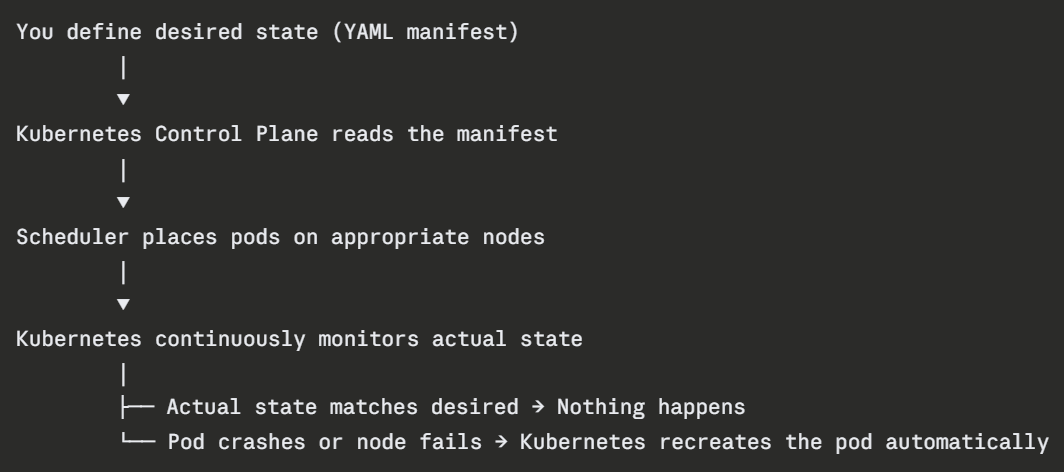
This is the core principle of Kubernetes — declarative management. You declare what you want. Kubernetes makes it happen and keeps it that way.
What is Amazon EKS?
Amazon Elastic Kubernetes Service (EKS) is AWS's fully managed Kubernetes service. Running Kubernetes yourself is complex — you have to install it, configure it, manage the control plane, handle upgrades, and ensure high availability. EKS removes all of that.
With EKS, AWS manages the Kubernetes control plane — the brain of the cluster. You only manage the worker nodes where your containers actually run, and even those can be fully managed through AWS Fargate or EKS Managed Node Groups.
EKS Node Options
1. Managed Node Groups: AWS provisions and manages EC2 instances as worker nodes. You choose the instance type and size. AWS handles patching, updates, and replacement of unhealthy nodes.
2. Fargate on EKS: Completely serverless. No nodes to manage at all. Each pod runs on its own isolated Fargate instance. AWS handles all the underlying infrastructure.
3. Self-managed nodes: You fully control the EC2 instances. Maximum flexibility but maximum responsibility.
EKS vs. ECS — Which to Choose?

If you are building exclusively on AWS and want simplicity, ECS, especially with Fargate is the faster path.
If your organisation runs multi-cloud, needs advanced networking or scheduling control, or has teams already experienced with Kubernetes, EKS is the right choice.
Many large organisations use both — ECS for simpler workloads and EKS for complex, large-scale applications.
