Most people use cloud services every day without realising it, when you store photos online, stream a video, or use a web-based email — that is the cloud at work.
What is Cloud Computing?
A simple idea that changed the entire technology industry. Before cloud computing existed, if a company wanted to run a website or an application, they had to:
1. Buy physical servers.
2. Set up a data centre or rent space in one.
3. Hire people to manage the hardware.
4. Pay for it all upfront, whether they used it fully or not.
This was expensive, slow, and inflexible. If traffic suddenly doubled, there was no quick way to handle it. If hardware failed, the whole system went down.
Cloud computing changed this completely. It means accessing computing resources — servers, storage, databases, networking, software — over the internet, on demand, and paying only for what you use.
Instead of owning the hardware, you rent it from a cloud provider. The provider manages the physical infrastructure. You focus on building your product.
The three biggest cloud providers today are Amazon Web Services (AWS), Microsoft Azure, and Google Cloud Platform (GCP). This course focuses on AWS.
Key Characteristics of Cloud Computing
Not every online service is "cloud computing" in the true sense. Real cloud computing has five defining characteristics:
1. On-demand self-service: You can provision resources yourself, instantly, without calling anyone or waiting for approval.
2. Broad network access: You can access your resources from anywhere with an internet connection — laptop, phone, or any device.
3. Resource pooling: The provider's infrastructure is shared across many customers, but each customer's data and environment is isolated and secure.
4. Rapid elasticity: You can scale up or scale down almost instantly based on demand. Need more servers at peak hours? Done. Need fewer at night? Scale down and save money.
5. Measured service: You only pay for what you actually use. Like a utility bill — electricity, water, or internet.
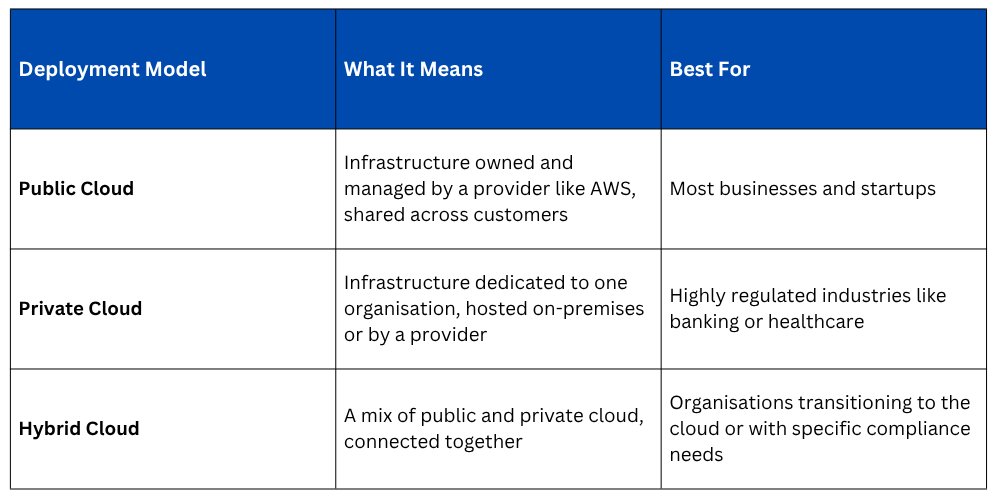
Cloud Deployment Models
Before we get into service models, it helps to understand how cloud environments are deployed. There are three main types:
The Three Cloud Service Models
When people talk about cloud computing, they often refer to three models — IaaS, PaaS, and SaaS. Each one gives you a different level of control and a different level of responsibility.
A simple way to think about it, imagine building a house:
1. IaaS gives you the land and raw materials. You build everything yourself.
2. PaaS gives you a ready-built structure. You just decorate and furnish it.
3. SaaS gives you a fully furnished, move-in-ready home. You just use it.
IaaS — Infrastructure as a Service
The most flexible model. You get the raw infrastructure and manage most of it yourself.
With IaaS, the cloud provider gives you virtualised computing resources — servers, storage, and networking — over the internet. You are responsible for everything above the hardware level.
What the provider manages:
1. Physical servers and data centres
2. Networking hardware
3. Virtualisation layer
What you manage:
1. Operating system
2. Runtime and middleware
3. Applications and data
4. Security configuration
Real-world analogy: Renting an empty apartment. The building and utilities are taken care of. But you bring your own furniture, set your own rules, and maintain the space inside.
AWS Examples:
Amazon EC2 — Virtual servers you can configure and control completely.
Amazon S3 — Scalable object storage for files, backups, and data.
Amazon VPC — Your own private network within AWS.
Best suited for:
1. DevOps and cloud engineers who need full control over the environment.
2. Applications with very specific configuration requirements.
3. Organisations migrating existing on-premises systems to the cloud.
PaaS — Platform as a Service
The provider handles the infrastructure and platform. You focus entirely on your application.
With PaaS, you do not worry about servers, operating systems, or runtime environments. The platform is already set up and ready. You simply write your code, deploy it, and the platform handles the rest.
What the provider manages:
1. Physical infrastructure
2. Operating system
3. Runtime and middleware
4. Scaling and availability
What you manage:
1. Your application code
2. Your data
3. Application-level configuration
Real-world analogy: Renting a fully equipped kitchen in a restaurant. The kitchen, appliances, and utilities are all set up. You just bring your recipes and cook.
Best suited for:
1. Developers who want to focus on building features, not managing servers.
2. Teams that want to move fast without deep infrastructure expertise.
3. Rapid prototyping and application development.
SaaS — Software as a Service
The complete package. The software is built, hosted, and maintained by the provider. You just use it.
With SaaS, you do not manage anything technical. You access a fully working application through a web browser or app. The provider handles everything — hardware, software, updates, security, and availability.
What the provider manages: Everything. Infrastructure, platform, and the application itself.
What you manage:
1. Your data and user settings.
2. Who in your organisation has access.
Real-world analogy: Eating at a restaurant. You do not cook, clean, or manage the kitchen. You sit down, order, and enjoy the meal.
Common Examples:
Gmail / Google Workspace — Email and productivity tools, fully managed by Google.
Salesforce — Customer relationship management, fully managed.
Zoom — Video conferencing, no installation or infrastructure needed.
GitHub — Code hosting and collaboration, managed by Microsoft.
Best suited for:
1. End users and business teams who need software without technical setup.
2. Standard business tools like email, HR systems, or CRM platforms.
Why This Matters for DevOps?
As a DevOps engineer working on AWS, you will use all three models, often within the same project.
1. You might use IaaS (EC2) to host a custom application that needs specific server configuration.
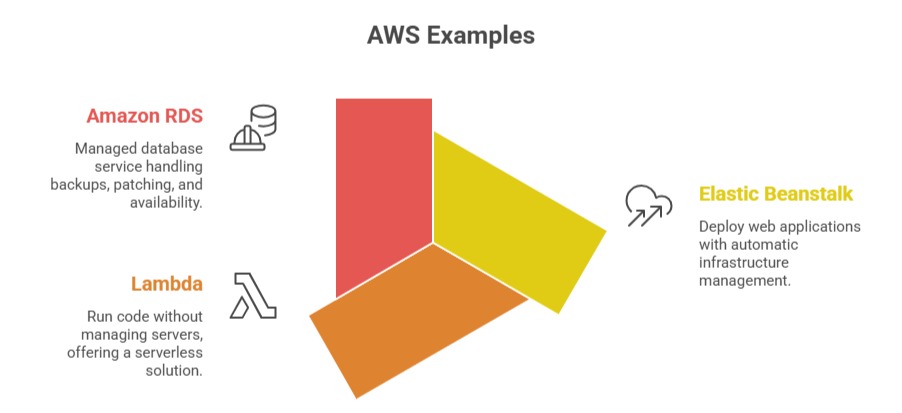
2. You might use PaaS (Lambda or RDS) to reduce the operational overhead of managing databases and compute.
3. Your team might use SaaS tools like GitHub or Jira for collaboration and project management.
Understanding which model fits which situation helps you make smarter architectural decisions, balancing control, cost, and complexity.
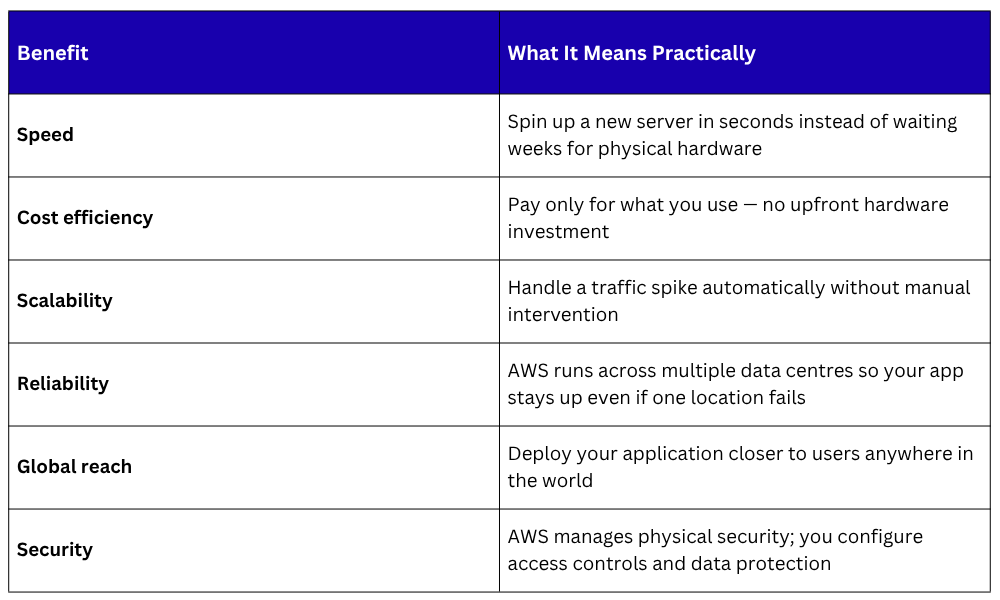
Benefits of Cloud Computing for DevOps Teams