In traditional software development, security was something that happened at the end, a security team reviewed the application after it was built and before it was deployed. This approach is slow, expensive, and ineffective.
Vulnerabilities found late in the process are far harder and costlier to fix than those caught early.
Shift-left security changes this by moving security checks earlier to the left in the development timeline, making security a continuous part of the entire DevOps workflow rather than a final gate.
What Does Shift-Left Mean?
The term comes from visualising the software delivery timeline as a line moving left to right from development on the left to production on the right. Shifting security left means moving it as close to the development stage as possible.

Security checks happen at every stage — not just at the end. The earlier a vulnerability is found, the cheaper and faster it is to fix.
The cost of fixing a vulnerability:
1. Found by the developer while writing code — minutes to fix.
2. Found in code review — hours to fix.
3. Found in testing — days to fix.
4. Found in production — days to weeks, plus potential data breach, compliance violation, and reputational damage.
Security in the Development Stage
Security starts before a line of code is merged into the repository.
1. Pre-commit Scanning: Pre-commit hooks scan code for secrets — API keys, passwords, credentials — before they are committed. Tools like Gitleaks catch these at the earliest possible moment.
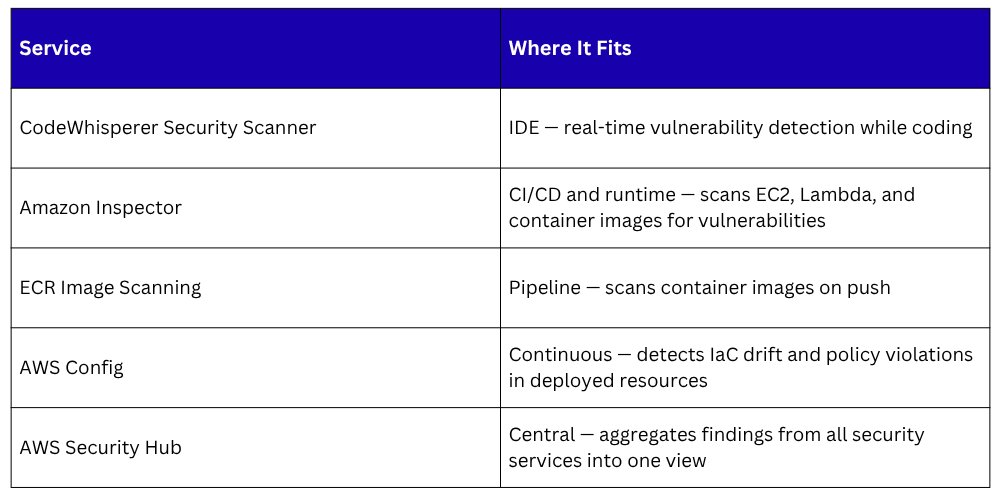
2. IDE Security Plugins: Security checks inside the code editor give developers immediate feedback as they write. Amazon CodeWhisperer's built-in security scanner flags vulnerabilities in real time. Developers fix issues before they are even committed, let alone reviewed.
3. Secure Coding Standards: Teams should define and document secure coding standards — input validation rules, error handling practices, approved cryptographic methods, prohibited functions. Code review enforces these standards before code reaches the pipeline.
Security in the CI/CD Pipeline
The pipeline is where automated security checks run at scale on every code change.
Static Application Security Testing — SAST
SAST tools analyse source code without running it, looking for known vulnerability patterns — SQL injection, cross-site scripting, insecure deserialization, hardcoded credentials, weak cryptography.
SAST runs as a pipeline stage — if critical vulnerabilities are found, the pipeline fails and the code cannot proceed to deployment. Common SAST tools include SonarQube, Semgrep, and Checkov for IaC security scanning.
Software Composition Analysis — SCA
Modern applications use many open-source libraries and dependencies. SCA tools scan your dependency list against databases of known vulnerabilities — CVEs, and alert you when a dependency has a known security issue.
Tools like Snyk and OWASP Dependency-Check integrate directly into CI/CD pipelines and fail the build if critical vulnerabilities are found in dependencies.
Container Image Scanning
Every Docker image pushed to ECR should be scanned before deployment. ECR's built-in scanner, checks images for known CVEs automatically on push. Configure your pipeline to check scan results and block deployment if critical vulnerabilities are found.
IaC Security Scanning
Infrastructure as Code can contain security misconfigurations — S3 buckets with public access, security groups open to the world, IAM roles with excessive permissions.
Tools like Checkov and tfsec scan Terraform and CloudFormation templates for these issues before infrastructure is provisioned.
Security Gates in the Pipeline
A security gate is a pipeline stage that must pass before code moves forward. Gates enforce that security checks are not skipped under time pressure.
A well-structured pipeline with security gates:
Code pushed
│
▼
SAST scan — fails on critical vulnerabilities
│
▼
SCA scan — fails on critical CVEs in dependencies
│
▼
Container image build → ECR image scan
│
▼
IaC security scan — fails on critical misconfigurations
│
▼
Deploy to staging
│
▼
Dynamic security testing in staging environment
│
▼
Deploy to production
Security gates make security non-negotiable, not a step that can be skipped when a deadline is approaching.
Developer Responsibility and Culture
Tools and automation handle the mechanics of shift-left security. But the cultural shift is equally important.
1. Security is everyone's responsibility: In a DevSecOps culture, developers are responsible for the security of the code they write. Security teams shift from being gatekeepers to being enablers — providing tools, training, and guidance rather than final approval.
2. Security training for developers: Developers who understand common vulnerability types — OWASP Top 10, injection attacks, authentication flaws, write more secure code naturally. Regular security training and threat modelling sessions build this knowledge.
3. Threat modelling: Before building a new feature or system, the team considers potential threats, what could go wrong, how could this be attacked, what data is at risk. This proactive thinking prevents vulnerabilities from being built in at the design stage.
AWS Native Security Services for Shift-Left