The real power comes when you connect them all through a CI/CD pipeline. Instead of manually building images, pushing them to ECR, and updating your service — the pipeline does all of it automatically every time code is pushed.
The Container CI/CD Pipeline
Developer pushes code to repository
│
▼
CI stage — Build and test the application
│
▼
Build Docker image
│
▼
Push image to Amazon ECR with a version tag
│
▼
CD stage — Update ECS service or EKS deployment with new image
│
▼
New containers running in production
Every step is automated. A code push is all it takes to go from source code to running containers in production.
What Changes Compared to a Standard Pipeline
A container pipeline follows the same CI/CD principles you already know — but with two additional steps inserted between the build and deploy stages:
Build the Docker image: After the application is built and tested, Docker builds an image from the Dockerfile in your repository.
Push to ECR: The image is tagged with the Git commit SHA or version number and pushed to your ECR repository.
Tagging Strategy in the Pipeline
Consistent image tagging is critical in a CI/CD pipeline. The recommended approach is to tag every image with the Git commit SHA — the unique identifier of the exact commit that produced the image.
This means you can always trace a running container back to the exact line of code that built it. This is invaluable for debugging production issues.
A typical tagging pattern:
my-app:a3f9c21 —tagged with the Git commit SHA for traceability.
my-app:latest — updated to point to the most recent build, used in development only.
Never deploy latest to production. Always deploy a specific, traceable version tag.
Deploying to ECS from a Pipeline
When a new image is pushed to ECR, the pipeline updates the ECS service to use the new image. There are two ways this works:
1. Update the task definition: The pipeline creates a new revision of the task definition pointing to the new image URI, then updates the ECS service to use that revision. ECS performs a rolling deployment automatically — replacing old tasks with new ones using the new image.
2. AWS CodeDeploy with ECS: For Blue/Green deployments, AWS CodeDeploy manages the traffic shift between the old and new task versions. This gives you instant rollback capability if the new version has issues.
The pipeline handles all of this without any manual steps. From code push to updated production containers is fully automated.
Deploying to EKS from a Pipeline
For EKS, the pipeline updates the Kubernetes deployment manifest with the new image tag and applies it to the cluster. Kubernetes then performs a rolling update — gradually replacing old pods with new ones running the updated image.
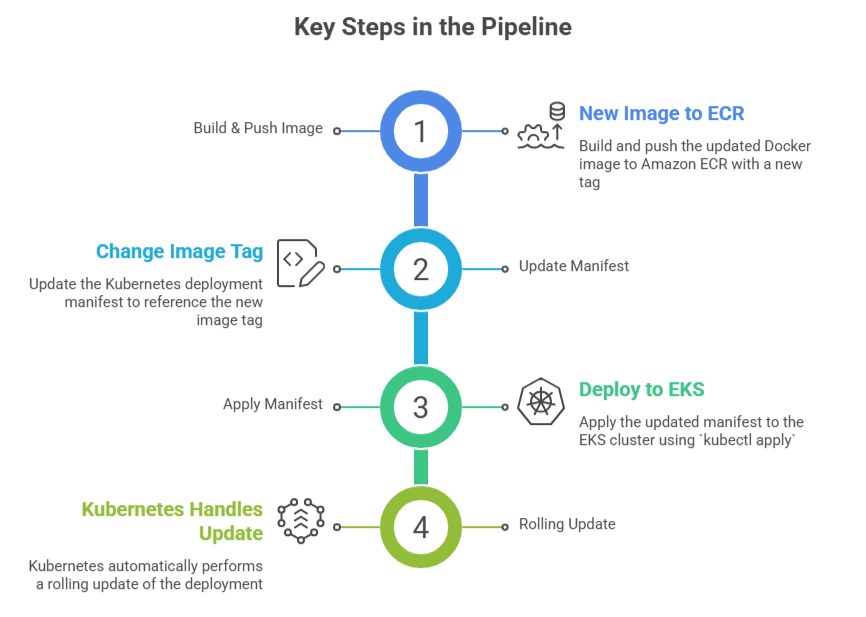
For teams using GitOps — a practice where the Git repository is the single source of truth for cluster state — tools like ArgoCD or Flux watch the repository and automatically apply manifest changes to the cluster without the pipeline needing direct cluster access.
Security Considerations in Container Pipelines
1. Image scanning before deployment: Configure your pipeline to run an ECR vulnerability scan and check the results before proceeding to deployment. If critical vulnerabilities are found, the pipeline fails and the image is not deployed.
2. Least privilege for pipeline roles: The IAM role your pipeline uses should have only the permissions it needs — push to specific ECR repositories, update specific ECS services or EKS deployments. Nothing more.
3. Never build images as root: Ensure your Dockerfile creates and switches to a non-root user before the application runs. This is a security best practice that should be enforced at the pipeline level.
A Typical buildspec.yml for a Container Pipeline
yaml
version: 0.2
phases:
pre_build:
commands:
- aws ecr get-login-password | docker login --username AWS
--password-stdin $ECR_URI
- IMAGE_TAG=$(echo $CODEBUILD_RESOLVED_SOURCE_VERSION | cut -c1-7)
build:
commands:
- docker build -t $ECR_URI:$IMAGE_TAG .
- docker push $ECR_URI:$IMAGE_TAG
post_build:
commands:
- aws ecs update-service --cluster production
--service my-app --force-new-deployment
