You have built a Docker image and stored it in ECR. Now you need to run it at scale, reliably, automatically, and with the ability to handle traffic spikes without manual intervention.
Amazon Elastic Container Service (ECS) is AWS's fully managed container orchestration service that does exactly this. It runs your containers, manages their health, scales them up and down, and restarts them if they fail.
What is Amazon ECS?
ECS is a service that runs and manages Docker containers on AWS. You tell ECS what container to run, how much CPU and memory it needs, how many copies to keep running, and ECS handles the rest — scheduling, placement, health monitoring, and scaling.
ECS removes the operational burden of managing container infrastructure yourself. You focus on your application. ECS keeps it running.
Core ECS Concepts
1. Cluster: A cluster is the logical boundary for your ECS resources — a group of infrastructure where your containers run. Every ECS deployment belongs to a cluster. You can have separate clusters for dev, staging, and production.
2. Task Definition
A task definition is a blueprint for your container. It defines:
1. Which Docker image to use — pulled from ECR.
2. How much CPU and memory the container gets.
3. Environment variables and secrets.
4. Port mappings — which container port maps to which host port.
5. Logging configuration — typically CloudWatch Logs.
Think of a task definition as the specification for how your container should run.
3. Task: A task is a running instance of a task definition — the actual container in execution. A task can contain one or more tightly coupled containers that run together.
4. Service: A service ensures that a specified number of tasks are always running. If a task fails or crashes, the service automatically starts a replacement. Services also integrate with load balancers to distribute traffic across multiple running tasks.

The Two Launch Types
This is the most important choice you make when setting up ECS — where do your containers actually run?
1. Fargate — Serverless Containers
With Fargate, you do not manage any servers at all. You define the task — the container, CPU, memory — and AWS provisions the underlying infrastructure automatically.
There are no EC2 instances to launch, patch, or scale. AWS handles everything below the container level.
You pay per task — based on the CPU and memory your task uses, for the time it runs. When the task stops, you stop paying.
Best for:
1. Teams that want to focus purely on applications, not infrastructure.
2. Variable or unpredictable workloads where you do not want to manage server capacity.
3. Microservices and API workloads.
2. EC2 Launch Type — Self-Managed Infrastructure
With the EC2 launch type, you provision and manage a pool of EC2 instances that form the cluster. ECS schedules containers onto these instances. You have full control over the instance types, the operating system, and the underlying infrastructure.
You pay for the EC2 instances — whether they are fully utilised or not.
Best for:
1. Workloads that require specific instance types — GPU workloads, memory-optimised workloads.
2. Teams that need maximum control over the underlying infrastructure.
3. Cost-sensitive workloads with predictable, sustained traffic where Reserved Instances offer significant savings.
Note: For most teams starting with ECS, Fargate is the recommended choice. It removes operational complexity and lets you focus on the application.
ECS Auto Scaling
ECS services can scale automatically based on demand. There are two dimensions of scaling:
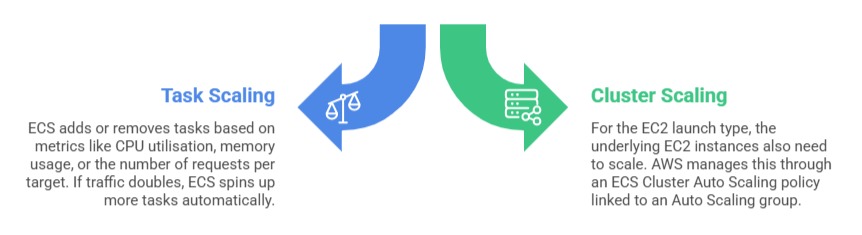
With Fargate, cluster scaling is not a concern — AWS handles infrastructure capacity automatically.
ECS and Load Balancing
In production, you rarely expose a single container directly to the internet. ECS integrates with the Application Load Balancer (ALB) to distribute incoming traffic across all running tasks in a service.
When a new task starts, ECS automatically registers it with the load balancer. When a task stops, ECS deregisters it. Users always hit a healthy task — they never see individual containers starting or stopping.
ECS Logging
Every container running on ECS can send its logs to Amazon CloudWatch Logs automatically. You configure the log driver in the task definition — typically awslogs — and specify the CloudWatch log group.
From there, you can search logs, set up alarms, and diagnose issues without ever SSH-ing into a server.
