AWS CloudFormation is Amazon's own Infrastructure as Code service. It lets you define your AWS infrastructure in a template file and CloudFormation takes care of creating, updating, and deleting resources in the right order.
No third-party tools, no extra setup — it is built directly into AWS.
How CloudFormation Works
You write a template, a file that describes what AWS resources you want. You give that template to CloudFormation and it creates a stack — a collection of all the resources defined in that template, managed together as one unit.

If you want to change your infrastructure, you update the template and CloudFormation figures out what needs to change, what can stay the same, and applies only the differences.
The Template
A CloudFormation template is written in either YAML or JSON. YAML is more readable and is what most teams use. A template has several sections — the most important ones are:
1. Parameters: Values you pass in when creating the stack, like environment name or instance type. Makes templates reusable across environments.
2. Resources: The only required section. This is where you define the actual AWS resources you want — EC2 instances, S3 buckets, IAM roles, VPCs, and so on.
3. Outputs: Values the stack exports after creation — like a load balancer URL or a database endpoint — so other stacks or team members can reference them.
A simple example that creates an S3 bucket:
yaml
AWSTemplateFormatVersion: '2010-09-09'
Description: Creates an S3 bucket for deployment artifacts
Parameters:
EnvironmentName:
Type: String
Default: production
Resources:
ArtifactBucket:
Type: AWS::S3::Bucket
Properties:
BucketName: !Sub 'my-artifacts-${EnvironmentName}'
VersioningConfiguration:
Status: Enabled
Outputs:
BucketName:
Value: !Ref ArtifactBucket
Description: Name of the artifact bucket
Stacks
A stack is the live, running result of deploying a template. Everything defined in the template becomes part of the stack — and CloudFormation manages all those resources together.
This is important because:
1. Create the stack — all resources are created together.
2. Update the stack — CloudFormation compares the new template to the current state and applies only what changed.
3. Delete the stack — all resources in the stack are deleted together. No orphaned resources left behind.
You manage stacks through the AWS Console, AWS CLI, or CI/CD pipeline.
Change Sets
A change set answers the question — "What will happen if I apply this updated template?" — before you actually apply it.
Instead of updating the stack immediately, you create a change set first. CloudFormation shows you exactly what will be created, modified, or deleted. You review it, and only then decide whether to execute it.
This is especially important for production environments. Some resource changes — like modifying a database — can cause downtime or data loss. A change set gives you full visibility before anything is touched.
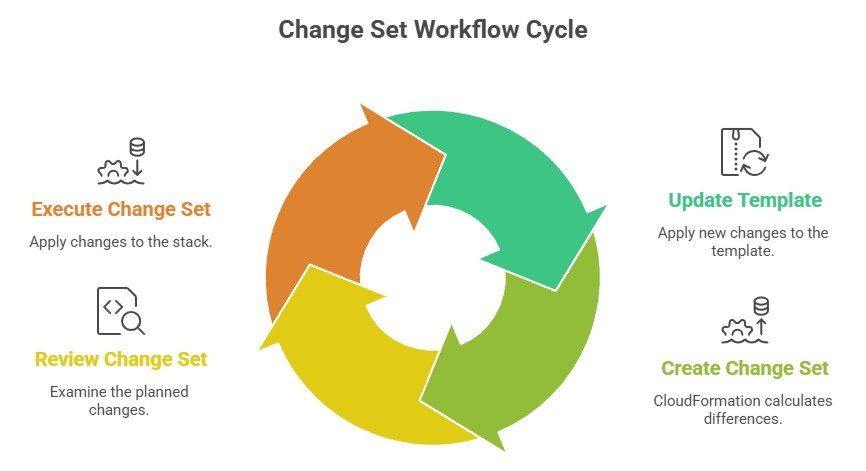
This review step makes CloudFormation updates safe and predictable.
Drift Detection
Over time, someone might manually change a resource that was created by CloudFormation — adding a rule to a security group through the Console, for example.
This creates drift — a gap between what CloudFormation thinks the infrastructure looks like and what it actually looks like.
CloudFormation has a built-in drift detection feature. Run it against a stack and it tells you which resources have been modified outside of CloudFormation and what specifically changed.
This helps you keep your infrastructure honest and your templates accurate.
Nested Stacks
As your infrastructure grows, a single template can become very large and hard to manage.
Nested stacks let you break a large template into smaller, focused templates — one for networking, one for compute, one for security — and reference them from a parent template.
This keeps each template small, focused, and reusable across different projects.
