One of the most common and most damaging mistakes in software development is accidentally committing sensitive information to a Git repository.
API keys, database passwords, AWS credentials, private certificates, when these end up in a repository, especially a public one, the consequences can be severe.
Accounts get compromised, data gets stolen, and cloud bills spike overnight because someone found your AWS keys and started mining cryptocurrency on your account.
This is not a rare edge case. It happens to experienced developers at large companies regularly. The good news is that it is entirely preventable.
What Counts as a Secret?
Before you can protect sensitive information, you need to know what qualifies as sensitive. The rule is simple:
If this information gives someone access to a system, account, or resource — it is a secret and must never be committed to a repository.
Common secrets that must never be in code:
Credentials and Keys
1. AWS Access Key ID and Secret Access Key
2. Database usernames and passwords
3. SSH private keys
4. API keys for third-party services — Stripe, Twilio, SendGrid, Google Maps
5. OAuth client secrets
6. JWT signing secrets
Certificates and Cryptographic Material
1. TLS/SSL private keys and certificates
2. PGP private keys
3. Any .pem, .key, .p12, or .pfx files
Configuration with Embedded Secrets
1. .env files containing real values
2. application.properties or config.yaml files with hardcoded passwords
3. Terraform .tfvars files with real credentials
4. Kubernetes secret manifests with base64-encoded values
Infrastructure Details That Aid Attackers
1. Internal IP addresses and hostnames of production systems.
2. Database connection strings pointing to production.
3. Account IDs combined with role names in sensitive contexts.
Why This is a Bigger Problem Than It Seems
Git stores the complete history of every change ever made. When you commit a file containing a secret and then delete it in the next commit, the secret still exists in the repository history.
Anyone who clones the repository can run git log and git show to retrieve the original file with the secret intact.
This is even worse for public repositories. Within minutes of a secret being pushed to a public GitHub repository, automated bots scan for exposed credentials.
AWS keys pushed to a public repository have been found and exploited within seconds — not minutes, not hours. Seconds.
Even for private repositories, the risk does not go away. If the repository is ever made public, if an employee's account is compromised, or if someone with access leaves the organisation — the secret is still there in the history.
The only correct response when a secret is committed is to revoke and rotate it immediately — not just delete it from the repository.
Preventing Secrets from Being Committed
Prevention is always better than remediation. Here are the layers of protection you should have in place.
1. The .gitignore File
A .gitignore file tells Git which files and folders to ignore — never track them, never include them in commits.
Every project should have a .gitignore file in the root directory. Here is a strong starting .gitignore for a typical DevOps and AWS project:
gitignore
# Environment variable files
.env
.env.local
.env.production
.env.*
# AWS credentials and config
.aws/credentials
.aws/config
*.pem
*.key
*.p12
*.pfx
# Terraform sensitive files
*.tfvars
*.tfvars.json
terraform.tfstate
terraform.tfstate.backup
.terraform/
.terraform.lock.hcl
# SSH keys
id_rsa
id_ed25519
*.ppk
# Python
__pycache__/
*.pyc
.venv/
venv/
# Node.js
node_modules/
npm-debug.log
# IDE and OS files
.DS_Store
.idea/
.vscode/
*.swp
Thumbs.db
# Build outputs
dist/
build/
*.zip
*.tar.gz
# Logs
*.log
logs/
Important: Adding a file to .gitignore only prevents future tracking. If the file was already committed, .gitignore will not remove it from the history. You need to explicitly untrack it:

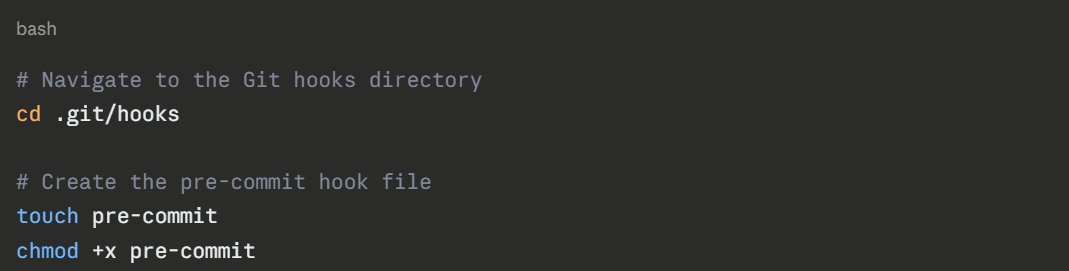
.png)

.png)
.png)
3. Gitleaks — Dedicated Secret Scanning
Gitleaks is an open-source tool specifically designed to detect secrets in Git repositories. It knows hundreds of patterns — AWS keys, GitHub tokens, Stripe keys, database connection strings, and more.
bash
# Install Gitleaks on Linux
wget https://github.com/gitleaks/gitleaks/releases/download/v8.18.0/gitleaks_8.18.0_linux_x64.tar.gz
tar -xzf gitleaks_8.18.0_linux_x64.tar.gz
sudo mv gitleaks /usr/local/bin/
# Scan your entire repository including history
gitleaks detect --source . --verbose
# Scan only staged files (use in pre-commit hook)
gitleaks protect --staged --verbose
# Scan a specific commit range
gitleaks detect --log-opts="HEAD~10..HEAD"
```
Gitleaks can also be added to your CI/CD pipeline so that every pull request is automatically scanned before it can be merged.
### 3.4 AWS-Native Secret Detection — Amazon CodeGuru
If you are using AWS CodeCommit or GitHub with AWS integrations, **Amazon CodeGuru Reviewer** can automatically scan your code for hardcoded secrets and security vulnerabilities when a pull request is opened. It integrates directly into the PR workflow — no separate tooling needed.
---
## 4. What to Do When a Secret Is Already Committed
If you discover a secret has been committed — stay calm, act quickly, and follow these steps in order.
### Step 1 — Revoke the secret immediately
Before anything else, go to the service where the credential is used and revoke or rotate it. Do not wait until you have cleaned the repository. Assume the secret is already compromised the moment it was committed.
```
AWS Console → IAM → Users → Security Credentials
→ Find the Access Key → Deactivate → Delete
→ Create a new Access Key
For other services, GitHub, Stripe, database passwords — follow the same process: invalidate the old credential and generate a new one.
Step 2 — Remove the secret from the repository history
Removing a committed secret from Git history requires rewriting that history. There are two main tools for this.
Option A — git-filter-repo (Recommended)
git-filter-repo is the modern, recommended tool for rewriting Git history. It is faster and safer than the older git filter-branch.
.png)
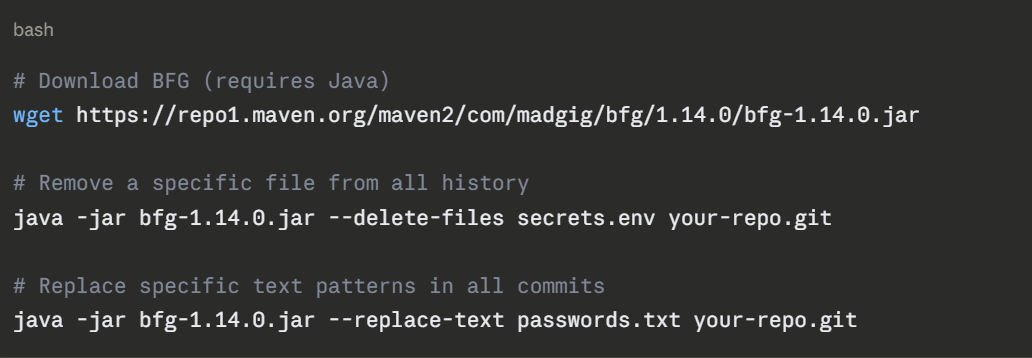
Option B — BFG Repo Cleaner
BFG is a simpler tool focused specifically on removing secrets and large files from history.
Step 3 — Force push the cleaned history
After rewriting history, you must force push to the remote repository. This overwrites the remote history with your cleaned version.

Warning: Force pushing rewrites shared history. Everyone who has cloned the repository must re-clone it after this operation. Communicate clearly with your team before doing this.
Step 4 — Notify and coordinate
If the repository is on GitHub, contact GitHub Support, they can help invalidate cached views of the old commits. AWS also has an exposed credentials response process that can help if AWS keys were involved.
If the repository was ever public, even briefly treat the credential as fully compromised regardless of how quickly you acted.
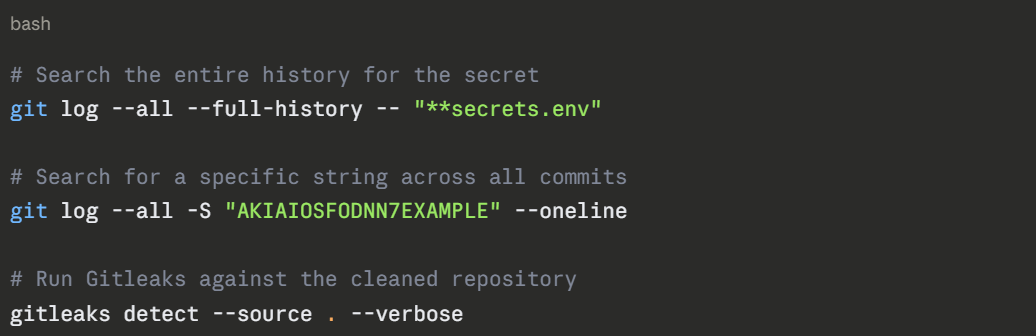
Step 5 — Verify the secret is gone
After cleaning, verify the secret no longer appears in the repository:
The Right Way to Manage Secrets
Prevention and remediation are important. But the real solution is a proper secrets management strategy — so secrets never end up in code in the first place.
1. Environment Variables
The simplest approach, store secrets as environment variables on the system where your code runs, not in the code itself.
.png)
For local development, use a .env file to set environment variables — but make sure .env is in your .gitignore and never committed.

Use a tool like python-dotenv or direnv to load .env automatically in your local environment.
2. AWS Secrets Manager
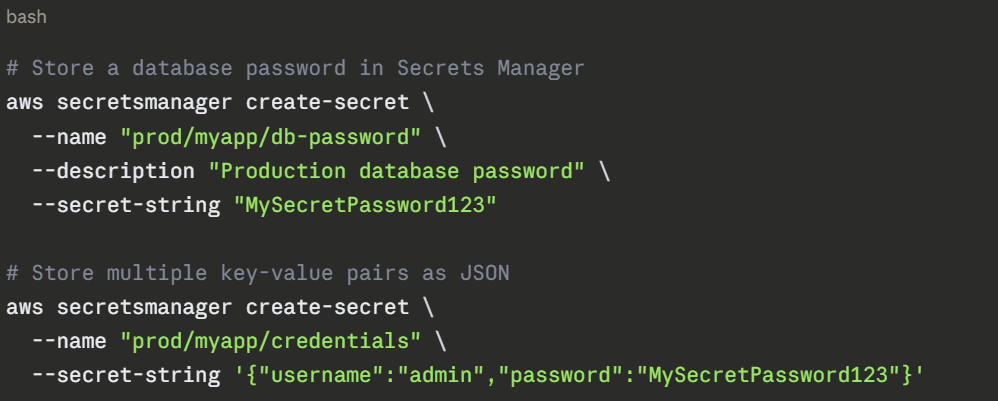
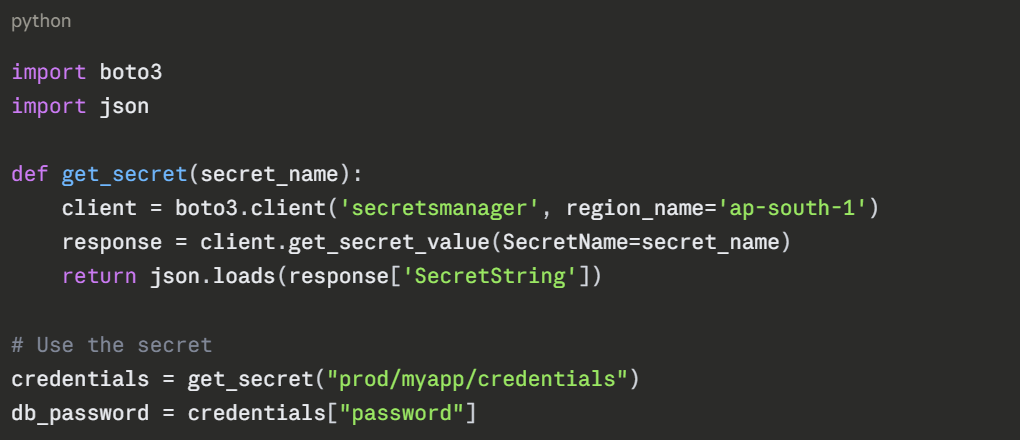
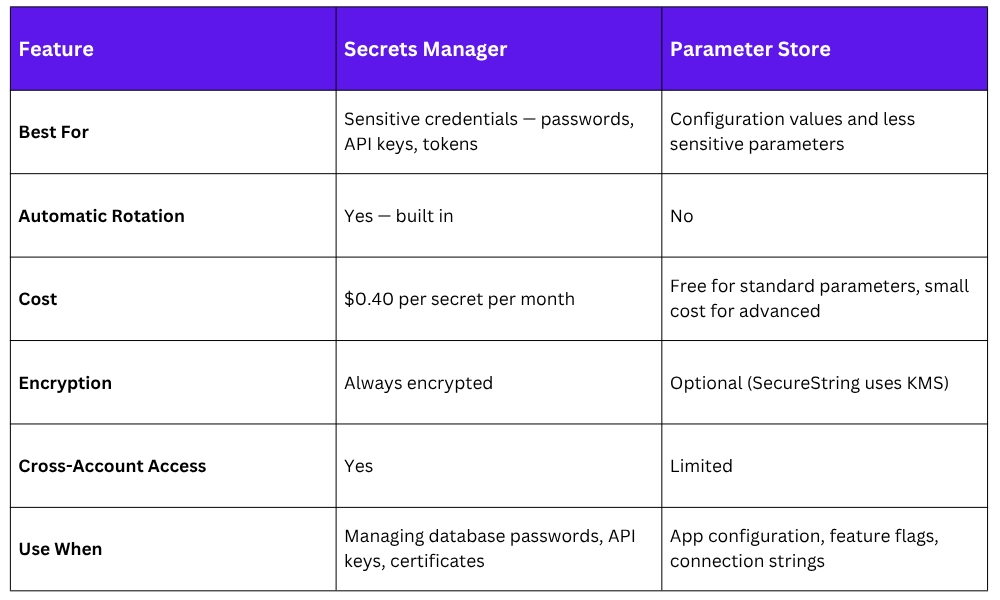
AWS Secrets Manager is the recommended way to store and manage secrets for applications running on AWS. It stores secrets encrypted, controls access through IAM, automatically rotates credentials, and provides an audit trail of every access.
Storing a secret:
Retrieving a secret in your application:
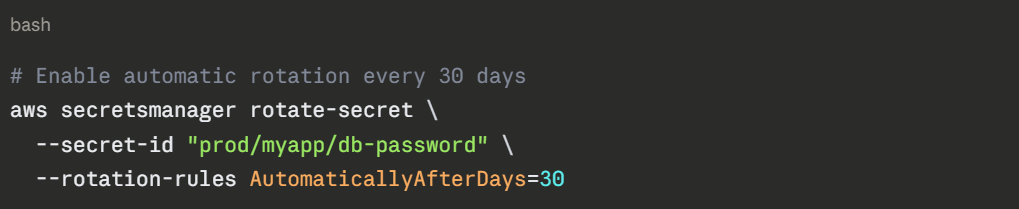
Automatic Rotation:
Secrets Manager can automatically rotate credentials on a schedule, for example, rotating a database password every 30 days — without any manual intervention. This dramatically reduces the risk of long-lived, stale credentials.
3. AWS Systems Manager Parameter Store
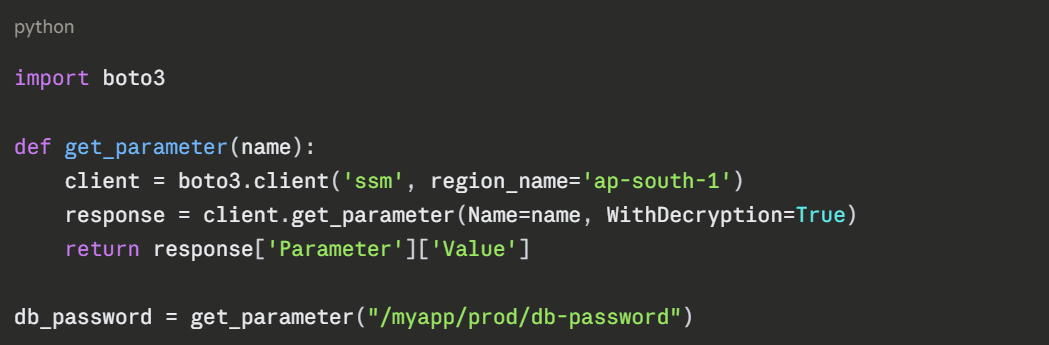
Parameter Store is a lighter-weight alternative to Secrets Manager. It is good for configuration values and less sensitive parameters, but also supports encrypted parameters using AWS KMS.
bash
# Store a plain text parameter
aws ssm put-parameter \
--name "/myapp/prod/db-host" \
--value "mydb.cluster.ap-south-1.rds.amazonaws.com" \
--type String
# Store an encrypted secret
aws ssm put-parameter \
--name "/myapp/prod/db-password" \
--value "MySecretPassword123" \
--type SecureString
# Retrieve a parameter
aws ssm get-parameter \
--name "/myapp/prod/db-password" \
--with-decryption \
--query "Parameter.Value" \
--output text
Retrieve in Python:
4. Secrets Manager vs. Parameter Store
5. Using Secrets in CI/CD Pipelines
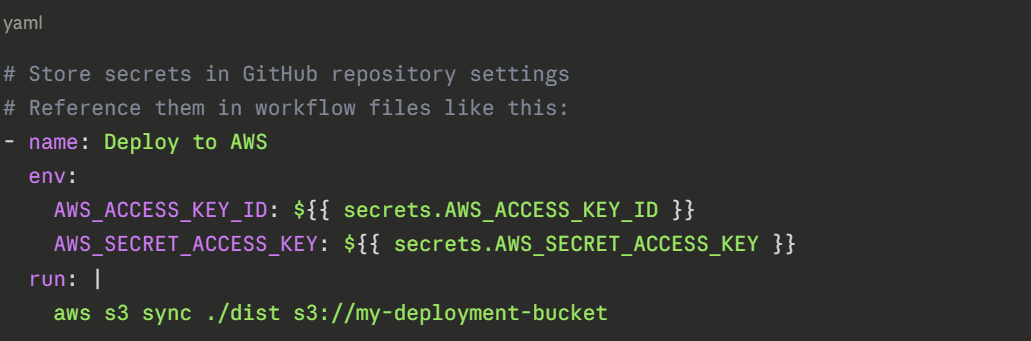
Your CI/CD pipeline also needs to handle secrets — for example, AWS credentials to deploy infrastructure, or a database password to run integration tests. Here is the right approach for each platform.
GitHub Actions:
AWS CodeBuild: CodeBuild can retrieve secrets directly from Secrets Manager or Parameter Store at runtime — no need to pass credentials in at all:
yaml
# buildspec.yml
version: 0.2
env:
secrets-manager:
DB_PASSWORD: "prod/myapp/db-password:password"
parameter-store:
DB_HOST: "/myapp/prod/db-host"
phases:
build:
commands:
- echo "Connecting to $DB_HOST"
- python deploy.py
```
The secret values are injected as environment variables at runtime. They never appear in your source code or configuration files.
---
## 6. A Practical Secrets Safety Checklist
Use this checklist for every project you work on:
```
□ .gitignore is set up and includes .env, *.pem, *.key,
*.tfvars, and other sensitive file types
□ pre-commit hooks are installed with secret scanning
(Gitleaks or detect-private-key)
□ No real credentials exist in any configuration file
committed to the repository
□ Secrets are stored in AWS Secrets Manager or
Parameter Store — not in environment files on servers
□ CI/CD pipelines retrieve secrets at runtime from
Secrets Manager or the platform's secret store
□ IAM roles are used for service-to-service authentication
— no access keys stored on EC2 instances or in containers
□ All IAM users with programmatic access have MFA enabled
□ Access keys are rotated regularly — or better,
replaced entirely with IAM roles
□ The repository has been scanned with Gitleaks at least once
□ Branch protection rules prevent direct pushes to main,
ensuring all code goes through a PR and CI scan
