Every service covered so far — EC2, ECS, EKS — requires you to think about servers in some form. You choose instance types, manage capacity, and think about what runs where. Serverless removes that entirely. You write code, define a trigger, and the cloud handles everything else.
What Does Serverless Actually Mean?
Serverless does not mean there are no servers. Servers still exist — you just do not see, manage, or think about them.
AWS provisions the infrastructure, runs your code, scales it automatically, and shuts it down when it is not needed. You only deal with the code itself.
The key characteristics of serverless:
1. No server management: No EC2 instances to launch, patch, or scale. No operating systems to maintain.
2. Event-driven execution: Your code runs in response to a trigger — an HTTP request, a file upload, a scheduled time, a database change. It does not run continuously.
3. Automatic scaling: If one request comes in, one instance of your code runs. If a million requests come in simultaneously, a million instances run in parallel. Scaling is instant and automatic.
4. Pay per use: You are charged only for the exact time your code runs, measured in milliseconds. When nothing is running, you pay nothing.
The Core Serverless Services on AWS
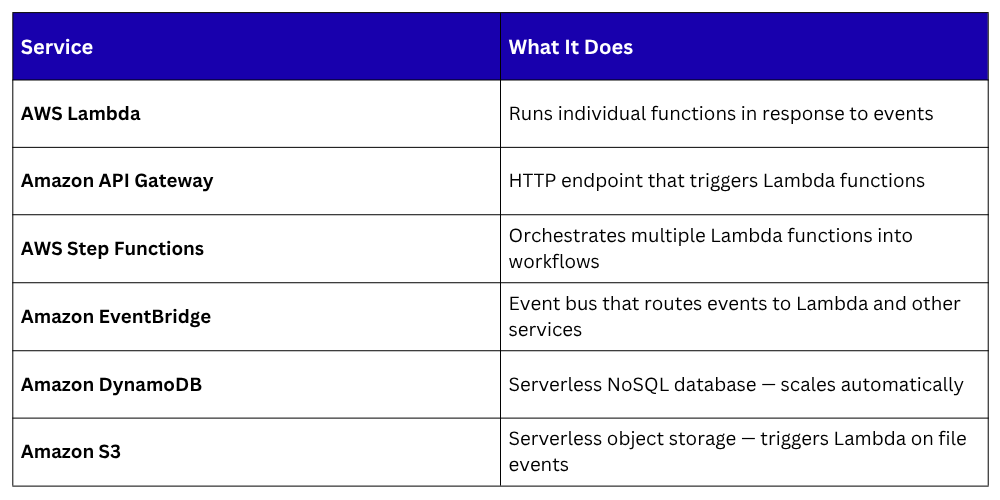
Lambda is the foundation of serverless on AWS. Everything else connects to it.
How Serverless Works in Practice
A serverless application is event-driven. Something happens — a user calls an API, a file is uploaded, a timer fires, and that event triggers a function to run.
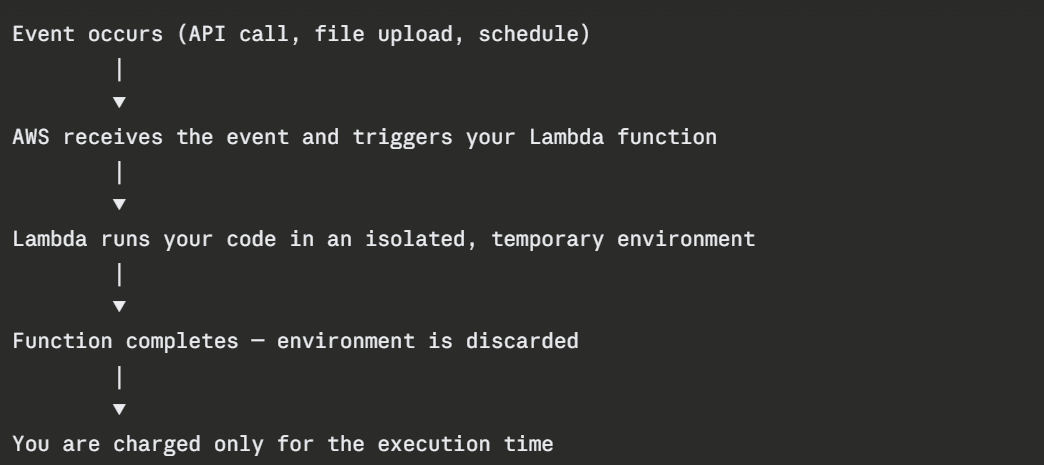
The function runs, does its job, and disappears. The next invocation starts fresh.
Common Serverless Use Cases
1. REST APIs: API Gateway receives HTTP requests and triggers Lambda functions to handle them. No web server needed.
2. File processing: A file is uploaded to S3. An event triggers a Lambda function to resize an image, parse a CSV, or validate a document automatically.
3. Scheduled tasks: Replace cron jobs with EventBridge rules that trigger Lambda on a schedule — clean up old records nightly, send a weekly report, rotate logs.
4. Real-time data processing: Lambda processes records from a stream — Kinesis or DynamoDB Streams — as they arrive, in real time.
5. CI/CD automation: Lambda functions handle pipeline tasks — send notifications, trigger deployments, run post-deployment checks, respond to infrastructure events.
6. Webhooks: Receive and process webhook payloads from third-party services — GitHub, Stripe, Slack — without running a dedicated server.
When Serverless Makes Sense
Serverless is a strong fit when:
1. Workloads are intermittent or unpredictable — traffic comes in bursts, not steadily.
2. Tasks are short-lived — individual executions complete in seconds or minutes.
3. You want to minimise operational overhead — no servers to manage means more focus on code.
4. Cost efficiency matters — paying only for execution time is significantly cheaper than running idle servers for low-traffic applications.
When Serverless Does Not Make Sense
Serverless is not the right choice for every workload:
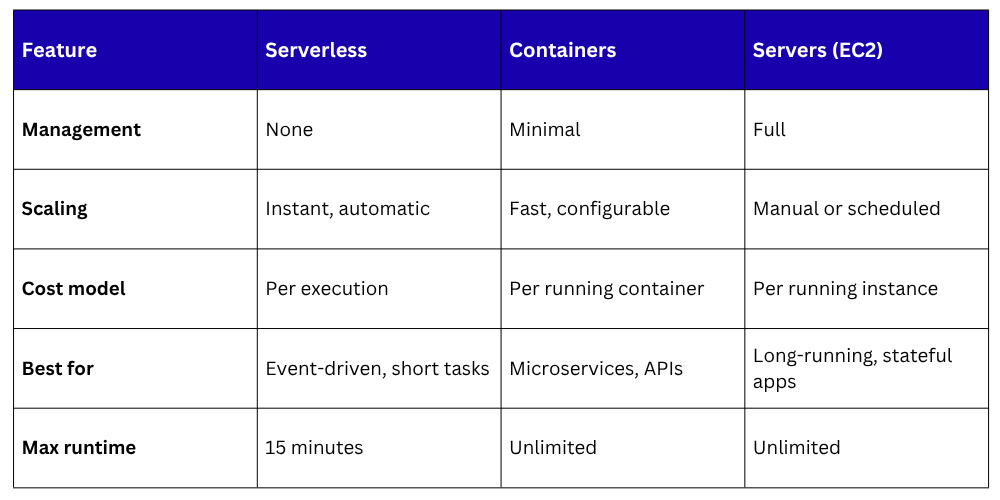
1. Long-running processes: Lambda has a maximum execution time of 15 minutes. Anything longer needs EC2 or containers.
2. Steady, high-volume traffic: For applications with constant, predictable high traffic, running EC2 instances or ECS containers is often cheaper than paying per Lambda invocation at scale.
3. Cold starts: When a Lambda function has not been invoked for a while, the first invocation takes slightly longer as AWS initialises a new environment. For latency-sensitive applications, this can be a problem.
4. Stateful applications: Lambda functions are stateless by design. Applications that require persistent in-memory state between requests are not a good fit.
Serverless vs. Containers vs. Servers