Every system will eventually experience a failure, a data centre outage, a corrupted database, an accidental deletion, a ransomware attack, or a botched deployment. Disaster recovery is not about preventing these events.
It is about planning for them in advance so that when they happen, your team knows exactly what to do, how fast the system can recover, and how much data can be lost without causing unacceptable business impact.
Two Critical Metrics — RTO and RPO
Before choosing a DR strategy, you must define two metrics with your stakeholders:
Recovery Time Objective — RTO
The maximum acceptable time between a disaster occurring and the system being fully operational again. How long can the business tolerate the system being down?
1. A banking transaction system might have an RTO of minutes.
2. An internal reporting tool might have an RTO of 24 hours.
Recovery Point Objective — RPO
The maximum acceptable amount of data loss measured in time. How much data can the business afford to lose?
1. A payment system might have an RPO of zero — no data loss is acceptable.
2. A logging system might have an RPO of one hour — losing an hour of logs is acceptable.
RTO and RPO drive every decision in disaster recovery. Lower RTO and RPO means higher cost, more infrastructure, more complexity, more automation.
Higher RTO and RPO means lower cost but higher business impact during a disaster. The right values are a business decision, not a technical one.
The Four DR Strategies
AWS describes four disaster recovery strategies arranged from lowest cost and highest RTO/RPO to highest cost and lowest RTO/RPO.
Strategy 1 — Backup and Restore
The simplest and cheapest strategy. Regular backups of data and configuration are stored in S3 or AWS Backup. When a disaster occurs, you restore from the most recent backup and rebuild the infrastructure from IaC.
RTO: Hours to days — depends on how long restoration and infrastructure rebuild takes.
RPO: Hours — depends on backup frequency.
Cost: Very low — you pay only for backup storage.
Best for: Non-critical systems where extended downtime is acceptable.
AWS Backup provides centralised, automated backup management across RDS, DynamoDB, EBS, EFS, and other services. Define backup schedules, retention periods, and cross-region copy rules in one place.
Strategy 2 — Pilot Light
A minimal version of the critical core infrastructure runs continuously in a secondary region, typically just the database tier with replication enabled.
Everything else — compute, load balancers, application layers is defined in IaC but not running. When disaster strikes, you launch the remaining infrastructure quickly and point it at the already-running database.
RTO: Tens of minutes to hours — time to launch and configure the remaining infrastructure.
RPO: Minutes — database replication keeps the secondary nearly current.
Cost: Low to moderate — you pay for the running database and replication costs.
Best for: Systems that can tolerate some downtime but need relatively current data.
Strategy 3 — Warm Standby
A reduced-capacity version of the full production environment runs continuously in a secondary region — not just the database but also the application layer, running at minimum scale.
During a disaster, you scale up the standby environment to full production capacity and redirect traffic.
RTO: Minutes — the environment is already running, just needs to scale up.
RPO: Seconds to minutes — active replication keeps the standby current.
Cost: Moderate to high — running a reduced-capacity environment continuously.
Best for: Business-critical systems where extended downtime causes significant impact.
Strategy 4 — Multi-Site Active/Active
Two or more full production environments run simultaneously in different regions. Traffic is distributed between them at all times. If one region fails, the other continues serving 100% of traffic without any recovery action needed.
RTO: Near zero — traffic shifts automatically to the healthy region.
RPO: Near zero — both environments are actively processing traffic.
Cost: Very high — running full production capacity in multiple regions simultaneously.
Best for: Mission-critical systems where any downtime or data loss is unacceptable.
AWS Services That Support DR
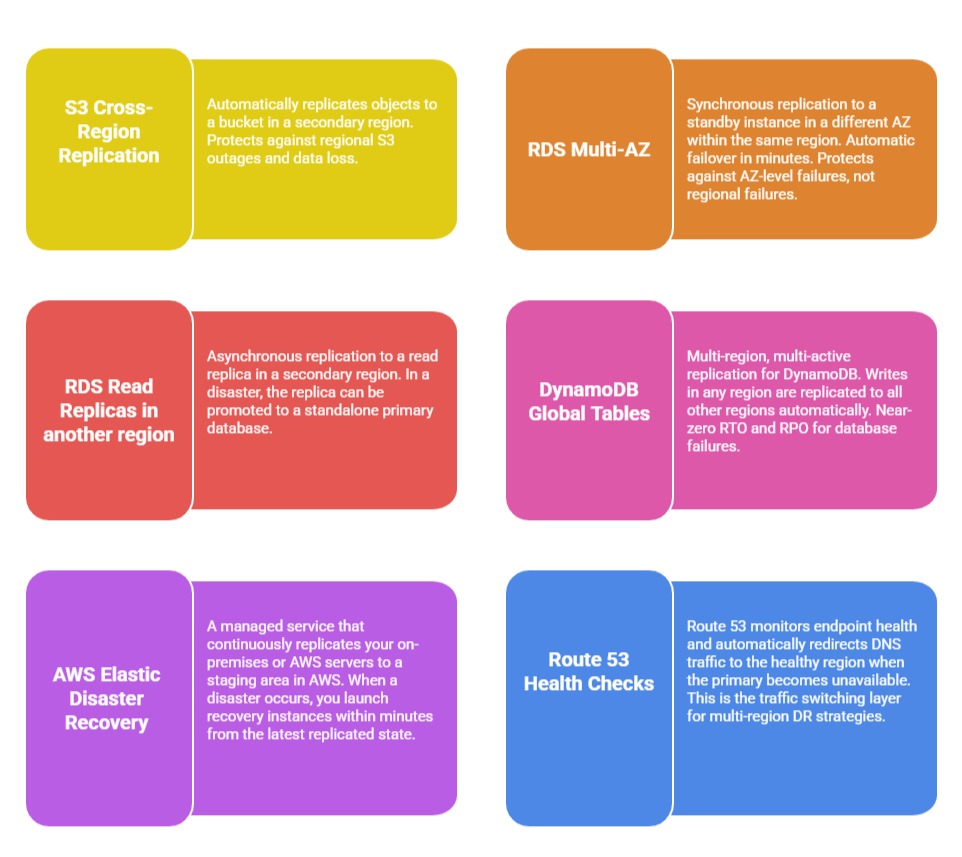 Testing Your DR Plan
A DR plan that has never been tested is not a DR plan — it is a hypothesis. Regular testing is non-negotiable.
1. Tabletop exercises: Walk through the DR scenario as a team without actually executing it. Identify gaps in the plan, unclear responsibilities, and missing documentation.
2. Backup restoration tests: Regularly restore from backups to verify they are valid and complete. A backup that cannot be restored is worthless.
3. Failover tests: Periodically simulate a failure and execute the actual failover process. Measure the real RTO and RPO — they are often worse than estimated until the process is practised and refined.
4. Chaos engineering: Intentionally introduce failures into the system — terminate instances, block network traffic, corrupt data — to verify that automated recovery mechanisms work as designed. AWS Fault Injection Service enables controlled chaos engineering experiments on AWS infrastructure.
