Amazon SageMaker is AWS's end-to-end machine learning platform.
It covers every stage of the ML workflow; preparing data, training models, evaluating performance, and deploying to production, all within a single, managed service.
Rather than stitching together separate tools for each stage, SageMaker gives you one platform where the entire ML lifecycle lives.
The SageMaker ML Workflow
SageMaker organises the ML process into clear stages:

Each stage has dedicated SageMaker capabilities. You can use all of them together or plug in only the stages you need.
Data Preparation
Before training, data needs to be cleaned, transformed, and formatted. SageMaker provides two tools for this:
1. SageMaker Data Wrangler: A visual, low-code tool for exploring and transforming data. You connect it to data sources — S3, Redshift, Athena — and apply transformations through a visual interface without writing code. Good for data scientists who want speed over control.
2. SageMaker Processing: For more complex transformations, Processing jobs run custom Python scripts — using frameworks like pandas or Spark — on managed compute infrastructure. You provide the script and the data location in S3. SageMaker provisions the compute, runs the job, and stores the output back in S3.
All training data and processed outputs live in Amazon S3. S3 is the data layer for all SageMaker operations.
Model Training
Training is where SageMaker does the heavy lifting. You provide the training script, the data location, and the compute configuration. SageMaker provisions the infrastructure, runs the training job, and stores the resulting model artifact in S3.
Key Training Concepts
1. Training Job: A single run of your training script on a specified dataset. SageMaker launches the compute, trains the model, saves the artifact, and terminates the instance when done. You only pay for the compute time used.
2. Built-in Algorithms: SageMaker provides optimised, ready-to-use implementations of common ML algorithms — XGBoost, Linear Learner, K-Means, and more. You do not need to write training code for standard algorithms.
3. Bring Your Own Script: For custom models, you write a training script in Python using frameworks like TensorFlow, PyTorch, or scikit-learn. SageMaker wraps it in a managed container and runs it on your chosen compute.
4. Hyperparameter Tuning: SageMaker Automatic Model Tuning runs multiple training jobs simultaneously with different hyperparameter combinations and identifies the configuration that produces the best model. This replaces manual trial-and-error tuning.

Model Evaluation
After training, the model artifact is stored in S3. Before deploying, you evaluate it — test it against a holdout dataset and measure performance metrics like accuracy, precision, recall, or RMSE depending on the problem type.
SageMaker Processing jobs handle evaluation the same way they handle data preparation — you write an evaluation script, provide the model artifact and test data, and SageMaker runs it. The output is a metrics report stored in S3.
This evaluation step is what SageMaker Pipelines uses to decide whether a new model is good enough to deploy.
Model Registry
The SageMaker Model Registry is a central store for all trained models. Every model version that passes evaluation is registered here with:
1. The model artifact location in S3.
2. The performance metrics from evaluation.
3. The training data and hyperparameters used.
4. An approval status — pending, approved, or rejected.
The registry gives you full traceability. You always know which model version is in production, what data it was trained on, and how it performed at evaluation time. Approved models can be deployed directly from the registry.
Model Deployment
1. SageMaker deploys models as endpoints: Managed HTTPS endpoints that receive inference requests and return predictions. Your application calls the endpoint with input data and receives a prediction in response.
2. Real-time endpoints: Always-on endpoints that respond to requests with low latency. Best for user-facing applications where predictions are needed immediately.
3. Serverless inference: The endpoint scales to zero when not in use and scales up automatically when requests arrive. Best for workloads with infrequent or unpredictable traffic. No idle costs.
4. Batch transform: For processing large datasets offline. Instead of calling an endpoint request by request, you provide an entire dataset in S3 and SageMaker processes all records in parallel and stores the results back in S3. Best for bulk predictions.
5. Multi-model endpoints: Host multiple models behind a single endpoint. SageMaker loads the relevant model on demand. Cost-efficient when you have many models with low individual traffic.
Model Monitoring
Once deployed, a model needs continuous monitoring. SageMaker Model Monitor automatically captures inference data — the inputs sent to the model and the predictions it returns, and compares them against a baseline established from training data.
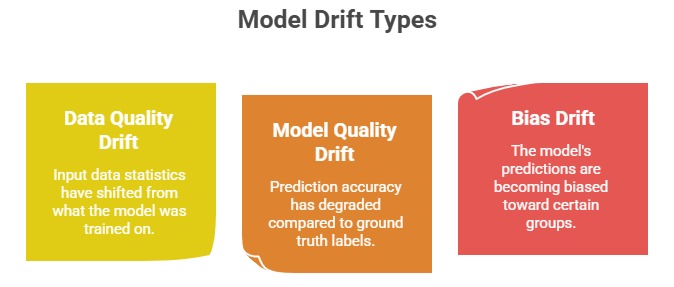
When drift is detected, Model Monitor triggers a CloudWatch alarm, which can then trigger a retraining pipeline through EventBridge and SageMaker Pipelines automatically.

Class Sessions
Sales Campaign

We have a sales campaign on our promoted courses and products. You can purchase 1 products at a discounted price up to 15% discount.