Lambda functions are powerful but they have no public interface by default. You cannot call a Lambda function directly from a browser or a mobile app.
To expose a Lambda function as an HTTP endpoint, a proper REST API that the outside world can call — you need Amazon API Gateway. Together, API Gateway and Lambda form the foundation of serverless APIs on AWS.
What is Amazon API Gateway?
API Gateway is a fully managed service that lets you create, publish, and manage HTTP APIs at any scale. It acts as the front door to your backend, receiving HTTP requests, routing them to the right Lambda function, and returning the response to the caller.
You pay only for the requests received and the data transferred. No servers to manage, no load balancers to configure.
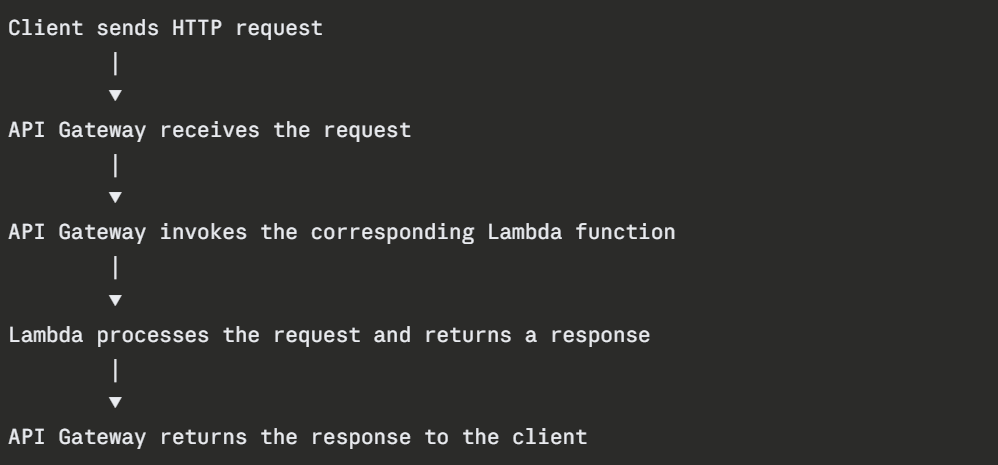
How API Gateway and Lambda Work Together
From the client's perspective, it is just calling an HTTP endpoint. Behind the scenes, a Lambda function is running, processing the request, and returning the result.
API Gateway Types
AWS offers three types of API Gateway. Choosing the right one matters.
1. REST API: The original, most feature-rich option. Supports request validation, transformation, caching, usage plans, and API keys. Best for public APIs that need full control over request and response handling.
2. HTTP API: A newer, simpler, and cheaper option. Lower latency than REST API. Supports JWT authorisation out of the box. Best for most serverless API use cases — it covers the majority of needs at lower cost.
3. WebSocket API: For real-time, two-way communication. The connection stays open — useful for chat applications, live dashboards, and real-time notifications.
For most serverless API projects, HTTP API is the recommended starting point — it is faster, cheaper, and simpler than REST API.
Request and Response Flow
When API Gateway receives a request and passes it to Lambda, it packages the request as a JSON event. The Lambda function receives this event, processes it, and returns a structured response.
A Lambda function responding to an API Gateway request:
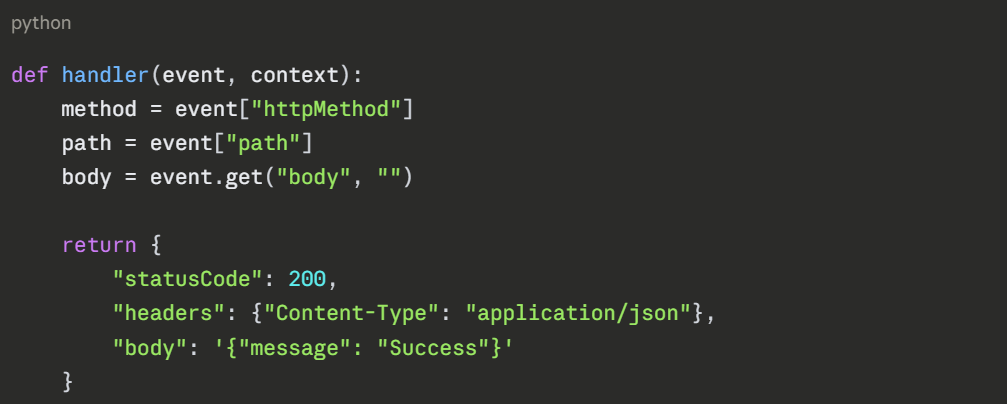
The response must include a statusCode. API Gateway takes this response and sends it back as a proper HTTP response to the client.
Authorisation and Security
Exposing a Lambda function publicly through API Gateway means anyone on the internet can call it. You need to control who can access your API.
1. IAM Authorisation: Callers must sign requests with valid AWS credentials. Best for internal service-to-service APIs.
2. Lambda Authoriser: A separate Lambda function that runs before your main function. It validates a token — JWT, OAuth, or custom, and returns an allow or deny decision. Best for custom authentication logic.
3. Cognito Authoriser: Integrate directly with Amazon Cognito for user authentication. Users log in through Cognito and receive a JWT token that API Gateway validates automatically. Best for user-facing applications.
4. API Keys: Simple keys passed in request headers. Use for basic rate limiting and identifying API consumers — not for security on their own.
For any public API, always apply authorisation. An unprotected Lambda function behind API Gateway is an open door.
Throttling and Rate Limiting
API Gateway has built-in throttling to protect your Lambda functions from being overwhelmed by too many requests.
1. Default limits: 10,000 requests per second with a burst of 5,000 requests. These are account-level limits and can be increased through AWS Support.
2. Usage plans: For REST APIs, you can create usage plans that assign specific rate limits and quotas to different API keys — allowing different tiers of access for different consumers.
Throttled requests receive a 429 Too Many Requests response automatically — your Lambda function is never invoked, so you are not charged for the throttled request.
Stages and Deployments
API Gateway uses the concept of stages to manage different versions of your API; typically dev, staging, and production. Each stage has its own URL and can have its own configuration — throttling limits, logging settings, and stage variables.
Stage variables act like environment variables for your API, you can point different stages at different Lambda function versions or aliases, so your dev stage calls a dev Lambda and your production stage calls the production Lambda.
Logging and Monitoring
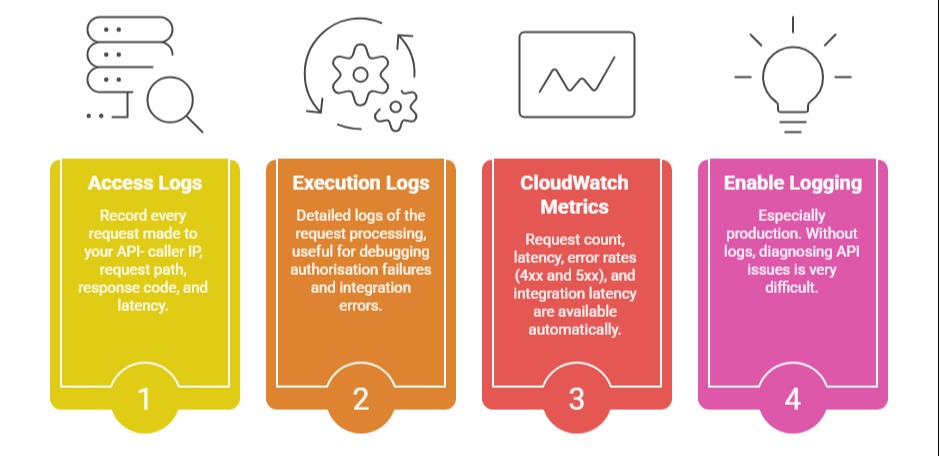
API Gateway integrates with CloudWatch for logging and monitoring: