The DevOps Lifecycle is a continuous loop of six phases that a software team moves through every time they build and deliver something. Each phase connects to the next, and the cycle never really stops, it just keeps improving with every round.
Think of it like a wheel that keeps spinning. The faster and smoother each phase runs, the better the software gets, and the happier the users are.
The DevOps Lifecycle
Here are the six phases in order:
Plan → Build → Test → Deploy → Operate → Monitor → (back to Plan)
Each phase has a clear purpose, specific activities, and tools that support it.
Phase 1 — Plan
This is where everything starts. Good planning saves a lot of pain later. Before writing a single line of code, the team decides what to build and why.
What happens in this phase:
1. Teams gather requirements from stakeholders and users.
2. Work is broken into smaller tasks — often called user stories or tickets.
3. Priorities are set, what gets built first, what can wait.
4. Timelines and goals are agreed upon.
Why it matters: Without a clear plan, developers build the wrong things, waste time, and miss deadlines. Planning keeps everyone aligned and focused on what actually delivers value.
Common tools: Jira, Trello, Azure Boards, Confluence, GitHub Issues
Phase 2 — Build
This is where developers write the code and turn the plan into a working product.
Once the plan is ready, developers start writing code. But in DevOps, building is not just about writing — it is about building in a structured, collaborative way.

Why it matters: Without structured building practices, code from different developers clashes, bugs build up, and integration becomes a nightmare. CI catches problems early — when they are small and easy to fix.
Common tools: Git, GitHub, GitLab, AWS CodeCommit, AWS CodeBuild, Jenkins
Phase 3 — Test
You should never ship code you have not tested. In DevOps, testing is automated and continuous.
Testing in DevOps is not a one-time event at the end of the project. It happens throughout the Build phase and continues until the code is deployed.
What happens in this phase:
1. Unit tests check individual pieces of code in isolation.
2. Integration tests check that different parts of the system work together.
3. Performance tests check that the application handles load well.
4. Security scans check for known vulnerabilities in the code.
5. All of these run automatically, no manual trigger needed.
Why it matters: Automated testing catches bugs before they reach users. The earlier a bug is found, the cheaper it is to fix. A bug caught in testing costs far less than a bug discovered in production.
Common tools: Selenium, JUnit, pytest, SonarQube, AWS CodeBuild (test stage), Snyk
Phase 4 — Deploy
This is the moment the code goes live. In DevOps, deployments are frequent, small, and low-risk.
After passing all tests, the code is ready to be deployed — moved from a development or staging environment to the live production environment where real users access it.
What happens in this phase:
1. The deployment pipeline runs automatically.
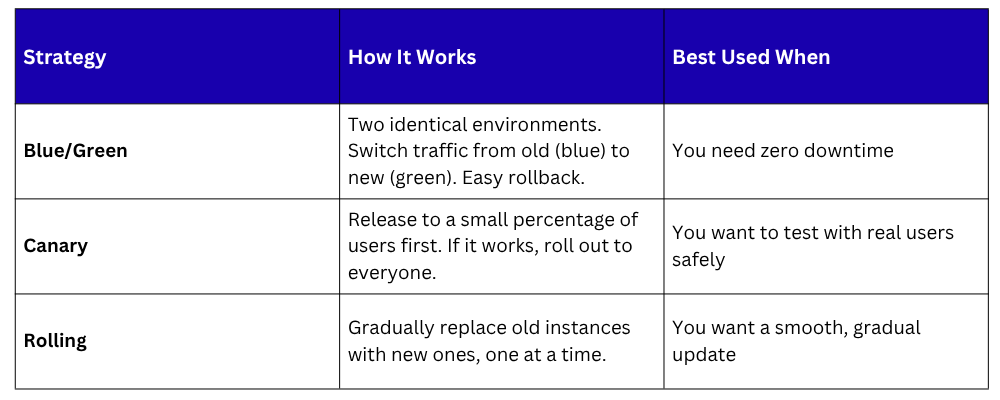
2. Code is pushed to production using a safe deployment strategy.
3. Human approval may be required (Continuous Delivery) or it may be fully automatic (Continuous Deployment).
Deployment strategies
Common tools: AWS CodeDeploy, AWS CodePipeline, GitHub Actions, ArgoCD, Spinnaker
Phase 5 — Operate
Deploying is not the finish line. Once code is live, it needs to be kept running.
The Operate phase covers everything that keeps the application healthy, available, and performing well in production.
What happens in this phase:
1. Servers, databases, and infrastructure are managed and maintained.
2. Scaling is handled if traffic increases, more resources are added automatically.
3. Incidents are responded to when systems go down or degrade.
4. Routine tasks like patching, backups, and configuration updates are performed — ideally through automation.
Why it matters: Even the best code can fail in production due to traffic spikes, hardware issues, or configuration problems. A DevOps team does not just deploy and walk away — they own the system and keep it running.
Common tools: AWS EC2, AWS Auto Scaling, AWS ECS, Kubernetes, Ansible, Terraform
Phase 6 — Monitor
You cannot improve what you cannot see.
Monitoring gives the team visibility into everything. Monitoring is the last phase — but it feeds directly back into Planning, which is why the lifecycle is a loop and not a straight line.
What happens in this phase:
1. The team tracks metrics — response time, error rate, CPU usage, memory, uptime.
2. Logs are collected and analysed to trace what happened when something went wrong.
3. Alerts are set up so the team is notified immediately when something breaks.
4. User behaviour and feedback are reviewed to understand how real people use the product.
Difference between Monitoring and Observability:
Monitoring tells you that something is wrong — for example, an alert fires because error rates spiked.
Observability tells you why it went wrong — by giving you the ability to dig into logs, traces, and metrics to find the root cause.
Both are essential in a mature DevOps setup.
Common tools: Amazon CloudWatch, AWS X-Ray, Grafana, Prometheus, Datadog, ELK Stack
How the Six Phases Connect
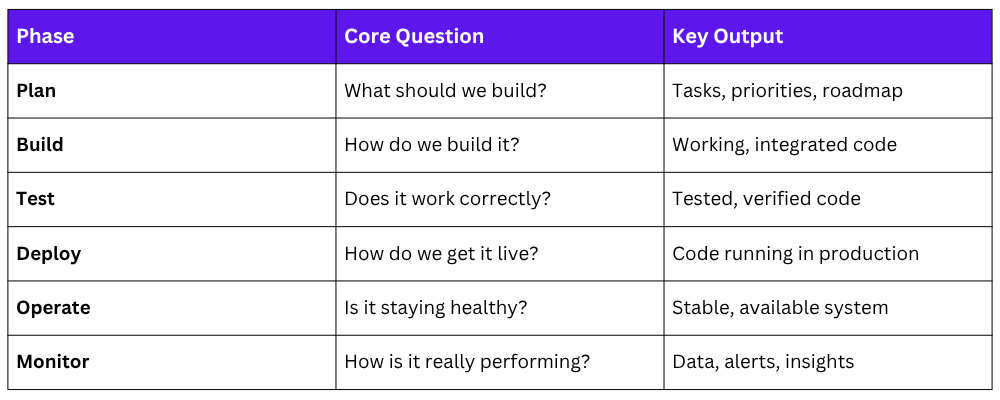
The output of Monitor feeds back into Plan, and the cycle begins again. This is what makes DevOps continuous.
