A CI pipeline without testing is just an automated way to ship broken code faster. Testing is what gives CI its value — every time code is pushed, the pipeline verifies it actually works before it moves any further.
The Three Types of Automated Checks
Unit Tests
Unit tests check individual pieces of code in isolation — a single function, a single method, a single class. They are fast, focused, and tell you exactly which part of the code is broken.
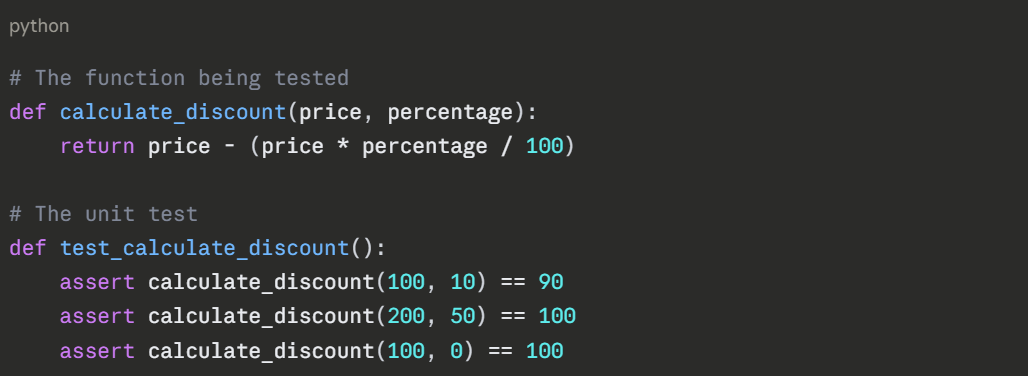
Unit tests run in milliseconds. You should have many of them — they form the foundation of your test suite.
Integration Tests
Integration tests check that different parts of the system work correctly together — your application connecting to a database, an API calling another service, a Lambda function writing to S3.
Where unit tests test a single piece in isolation, integration tests test how pieces interact in a real or simulated environment.
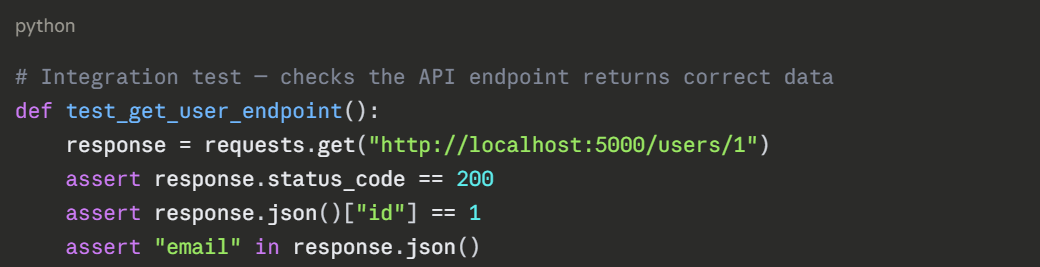
Integration tests are slower than unit tests because they involve real connections and real data flows.
Linting
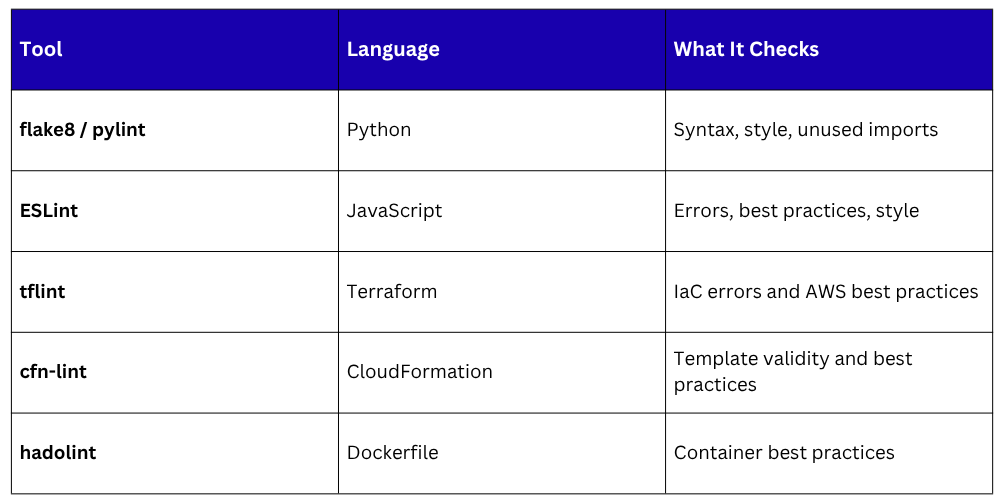
Linting is automated code quality checking. A linter reads your code and flags problems — syntax errors, formatting issues, unused variables, overly complex functions, security anti-patterns — before the code even runs.
Linting is not about style preference. It is about catching real problems early and keeping the codebase consistent across the whole team.
Running Tests Inside CodeBuild
All three checks — unit tests, integration tests, and linting — run inside the pre_build and build phases of your buildspec.yml.
yaml
version: 0.2
phases:
install:
runtime-versions:
python: 3.11
commands:
- pip install -r requirements.txt
- pip install pytest flake8
pre_build:
commands:
- echo Running linter
- flake8 src/ --max-line-length=100
- echo Running unit tests
- pytest tests/unit/ --verbose
build:
commands:
- echo Running integration tests
- pytest tests/integration/ --verbose
- echo All tests passed. Building artifact.
- zip -r app.zip src/
artifacts:
files:
- app.zip
If any command fails — linting finds an error, a test fails — CodeBuild stops immediately and marks the build as failed. CodePipeline then blocks the code from moving to the deploy stage.
Test Reports in CodeBuild
CodeBuild can generate visual test reports in the AWS Console, making it easy to see which tests passed and which failed without reading through logs.
yaml
reports:
pytest-results:
files:
- test-results.xml
file-format: JUNITXML
phases:
pre_build:
commands:
- pytest tests/unit/ --junitxml=test-results.xml
```
Once configured, go to CodeBuild → your project → **Reports** to see a visual breakdown of every test run.
## 4. The Testing Pyramid
Not all tests are equal. The testing pyramid helps you understand how many of each type to write:
```
/\
/ \
/ E2E\ ← Few — slow and expensive
/──────\
/Integrat\ ← Some — moderate speed
/──────────\
/ Unit Tests \ ← Many — fast and cheap
/______________\
1. Write many unit tests — they are fast, cheap, and precise.
2. Write some integration tests — they catch real interaction bugs.
3. Write few end-to-end tests — they are slow and fragile but validate the full user journey.
Most of your CI pipeline speed comes from having a strong base of unit tests that run in seconds
