Shift-left security and pipeline scanning protect you during development and deployment. But threats do not stop once code reaches production.
Misconfigurations happen, credentials get compromised, attackers probe your environment, and compliance requirements demand continuous proof that your infrastructure meets defined standards.
Three AWS services work together to provide runtime security and continuous compliance — Security Hub as the central aggregator, GuardDuty as the threat detector, and AWS Config as the compliance monitor.
Amazon GuardDuty — Threat Detection
GuardDuty is a managed threat detection service that continuously monitors your AWS environment for malicious activity and unauthorised behaviour.
It analyses data from three sources automatically — AWS CloudTrail logs, VPC Flow Logs, and DNS query logs — without requiring you to configure log collection or manage any infrastructure.
What GuardDuty Detects
GuardDuty uses machine learning and threat intelligence feeds to identify patterns that indicate real threats:
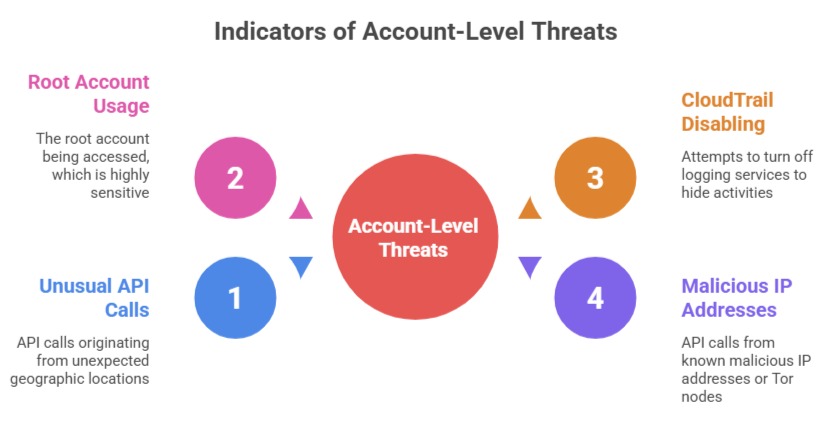
Instance-level threats:
1. EC2 instances communicating with known command-and-control servers.
2. Cryptocurrency mining activity — a common sign of a compromised instance.
3. Port scanning activity originating from your instances.
4. Unusual outbound network traffic patterns.
Container threats:
1. Privileged container execution.
2. Containers accessing sensitive host files.
3. Unusual process execution inside containers.
GuardDuty Findings
When GuardDuty detects a threat, it generates a finding — a detailed report that includes the threat type, severity, affected resource, and evidence.
Findings are categorised by severity — low, medium, high — and include enough context to understand and respond to the threat.
Findings are sent to Security Hub automatically and can trigger EventBridge rules for automated response — alerting the team, isolating an affected instance, or revoking compromised credentials.
GuardDuty is enabled with a single click — no agents, no log configuration, no infrastructure to manage. For an AWS account with any real traffic, the protection it provides far outweighs its cost.
AWS Config — Continuous Compliance
AWS Config is a continuous configuration monitoring service. It records the configuration state of every AWS resource in your account — EC2 instances, S3 buckets, IAM roles, security groups, RDS databases — and tracks every change over time.
What Config Provides
Configuration history: Every change to every resource is recorded. You can answer questions like — what did this security group look like three weeks ago? When was this S3 bucket made public? Who changed this IAM policy and what did it look like before?
Configuration rules: Config rules define what a compliant resource configuration looks like. AWS provides over 200 managed rules covering common compliance requirements:
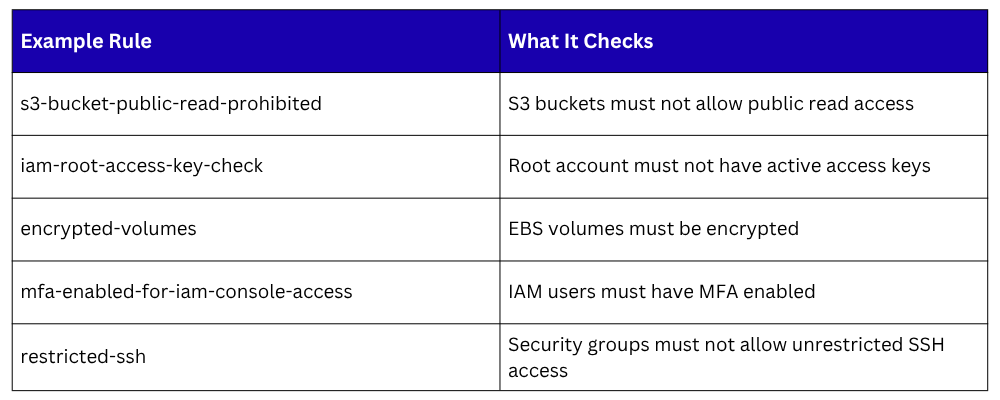
When a resource violates a rule, Config marks it as non-compliant and generates a finding. You can configure automatic remediation — an SSM Automation document runs to fix the violation — or simply alert the team.
Compliance Dashboards
Config provides an account-level compliance dashboard showing the overall compliance posture — how many resources are compliant versus non-compliant, which rules have the most violations, and which resources are the biggest compliance risks.
This gives security and compliance teams a continuous, real-time view of the environment without manual auditing.
Config with AWS Organisations
For organisations with multiple AWS accounts, Config can aggregate compliance data from all accounts into a single view in a designated aggregator account.
This gives central security teams visibility across the entire organisation without logging into each account individually.
AWS Security Hub — The Central View
Security Hub aggregates security findings from multiple sources into one centralised dashboard. In the context of runtime security, it collects findings from:
1. GuardDuty — threat detection findings.
2. AWS Config — compliance violation findings.
3. Amazon Inspector — vulnerability findings from EC2, Lambda, and containers.
4. IAM Access Analyzer — findings about publicly accessible resources and overly permissive policies.
5. Macie — findings about sensitive data exposed in S3 buckets.
Security Standards
Security Hub evaluates your environment against recognised security frameworks automatically:
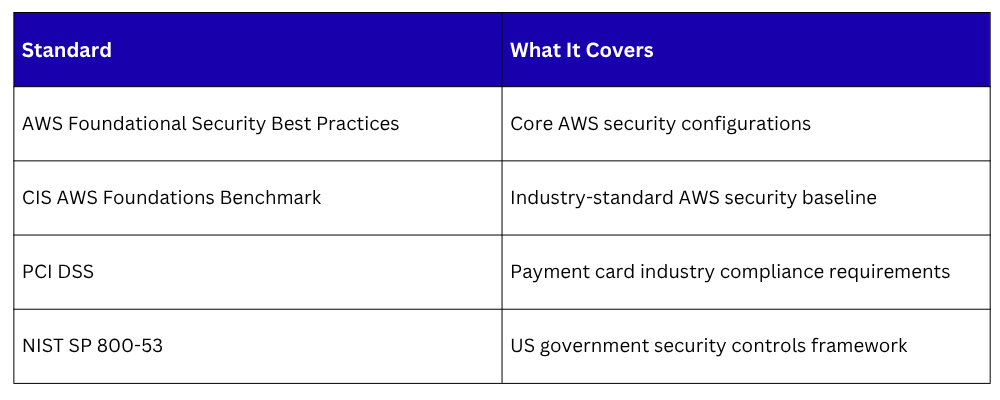
Each standard runs hundreds of automated checks across your AWS resources and produces a compliance score — a percentage indicating how much of the standard your environment currently meets. This score updates in real time as resources change.
Automated Response with Security Hub and EventBridge
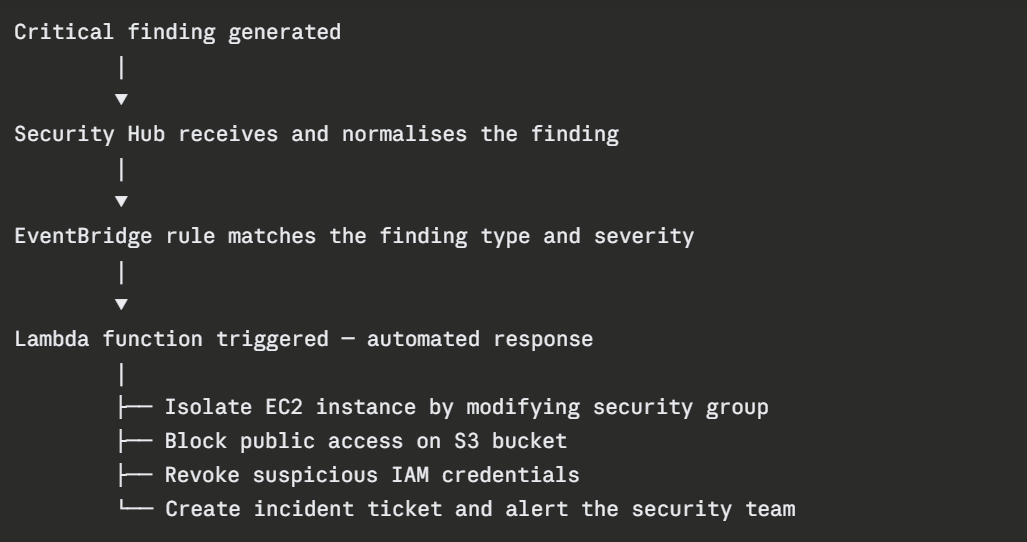
Security Hub integrates with EventBridge to enable automated response to findings.
When a critical finding is generated — GuardDuty detects a compromised EC2 instance, Config detects a public S3 bucket — EventBridge triggers a Lambda function that responds automatically:
The Three Services Working Together
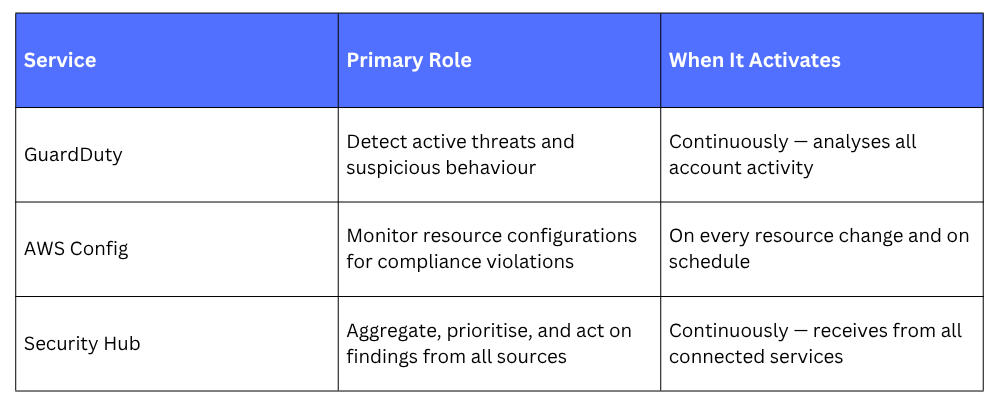
Together they cover the full runtime security picture — GuardDuty catches active attacks, Config catches misconfigurations, and Security Hub gives you one place to see and act on everything.
