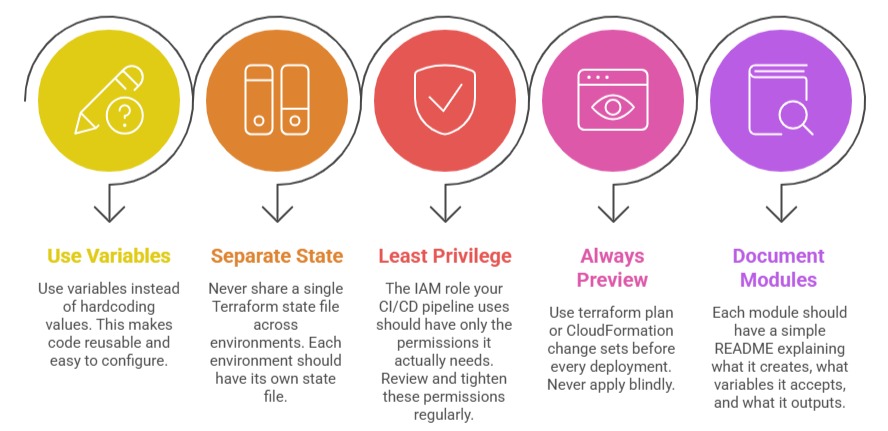
Knowing how to write IaC is one thing. Writing it well is another. As your infrastructure grows, poorly structured IaC becomes just as painful to maintain as poorly written application code.
Modularity
The single most important structural practice in IaC is breaking your infrastructure into small, focused, reusable modules rather than writing everything in one large file.
A monolithic IaC file that defines your entire infrastructure — networking, compute, databases, security — in one place is hard to read, hard to test, and dangerous to change. One mistake can affect everything.
The right approach is to separate your infrastructure by concern:
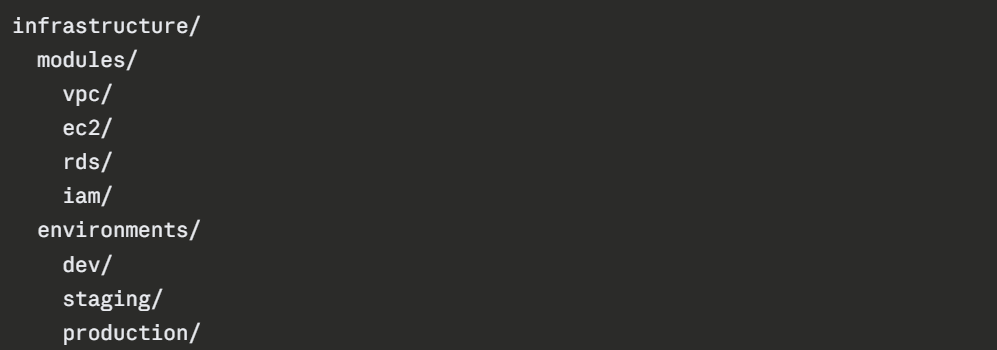
Each module handles one responsibility. The environment folders reference those modules and pass in environment-specific values — different instance sizes, different database configurations, different scaling settings.
Benefits of modular IaC:
1. A change to the database module only affects the database — not networking or compute.
2. The same VPC module can be reused across dev, staging, and production without rewriting it.
3. New team members can understand one module at a time rather than one enormous file.
4. Modules can be tested independently before being used in production.
Versioning
Version Control Your IaC Code: All IaC files must live in a Git repository — not on someone's laptop, not on a shared drive. Every change goes through a pull request, gets reviewed, and is merged with a clear commit message. This gives you a full history of every infrastructure change ever made.
Pin Module and Provider Versions: When you use a Terraform module from the public registry or reference a CloudFormation resource type, always pin to a specific version. If you do not, an upstream update can silently change your infrastructure the next time you run a deployment.
In Terraform, always specify the version for providers and modules:
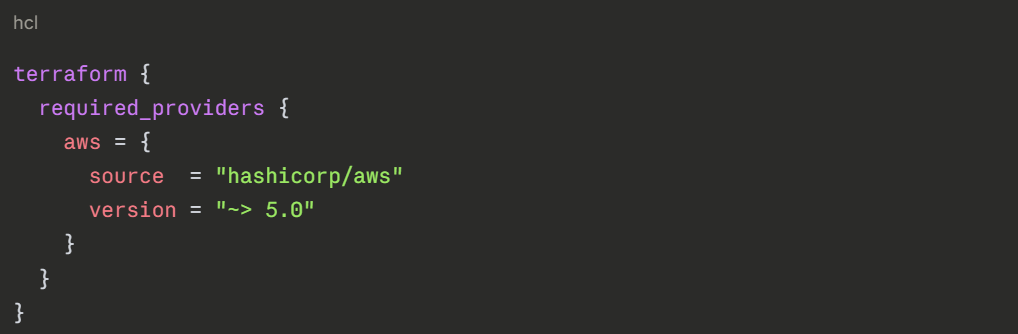
This tells Terraform to use version 5.x but never automatically jump to version 6.x, which may have breaking changes.
Tag Your Infrastructure Releases: Just as you tag application releases in Git, tag your infrastructure releases too. This makes it easy to identify exactly which version of your IaC was deployed at any point in time — critical for debugging and rollback.
Drift Detection
Drift happens when someone manually changes a resource — through the AWS Console or CLI — that was originally created by IaC. The result is a gap between what your code says the infrastructure should look like and what it actually looks like in AWS.
Drift is dangerous because:
1. Your IaC no longer reflects reality.
2. The next time you run a deployment, the unexpected difference can cause errors or overwrite the manual change.
3. You lose the audit trail — there is no record in Git of what changed or why.
How to Detect Drift
CloudFormation has a built-in drift detection feature. Run it against any stack and it reports which resources have been modified outside of CloudFormation and exactly what changed.
Terraform detects drift automatically when you run terraform plan. If the real AWS state no longer matches the state file, the plan will show the difference as a proposed change.
How to Prevent Drift
The best approach to drift is cultural, the team agrees that all infrastructure changes go through IaC, never through the Console. Enforce this through IAM policies that restrict who can manually modify production resources directly.
For extra enforcement, set up automated drift detection on a schedule — run CloudFormation drift detection or terraform plan nightly as part of a pipeline job. If drift is detected, alert the team immediately.
Other Key Best Practices