Lambda is the engine of serverless on AWS. Understanding how to build, configure, and deploy a Lambda function is a foundational skill for any DevOps engineer working on AWS.
Anatomy of a Lambda Function
Every Lambda function has three core parts:
1. Handler: The entry point. When Lambda receives an event, it calls the handler function. The handler receives two arguments — the event data and the context object.
2. Event: The input data passed to the function. Its structure depends on the trigger — an API Gateway event looks different from an S3 event or a scheduled event.
3. Context: Metadata about the invocation — function name, memory limit, remaining execution time, and request ID.
A basic Lambda function in Python:
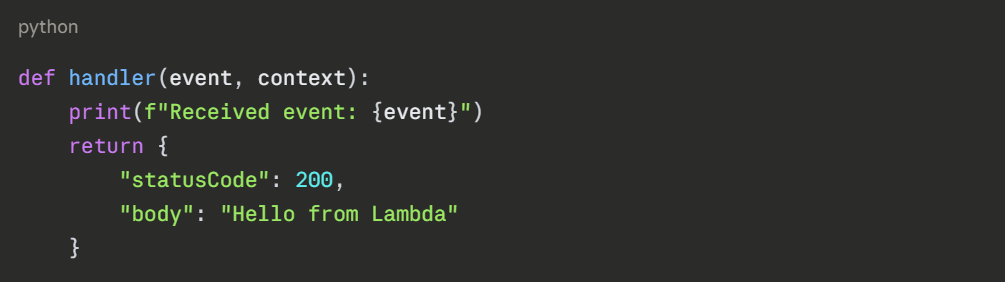
This is all Lambda needs. The function receives an event, does something, and returns a response.
Configuring a Lambda Function
When you create a Lambda function, you configure several key settings:
1. Runtime: The language environment your function runs in. AWS supports Python, Node.js, Java, Go, Ruby, and .NET. Choose the runtime that matches your code.
2. Memory: Lambda allocates CPU proportionally to the memory you assign. You can set memory from 128 MB up to 10 GB. More memory means faster execution — but also higher cost per millisecond. Find the right balance through testing.
3. Timeout: The maximum time your function is allowed to run. The default is 3 seconds. The maximum is 15 minutes. Always set this deliberately — a function stuck in an infinite loop should not run for 15 minutes before stopping.
4. Environment Variables: Configuration values passed to your function at runtime — database endpoints, feature flags, region names. Never hardcode these inside your function code.
5. IAM Execution Role: Every Lambda function needs an IAM role that defines what AWS services it can interact with. If your function reads from S3, the role needs S3 read permissions. Follow least privilege — grant only what the function actually needs.
Deployment Methods
There are three ways to deploy a Lambda function:
1. AWS Console: Upload a ZIP file or write code directly in the browser-based editor. Good for learning and quick experiments. Not suitable for production.
2. AWS CLI: Package your code as a ZIP file and deploy using the CLI. Suitable for simple functions.
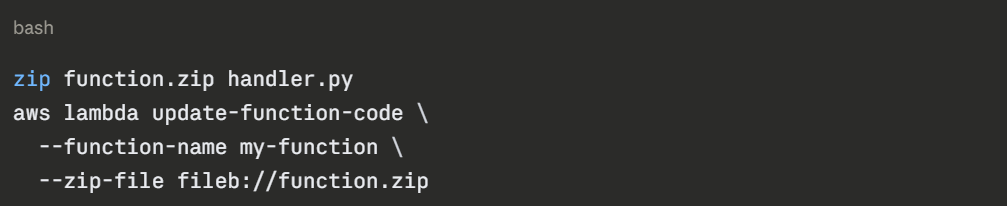
3. Infrastructure as Code: Recommended for Production — Define and deploy Lambda functions through Terraform, CloudFormation, or AWS CDK. This integrates Lambda deployment into your CI/CD pipeline and keeps everything version-controlled.
For any real project, always deploy Lambda through IaC and a CI/CD pipeline — not manually through the Console.
Lambda Layers
If multiple Lambda functions share the same dependencies — a common library, utility functions, configuration — package them as a Lambda Layer. A layer is a ZIP archive of shared code that functions reference rather than bundle individually.
Benefits of layers:
1. Keeps deployment packages small.
2. Shared dependencies are updated in one place — not in every function.
3. AWS provides official layers for common runtimes and tools.
Lambda Triggers
A Lambda function does nothing until it is triggered. Common triggers:
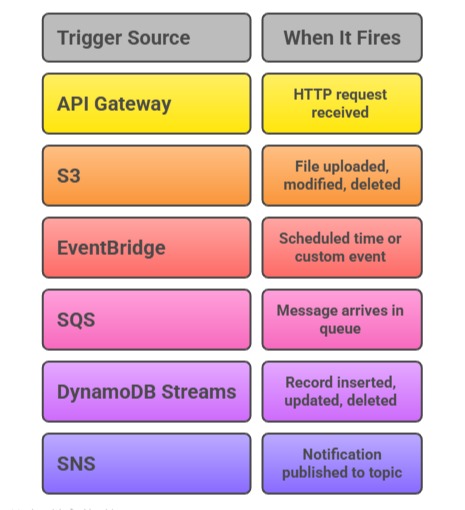
You connect a trigger to a Lambda function through the AWS Console, CLI, or IaC. Once connected, Lambda invokes your function automatically every time the trigger fires.
Monitoring Lambda Functions
Every Lambda invocation automatically sends metrics and logs to Amazon CloudWatch:
1. Metrics: Invocation count, error count, duration, and throttles are available in CloudWatch automatically. No setup needed.
2. Logs: Every print() or logging statement in your function appears in a CloudWatch Log Group named /aws/lambda/your-function-name. Use these to debug issues in production.
3. AWS X-Ray: Enable X-Ray tracing on your function to get a visual trace of every invocation — how long each part took, which services were called, and where errors occurred.
Common Lambda Mistakes to Avoid
1. Storing state inside the function: Lambda functions are stateless. Do not store data in global variables expecting it to persist between invocations. Use DynamoDB, S3, or ElastiCache for persistent state.
2. Oversized deployment packages: Lambda has a 50 MB limit for ZIP uploads directly and 250 MB unzipped. Use layers for large dependencies. Keep functions lean.
3. Not setting a timeout: The default 3-second timeout is too short for many real-world tasks. Set it deliberately based on what your function actually does.
4. Hardcoding credentials: Never put AWS credentials inside a Lambda function. The IAM execution role handles authentication automatically.
