Every action taken in AWS — launching an instance, reading from S3, invoking a Lambda function, pushing to CodeCommit — requires permission. IAM is the service that grants or denies those permissions.
Getting IAM right is one of the most important security responsibilities in any AWS environment. Done well, it limits the blast radius of a compromised account or misconfigured service. Done poorly, a single mistake can expose your entire infrastructure.
The Core IAM Components
IAM has four building blocks that work together:
1. Users: Human identities with long-term credentials. Use these sparingly, only for people who need console access. For programmatic access, prefer roles over users with access keys wherever possible.
2. Groups: Collections of users that share the same permissions. Manage permissions at the group level, not the individual user level. A developer group, an operations group, a read-only auditor group — permissions are assigned once and inherited by all members.
3. Roles: Temporary identities assumed by AWS services, applications, or users from other accounts. Roles are the correct mechanism for giving AWS services permission to interact with other services, a Lambda function reading from S3, an EC2 instance writing to CloudWatch, a CodeBuild job deploying to ECS.
4. Policies: JSON documents that define what is allowed or denied. Policies are attached to users, groups, or roles.
Understanding IAM Policies
A policy is a set of statements, each defining an effect, an action, and a resource.
A simple policy that allows reading objects from a specific S3 bucket:
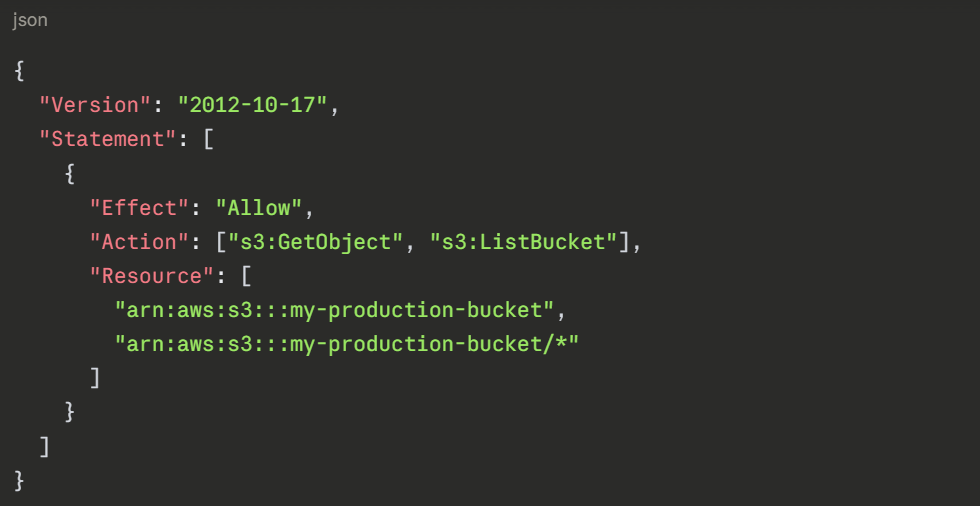
1. Effect: Either Allow or Deny. Deny always wins — if a deny statement applies, the action is blocked regardless of any allow statements.
2. Action: The specific AWS API operation being permitted or denied. Always be as specific as possible — s3:GetObject not s3:*.
3. Resource: The specific AWS resource the policy applies to. Always scope to a specific resource ARN — never use * in production unless absolutely necessary.
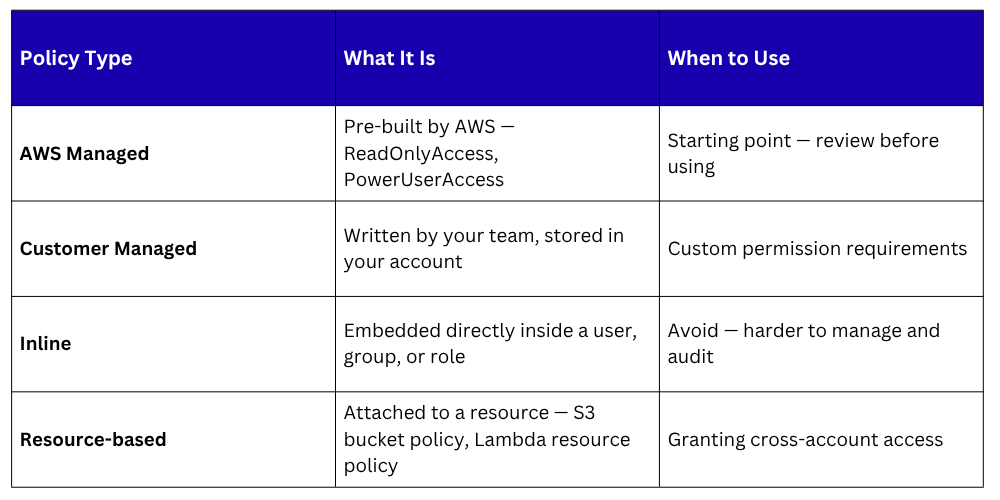
Policy Types
 The Principle of Least Privilege
Least privilege means granting only the permissions needed to perform a specific task — nothing more.
In practice, this means:
1. A Lambda function that reads from DynamoDB gets only dynamodb:GetItem and dynamodb:Query on the specific table it uses — not dynamodb:* on all tables.
2. A developer gets read access to production resources for debugging — not write access.
3. A CI/CD pipeline role gets permission to deploy to ECS and push to ECR — not permission to modify IAM policies or access billing data.
Why least privilege matters: If a role or user is compromised — through a stolen credential, a misconfigured application, or a supply chain attack — the damage is limited to what that identity was permitted to do. An overprivileged role can be catastrophic. A least-privileged role causes minimal harm.
Implementing Least Privilege in Practice
1. Start with AWS managed policies for discovery: Use them to understand what permissions a service needs, then create a tighter customer managed policy based on actual usage.
2. Use IAM Access Analyzer: IAM Access Analyzer reviews your policies and resource access and identifies permissions that are granted but never used. Use this data to tighten policies over time.
3. Use permission boundaries: A permission boundary is a maximum permission limit applied to a user or role. Even if a policy grants broader access, the boundary caps what can actually be used. Useful for delegating IAM management to teams without allowing them to escalate their own privileges.
IAM Roles for AWS Services — Best Practices
Every AWS service that needs to interact with another service should use a role, never an access key stored in configuration.
1. Lambda functions: Every Lambda function has an execution role. Define this role with only the permissions the function actually needs. Review it when the function's responsibilities change.
2. EC2 instances: Attach an instance profile — an IAM role — to every EC2 instance. Applications running on the instance inherit the role automatically through the instance metadata service. No credentials stored on disk.
3. CI/CD pipelines: CodeBuild, CodePipeline, and GitHub Actions all assume roles to interact with AWS. Scope these roles tightly — the pipeline should only be able to deploy to its specific target environment, not across all environments.
4. ECS and EKS tasks: ECS task roles allow individual containers to have their own IAM permissions rather than inheriting the permissions of the EC2 instance host. Always use task roles in ECS — never rely on the underlying instance role.
Cross-Account Access with IAM Roles
1. Large organisations use multiple AWS accounts —separate accounts for dev, staging, production, security, and logging. IAM roles enable secure cross-account access without sharing credentials.
2. The pattern works like this — a role in Account B defines a trust policy that allows Account A to assume it. A user or service in Account A calls sts:AssumeRole and receives temporary credentials for the role in Account B. All cross-account access is temporary, audited, and revocable.
3. This is how centralised CI/CD pipelines deploy to multiple accounts — one pipeline account assumes deployment roles in each target account, with tightly scoped permissions per environment.
IAM Security Best Practices